



October 16, 2026




TL;DR:
- Running Facebook Ads without a clear system results in wasted budgets and unqualified leads.
- A solid foundation, including verified accounts, proper tracking, and campaign objectives, is essential for success.
- Long-term campaign stability, disciplined testing, and prompt lead follow-up lead to sustainable results.
Running Facebook Ads without a clear system is one of the most common ways small and medium-sized businesses burn through budget without seeing real results. You set up a campaign, pick an audience, and wait — but the leads either never come or they are so unqualified that your sales team stops trusting the channel entirely. This guide walks you through exactly how to plan, launch, track, and grow Facebook Ads campaigns built for lead generation and brand visibility. From campaign objectives and form types to pixel deduplication and scaling strategy, you will leave with a clear, actionable framework that actually moves the needle.
Table of Contents
- What you need to prepare for successful Facebook Ads lead campaigns
- How to set up and optimize Facebook lead generation campaigns
- Ensuring accurate tracking and measurement with Meta Pixel and Conversions API
- Monitoring, optimizing, and scaling your Facebook lead campaigns for sustained success
- A fresh perspective on Facebook Ads lead generation: balancing stability and innovation
- Boost your Facebook Ads results with expert digital marketing services
- Frequently asked questions
Key Takeaways
| Point | Details |
|---|---|
| Start with the right setup | Ensure all prerequisites like Meta Ads Manager access, payment, Facebook Page, and Pixel installation are completed before launching campaigns. |
| Balance volume and quality | Use Instant Forms for higher volume and Higher Intent forms to improve lead quality based on your sales capacity. |
| Implement tracking redundancy | Run Meta Pixel with Conversions API and configure event deduplication to avoid inflated conversion counts. |
| Monitor key metrics early | Track CTR, CPL, and form completion rates in the first 72 hours to identify issues and optimize campaigns promptly. |
| Scale campaigns gradually | Increase budgets by no more than 20-30% every few days to keep Meta’s learning phase stable and maintain cost efficiency. |
What you need to prepare for successful Facebook Ads lead campaigns
Before you write a single line of ad copy, you need the right foundation in place. Skipping this step is where most campaigns quietly fail before they even begin.
Here is what you need ready before launching, according to the Facebook Ads beginners guide:
- Meta Business Suite access — this is your central hub for managing pages, ad accounts, and team permissions
- Meta Ads Manager access — where you actually build, launch, and monitor campaigns
- A verified Facebook Page — your ads run from this page, so it must be active and complete
- A verified payment method — no payment method means no ads, and billing issues can pause campaigns at the worst time
- Meta Pixel installed on your website — this small code snippet tracks user behavior and conversion events after someone clicks your ad
- Conversions API (CAPI) configured — this is a server-side tracking layer that sends data directly from your server to Meta, filling gaps that browser-based tracking misses due to ad blockers or iOS privacy changes
Think of the Pixel and CAPI as two windows into the same room. One looks in from the browser, the other from the server. Together, they give you a far more complete picture of what your ads are actually driving.
Key prerequisites at a glance
| Requirement | Why it matters | Priority |
|---|---|---|
| Meta Business Suite | Central account management | Essential |
| Ads Manager | Campaign creation and monitoring | Essential |
| Facebook Page | Ad identity and credibility | Essential |
| Payment method | Enables ad delivery | Essential |
| Meta Pixel | Browser-side conversion tracking | High |
| Conversions API | Server-side tracking accuracy | High |
| Campaign objective set | Guides Meta’s algorithm | High |
Setting your campaign objective correctly from the start matters more than most advertisers realize. Meta uses your objective to decide who sees your ad. Choose the wrong one and you pay to reach people who were never going to convert. Our lead generation overview breaks down how this fits into a broader customer acquisition strategy, and for deeper context on what makes lead campaigns succeed long-term, the lead generation best practices page is worth reviewing before you spend a dollar.
Pro Tip: Before launching, use Meta Events Manager to confirm your Pixel is firing correctly on your thank-you page or form submission page. A silent Pixel means your optimization data is missing from day one.
With these foundational tools and accounts ready, let’s move into setting up and executing your Facebook lead campaigns.
How to set up and optimize Facebook lead generation campaigns
Getting the campaign structure right is not just a technical task. It determines how Meta’s algorithm learns, who it targets, and how much you pay per lead over time.
Step-by-step campaign setup
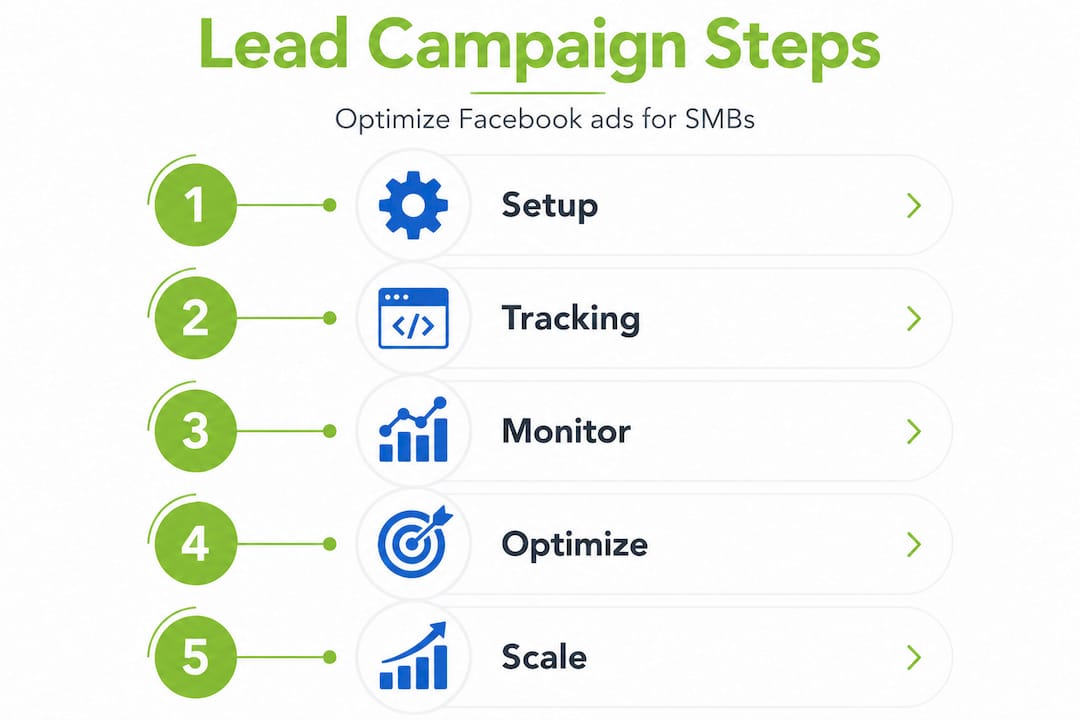
- Choose the “Leads” campaign objective in Meta Ads Manager. This tells Meta’s system to find users most likely to submit a form, whether on your website or through a native Facebook lead form.
- Start with volume optimization at the ad set level. Per Meta’s lead generation guidance, you should begin optimizing for lead volume to gather data quickly, then shift to conversion-lead optimization once you consistently hit 50 or more conversions per week.
- Choose your lead form type carefully. Meta offers two options: Instant Forms and Higher Intent forms.
- Set a realistic daily budget. For most SMBs, starting between $20 and $50 per day gives enough data without overcommitting.
- Build your audience targeting using a mix of interest-based, lookalike, or retargeting audiences depending on your current data pool.
- Create at least two to three ad variations testing different headlines, images, or value propositions. Keep everything else constant to isolate what is actually driving performance.
- Scale gradually. Increase budgets by 20 to 30 percent every few days rather than doubling overnight.
Instant Forms vs. Higher Intent forms
This choice is one of the most consequential decisions in any lead generation campaign. Instant Forms use pre-filled profile data to make submission fast and frictionless, which increases volume. But that ease often means someone submits without real intent. Higher Intent forms add a review step before submission. That one extra click can reduce lead volume by 10 to 30 percent but the leads you do get tend to be far more serious.
| Form type | Lead volume | Lead quality | Best for |
|---|---|---|---|
| Instant Form | Higher | Lower | High-volume funnels with fast follow-up |
| Higher Intent Form | Lower (10-30% drop) | Higher | B2B, services requiring qualification |
- Use Instant Forms if your sales team can handle volume and you have a strong qualification process in place
- Use Higher Intent Forms if your team is lean and every lead needs to count
Your call-to-action copy also shapes lead quality. “Get a free quote” attracts bargain-hunters. “Schedule a strategy call” pre-qualifies intent. Be specific about what happens after someone submits the form. For more on building these campaigns with quality in mind, our lead generation strategies page covers audience targeting and funnel alignment in depth. You can also explore boosting lead quality through smarter follow-up systems.
Pro Tip: If you have enough data, test both form types simultaneously with a 50/50 budget split for two weeks. The results will tell you far more than any industry benchmark.

Now that you have your campaign set up, let’s explore tracking and measurement strategies essential for verifying results and optimizing performance.
Ensuring accurate tracking and measurement with Meta Pixel and Conversions API
Here is where most SMB campaigns quietly go off the rails. You think your ads are generating 60 leads a week. In reality, you might be counting the same leads twice. Duplicate conversion events are far more common than advertisers expect, and they corrupt the data Meta uses to optimize your campaigns.
Why deduplication matters
Using Pixel and CAPI together without proper deduplication causes the same conversion event to fire twice — once from the browser and once from the server. Meta counts both. Your cost per lead looks artificially low, your campaign appears to be performing well, and you keep spending on a false signal.
The fix is matching the “event_idparameter in both your Pixel event and your CAPI event for every conversion. When Meta sees two events with the sameevent_id`, it knows they represent the same action and deduplicates them automatically.
Key tracking best practices
- Match
event_idvalues between Pixel and CAPI for every conversion event, including lead form submissions and purchase events - Validate your setup in Meta Events Manager using the Test Events tool before scaling spend
- Capture
fbclid(Facebook Click ID) in a cookie when users arrive from a Facebook ad, then pass it back with your CAPI events to improve attribution accuracy - Send hashed customer data (email, phone, name) with every CAPI event to raise your Event Match Quality score
- Audit your integrations if you use third-party tools like CRMs or landing page builders, as these sometimes send duplicate events independently
Event Match Quality scores of 8 or higher improve attribution accuracy and return on ad spend by 15 to 25 percent. That is a meaningful difference at any budget level.
| Common tracking issue | Root cause | Fix |
|---|---|---|
| Duplicate conversions | Missing event_id match |
Add matching event IDs to Pixel + CAPI |
| Low Event Match Quality | Missing hashed customer data | Pass email/phone with CAPI events |
| Missing conversions | iOS blocking browser Pixel | Rely on CAPI as primary signal |
| Wrong event names | Inconsistent naming across tools | Standardize event names in Events Manager |
Pro Tip: Review your lead gen best practices for SMBs and cross-reference your tracking setup against what your CRM is actually recording. Discrepancies between Meta’s reported leads and CRM entries are often the first sign of a deduplication problem.
Having tracking correctly configured, let’s review how to monitor campaign performance and scale your Facebook Ads effectively.
Monitoring, optimizing, and scaling your Facebook lead campaigns for sustained success
Data without a review process is just noise. The way you read and respond to your campaign metrics determines whether your results improve or plateau.
Metrics to review in the first 72 hours
Per early campaign performance guidance, you should be checking these three signals within 48 to 72 hours of launch:
- Click-through rate (CTR): A CTR below 1 percent on a cold audience often signals weak creative or a mismatched message. Test a new headline or image before assuming the audience is wrong.
- Cost per lead (CPL): Compare this against your customer lifetime value, not just a gut feeling. A $90 CPL might be a great deal if your average sale is $3,000.
- Lead form completion rate: If people click through but do not finish the form, something inside the form is causing drop-off. Reduce the number of fields or clarify the value proposition.
Ongoing optimization practices
- Review lead gen performance monitoring data weekly, not daily, to avoid reactive decisions
- Track your lead-to-customer conversion rate inside your CRM — this is the only metric that truly tells you whether your ads are generating business
- Exclude audience segments that generate form submissions but zero sales
- Use audience insights to find unexpected demographic or interest patterns in your converting leads
How to scale without breaking performance
- Increase daily budget by 20 to 30 percent, then wait three to five days before adjusting again
- Duplicate high-performing ad sets rather than editing them (editing can reset the learning phase)
- Introduce new creative variations at the ad level, not the ad set level, to preserve algorithm stability
- Only pause or replace underperforming ads after they have received at least 1,000 impressions
Pro Tip: Set a weekly calendar reminder to review CPL trends and lead quality feedback from your sales team. The gap between what Meta reports and what your CRM confirms is where your real optimization opportunities hide.
With these ongoing optimization tactics, you can maintain a healthy, cost-efficient lead pipeline. Next, let’s share a fresh perspective on common campaign practices for greater insight.
A fresh perspective on Facebook Ads lead generation: balancing stability and innovation
Most advice about Facebook advertising strategies tells you to test constantly, iterate fast, and keep changing. We think that is partially right and largely misapplied by SMBs.
Here is what we have seen repeatedly: business owners check their campaigns every morning, panic at a bad day, change the targeting, swap the creative, and then wonder why results are inconsistent. What they are actually doing is resetting Meta’s learning phase over and over. Frequent aggressive changes reset the learning phase, destabilizing lead costs and reducing campaign effectiveness. The algorithm needs time and consistency to find your best audience. Every time you make a major change, that clock resets.
The campaigns that perform best over six to twelve months are almost always the ones that were left alone long enough to learn, then adjusted with purpose rather than anxiety.
There is another pattern worth naming. Many SMBs obsess over cost per lead and declare victory when it drops. But a $20 lead that never answers the phone is worth nothing. A $90 lead that closes on the first call is worth everything. The real measure of a Facebook advertising campaign is not what Meta reports — it is what your CRM closes. Lead quality depends heavily on how fast your team follows up, how well leads are routed, and whether your offer matches what the ad actually promised.
The businesses that build sustainable lead pipelines through Facebook are not the ones with the most creative ads. They are the ones who treat the platform as a long-term system, not a quick switch. They test with discipline, scale with patience, and measure with the full picture. Our lead gen best practices resource reflects this philosophy in practical detail.
Boost your Facebook Ads results with expert digital marketing services
If you are serious about turning Facebook Ads into a reliable source of qualified leads, having the right team behind you makes a real difference. We work with SMBs across Long Island and throughout the United States to build paid social campaigns that are designed from the ground up for lead generation and brand visibility.
Our social media paid ads services include full campaign strategy, creative development, Pixel and Conversions API setup, event deduplication audits, and ongoing performance management. We also integrate campaigns directly with your CRM so lead routing and follow-up happen without delay. Whether you are launching your first campaign or rebuilding one that has lost momentum, our team at Idea Stream Marketing brings the experience to navigate Meta’s evolving platform with confidence. Explore our lead generation strategies and reach out to schedule a consultation today.
Frequently asked questions
What is the difference between Instant Forms and Higher Intent forms on Facebook Ads?
Instant Forms increase lead volume by pre-filling user profile data, making submission fast but often reducing lead quality, while Higher Intent forms add a review step that drops submissions by 10 to 30 percent but produces better qualified leads. Choose based on your team’s capacity to qualify and convert volume.
How can I prevent duplicate conversions when using Meta Pixel with Conversions API?
Implement event deduplication by ensuring the eventID in your Pixel and the event_id in your CAPI payload match exactly for every conversion event. Verify the setup is working correctly using Meta Events Manager’s Test Events tool before scaling.
When should I switch from volume-optimized to conversion-optimized lead campaigns?
Switch to conversion-lead optimization once your campaign is consistently recording at least 50 conversion events per week, which gives Meta’s algorithm enough data to identify and target higher-intent users reliably.
How quickly should I follow up with leads generated from Facebook Ads?
Faster follow-up, ideally within minutes, dramatically improves conversion rates compared to delays of hours or days, which is why CRM integration and automated lead routing matter as much as the ad itself.
What metrics should I monitor in the first 72 hours of my Facebook lead campaign?
Review CTR, CPL, and form completion rate within the first 48 to 72 hours to evaluate whether your creative is resonating, whether your cost efficiency is on track, and whether the form itself is creating friction that prevents submissions.

