



September 19, 2026



Public entities must meet the DOJ’s Title II web rule, which sets WCAG 2.1 Level AA as the technical standard. Private businesses fall under Title III, which has no codified technical rule but treats WCAG 2.1 AA as the practical benchmark courts and settlements rely on. Either way, the next move is the same: run a scoped audit of your highest-traffic pages now, and use the DOJ and U.S. Access Board as your reference points. Specialist digital marketing agencies can help you get that audit started.
TL;DR:
- Most organizations should aim for WCAG 2.1 Level AA compliance, which is the standard used in legal settlements and enforced for government entities.
- Building to WCAG 2.2 AA offers headroom for future requirements, as it introduces additional criteria not covered in WCAG 2.1.
- Audits should focus on a representative sample of high-traffic pages, combining automated tools with manual and assistive-technology testing for accuracy.
- Fixed remediation steps should target shared templates and components to avoid patchwork fixes on individual pages, ensuring consistent accessibility.
- Relying on overlay widgets is ineffective; compliance must come from semantic, accessible HTML that prioritizes manual testing over superficial fixes.
Table of Contents
- Who the ADA Covers Online: Title II, Title III, and Section 508
- Which Technical Standard Should You Actually Build To?
- Building a Defensible Compliance Workflow
- Prioritizing Fixes on a Realistic Budget
- Why Overlay Widgets Won’t Save You in Court
- Deadlines, Demand Letters, and What Enforcement Looks Like
- Tools and Resources for a Defensible Audit
- About the Author and Idea Stream Marketing’s Accessibility Work
- Why Most Compliance Advice Gets the Priorities Backwards
- Get an Accessibility Audit Before a Demand Letter Forces One
- Sources
- FAQ
Who the ADA Covers Online: Title II, Title III, and Section 508
The regime that governs your website depends entirely on what kind of organization you run. Get this wrong, and you’ll either over-invest in the wrong standard or leave yourself exposed to a lawsuit you didn’t see coming.
Title II covers state and local governments, meaning cities, counties, public school districts, transit authorities, and public universities. The DOJ’s Title II final rule spells out exactly what these entities must do: bring web content and mobile apps up to WCAG 2.1 Level AA, with specific compliance dates attached.
Title III covers private businesses that operate as “places of public accommodation,” a category that includes retail stores, restaurants, medical practices, law firms, and most service-based businesses with a public-facing website. Here’s the catch: the DOJ has never issued a codified technical standard for Title III. Instead, DOJ guidance interprets the ADA’s effective communication provisions to apply to web content generally, leaving WCAG 2.1 AA as the standard that settlements, consent decrees, and demand letters consistently point back to.
Section 508 applies to federal agencies and any contractor doing business with the federal government. It’s a separate statute from the ADA, tied to federal procurement law rather than public accommodation law.
To figure out which regime applies to you, ask:
- Are you a government agency, public school, or public utility? You’re under Title II.
- Are you a private business serving the public, even if only online? You’re under Title III.
- Are you a federal contractor or agency? Section 508 governs your procurement and digital assets.
- Not sure which bucket you fall into? Treat WCAG 2.1 AA as your baseline regardless. It satisfies the strictest read of all three.
Which Technical Standard Should You Actually Build To?
Build to WCAG 2.1 Level AA. That’s the standard the DOJ has formally adopted for Title II entities, and it’s the same benchmark private businesses under Title III should target since no separate technical rule exists for them.
Here’s how the mapping breaks down by regime:
- Title II (state/local government): WCAG 2.1 AA is legally required, not optional, under the DOJ’s final rule.
- Title III (private business): No formal DOJ technical standard exists, but WCAG 2.1 AA is the de facto benchmark used in settlements and litigation.
- Section 508 (federal agencies/contractors): Requires conformance to WCAG 2.0 Levels A and AA, a slightly older version than what Title II uses.
What “Level A” vs “Level AA” actually means: Level A covers the bare minimum, things like providing alt text for images and making sure content isn’t seizure-inducing. Level AA adds the criteria most businesses actually get sued over: sufficient color contrast, resizable text, visible focus indicators, and consistent navigation. Level AA is the realistic remediation target for almost every organization reading this.
Statistic Callout: Litigated settlements and DOJ enforcement actions typically require remediation to WCAG AA levels, not the more permissive Level A alone, which is why AA has become the industry’s working definition of “compliant.”
If you’re building a new site in 2026, aim a notch higher. WCAG 2.2 AA adds requirements around focus visibility and drag-and-drop interactions that 2.1 doesn’t cover, and building to it now gives you headroom before it eventually becomes the next formal benchmark.
Building a Defensible Compliance Workflow
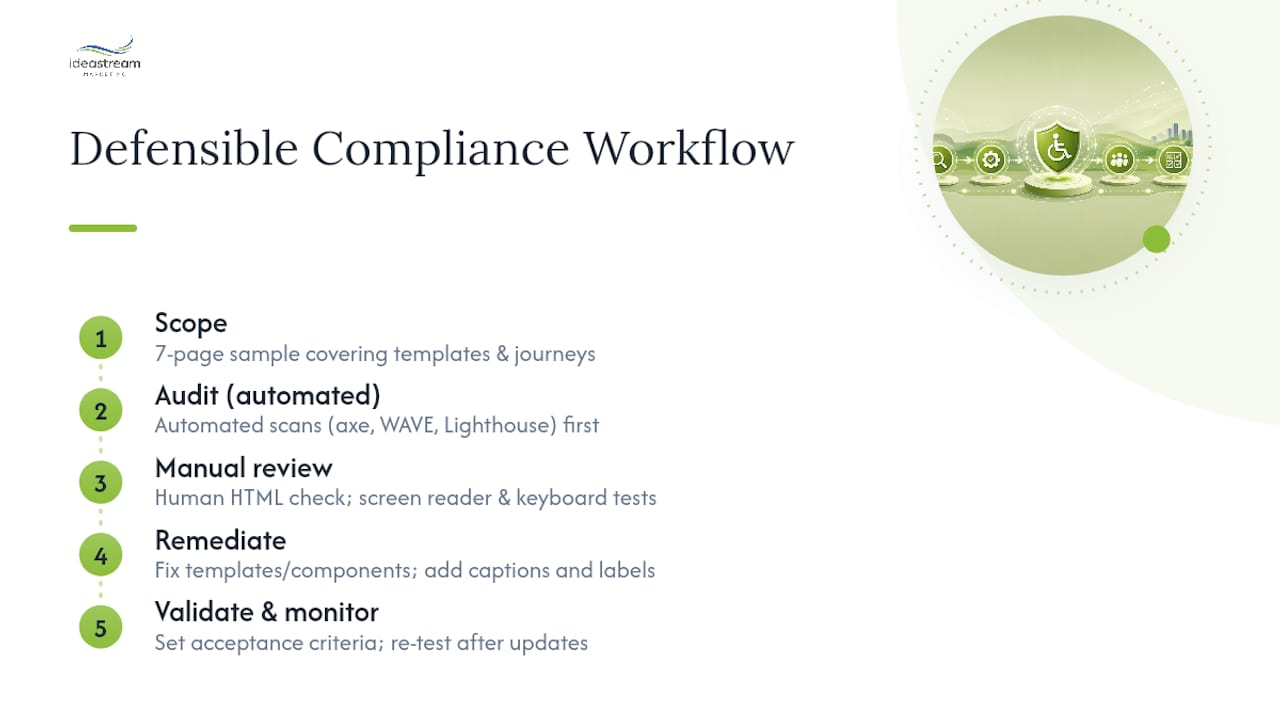
Compliance isn’t a single event. It’s a workflow with five stages: scope, audit, remediate, validate, and monitor. Skip a stage and you end up with a site that passes an automated scan but still fails the moment a real screen reader user tries to check out.
1. Set your scope with a representative sample. You don’t need to audit every page on a 400-page site. A defensible initial audit uses a 7-page sample that covers your templates and critical user journeys: home page, a listing or search page, a content page with embedded media, a form, a login or registration screen, a checkout or submission flow, and a page with a complex data table. Fix the templates behind those seven pages, and you’ve fixed the pattern across hundreds of pages that share the same code.
2. Run automated scanning first. Tools like axe DevTools, WAVE, or Lighthouse catch missing alt text, low contrast ratios, and missing form labels quickly. They’re a fast first pass, but they typically catch only a fraction of real-world barriers. DOJ guidance itself notes that automated checkers are useful but insufficient on their own.
3. Layer in manual review and assistive technology testing. This means a human reviewing the actual HTML for semantic structure, then testing the site with a screen reader (JAWS, NVDA, or VoiceOver) and navigating using only a keyboard, no mouse. Can you reach every interactive element? Does focus land somewhere sensible after a modal closes? Automated tools can’t answer that.
4. Remediate at the source, not the symptom. Fix broken patterns in your shared templates and components rather than patching individual pages one at a time. Add captions and transcripts to video and podcast content, correct form labeling, and fix focus order so keyboard users move through the page logically.
5. Validate and monitor continuously. Set acceptance criteria before you start (for example: “zero critical or serious axe violations across the sample pages”) and re-test after every major site update. Accessibility breaks the moment someone adds a new component without following the pattern library, so ongoing monitoring matters more than the initial fix.
Pro Tip: Assign one person on your team as the accessibility owner, even if it’s a part-time responsibility. Sites that lose compliance almost always lose it gradually, one un-reviewed template update at a time, not all at once.
Prioritizing Fixes on a Realistic Budget
Not every issue deserves the same urgency. Build a simple prioritization matrix around three factors: how critical the page is to your core user journey, how severe the accessibility failure is, and how exposed you are legally if that exact page gets tested in a lawsuit.
- Quick fixes (days, not weeks): missing alt text, insufficient color contrast, missing form labels. These are often a few hours of developer time per template.
- Component-level fixes (one to three weeks): broken keyboard navigation, missing ARIA roles on custom widgets, inaccessible dropdown menus. These require more careful testing since they touch shared code.
- Structural redesigns (one to three months): a checkout flow or data table that was never built with semantic HTML from the start. These sometimes require rebuilding the component rather than patching it, which is where accessible design decisions made early save real money later.
For staffing, most small and midsize businesses land in one of three models: an in-house developer handling fixes part-time, an outside accessibility specialist billing by the audit or by the hour, or a hybrid where an agency handles the audit and remediation plan while your internal team executes ongoing fixes. Whichever model you choose, document every remediation step with dates and screenshots. That record becomes your evidence if a demand letter ever arrives.
Why Overlay Widgets Won’t Save You in Court
The single most persistent myth in accessibility is that a JavaScript overlay widget, the kind that adds a floating accessibility icon to your site, makes you compliant. It doesn’t, and courts have increasingly caught on. Overlay tools don’t reliably fix underlying WCAG failures in your code; they layer a separate experience on top of a broken one, and that layered experience is frequently named specifically in the lawsuits it was supposed to prevent.
Overlay widgets can create a parallel experience that introduces its own new accessibility problems rather than resolving the ones already baked into the site’s markup, keyboard flow, and ARIA structure.
A second myth worth killing: the “nexus” defense, the argument that a website isn’t really covered by the ADA unless it’s tightly connected to a physical location. Courts have largely rejected this reasoning for businesses with any meaningful public-facing web presence. Assume your site is covered.
To protect yourself, prioritize:
- Semantic HTML and correct ARIA roles over cosmetic overlay fixes.
- Manual and assistive-technology testing over automated-only scans.
- A documented audit trail with dates, findings, and remediation steps, kept even after issues are fixed.
Deadlines, Demand Letters, and What Enforcement Looks Like
If you’re a state or local government entity, mark these dates now. An Interim Final Rule extended Title II compliance deadlines by one year: large public entities must comply by a specified deadline in 2027, and smaller entities and special districts have a later deadline, according to the Federal Register notice issued in 2026.
Private businesses under Title III face no fixed statutory deadline, but that doesn’t mean no risk. Enforcement usually starts with a demand letter from a plaintiff’s attorney, alleging specific WCAG failures found on your site. Many of these resolve through settlement rather than trial, and typical settlement terms bundle a remediation commitment (often tied explicitly to WCAG AA) with periodic compliance reporting.
| Entity Type | Governing Rule | Technical Standard | Key Deadline |
|---|---|---|---|
| Large public entities | Title II | WCAG 2.1 AA | April 2027 |
| Smaller public entities/special districts | Title II | WCAG 2.1 AA | April 2028 |
| Private businesses (public accommodation) | Title III | WCAG 2.1 AA (benchmark, not codified) | No fixed deadline; risk is ongoing |
| Federal agencies/contractors | Section 508 | WCAG 2.0 A/AA | Ongoing procurement requirement |
If a demand letter lands on your desk, don’t respond publicly and don’t promise a fix timeline before you’ve confirmed the facts. Preserve any existing audit records, loop in counsel, and commission an independent accessibility audit to establish where you actually stand before agreeing to anything.
Tools and Resources for a Defensible Audit
Start with the DOJ’s web accessibility guidance and the Access Board’s ADA standards pages, both of which lay out the current rule text and interpretation directly from the agencies that enforce it.
For the audit itself, sequence your tools deliberately:
- Automated scanners (axe DevTools, WAVE, Lighthouse) for a fast first pass across your 7-page sample.
- Browser-based manual audit tools for checking keyboard focus order and semantic structure by hand.
- Screen readers (NVDA, JAWS, VoiceOver) for real assistive-technology testing on your critical journeys.
- User-testing panels that include people who use assistive technology daily, for the nuances automated and manual review both miss.
When vetting an outside accessibility consultant, ask what technical standard they test to, whether they include assistive-technology testing (not just automated scans), and whether they’ll deliver a documented audit trail you can keep on file.
About the Author and Idea Stream Marketing’s Accessibility Work
This guide was developed under the editorial direction of Dean Spinato, CEO and Founder of Idea Stream Marketing, a Long Island video production and digital marketing agency serving businesses across New York and nationwide.
Some agencies build accessible WordPress sites from the ground up, meaning semantic markup and keyboard navigation get addressed during design rather than patched on afterward. That same accessibility mindset carries into the agency’s video production and podcast production work: captioning and transcripts on video content, accessible video players, and clean audio structure on podcast episodes repurposed into social clips. Combined with ongoing CMS-based monitoring, accessibility becomes a maintained standard rather than a one-time fix.
Why Most Compliance Advice Gets the Priorities Backwards
Most compliance content treats WCAG conformance as a checklist you complete once and then forget. That’s backwards, and it’s the single biggest reason businesses get sued twice for the same underlying problem. The Title II deadlines matter because they’re official and dated, but the private-sector reality is messier: there’s no clean finish line, just an ongoing exposure that changes every time a developer pushes new code.
The conventional advice, “run a scan, fix what’s red, move on,” skips the manual and assistive-technology testing that actually catches the failures plaintiffs’ attorneys look for. An automated scan is a smoke detector, not a fire inspection. It’ll flag missing alt text all day and completely miss a checkout flow that traps keyboard users in a modal.
If I had to tell a business owner one thing to prioritize first, it’s this: audit your highest-traffic and highest-revenue pages before you touch anything else, document what you find and fix, and build a change-control habit so new pages don’t quietly reintroduce old problems. Compliance is a maintenance practice, not a project with an end date.
— Dean Spinato, CEO & Founder of Idea Stream Marketing
Get an Accessibility Audit Before a Demand Letter Forces One
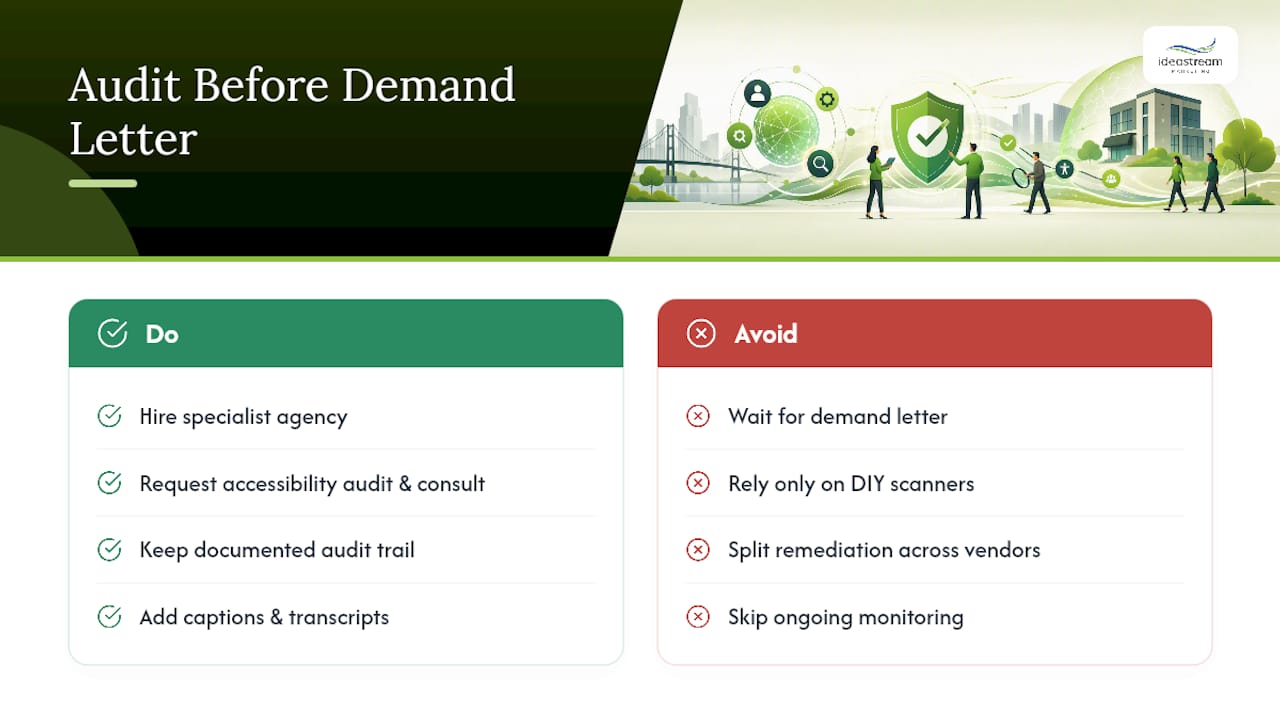
Specialist agencies may provide an alternative to hiring a standalone accessibility law firm or piecing together DIY scanner reports by combining accessible WordPress development, captioning and transcript work for video and podcast content, and ongoing site monitoring under one roof, so remediation happens inside the same workflow that manages your website and content.
Working with a specialist who understands both the technical side (semantic markup, ARIA roles, keyboard flow) and the content side (captioned videos, transcribed podcasts, accessible forms) cuts down the back-and-forth that drags a DIY remediation project out for months. It also builds the documented audit trail you’ll want on hand if a demand letter ever shows up.
Idea Stream Marketing also produces business podcasts and repurposes them into captioned Instagram Reels, TikTok videos, and YouTube Shorts, giving your content both accessibility compliance and broader social reach in the same production cycle.
If your website hasn’t had a real accessibility review, request an accessibility audit and consultation with Idea Stream Marketing’s team today, and get a clear, documented picture of where you stand before anyone else finds the gaps for you.
This article is general information, not a substitute for advice from a qualified lawyer. Consult a qualified legal professional about your own circumstances before acting on anything here.
Sources
- Fact Sheet: New Rule on the Accessibility of Web Content and Mobile Apps Provided by State and Local Governments
- Federal Register: Extension of compliance dates for accessibility of web information and services of state and local governments
- ADA accessibility standards (U.S. Access Board)
- Is My Website ADA Compliant? A 9-Point WCAG Self-Check
FAQ
Is My Website ADA Compliant Right Now?
The only way to know is to run a scoped audit combining automated scanning, manual code review, and assistive-technology testing against WCAG 2.1 AA. A defensible starting point uses a representative sample of about seven pages covering your main templates and user journeys.
What’s the Difference Between WCAG and ADA Compliance?
WCAG is the technical standard; the ADA is the law. The DOJ’s Title II rule formally requires WCAG 2.1 AA for public entities, while Title III businesses use WCAG 2.1 AA as the practical benchmark even though it isn’t codified for them.
Do Small Businesses Have to Follow ADA Website Rules?
Yes, if the business is open to the public, it falls under Title III regardless of size, though there’s no fixed compliance deadline the way there is for Title II. Exposure comes through demand letters and litigation, not a filing deadline.
Are Accessibility Overlay Widgets Enough to Comply?
No. Overlay widgets don’t reliably fix underlying code-level WCAG failures and have been named directly in lawsuits against the businesses that installed them. Remediation needs to happen in the site’s actual markup and components.
What Does an ADA Website Compliance Audit Cost?
Costs vary widely based on site size and how many templates need review, and Idea Stream Marketing’s current service details and consultation pricing are available directly on its website. A scoped seven-page sample audit is typically the most cost-effective starting point before committing to full-site remediation.