



September 26, 2026



The single biggest lever for service area business SEO is getting your Google Business Profile configured correctly and pairing it with genuinely useful, unique service area pages backed by real customer reviews. Be careful with the address and hide settings, since a mismanaged pin can quietly tank your local rankings. Expect meaningful movement over weeks to months, not overnight.
TL;DR:
- Most of the local ranking impact comes from correctly configured Google Business Profiles that include up to 20 well-chosen service areas and genuine customer reviews.
- Address hiding alone can hurt rankings if the map pin is geocoded incorrectly or falls back to a centroid, so both proper formatting and verification are critical.
- Building localized service area pages with unique content, reviews, and videos significantly improves visibility and conversions for regional searches.
- Consistent review collection, especially recent and detailed reviews, enhances prominence signals and complies with FTC guidelines against fake or incentivized reviews.
- Coordinated management of profiles, service pages, local content, reviews, and videos offers the best results for service area SEO rather than treating each component separately.
Table of Contents
- How service areas work in Google and the ranking model you need to know
- Step-by-step: set up and manage your Google Business Profile for a service-area business
- Service area pages: build pages that rank and convert
- Address visibility and map-pin geocoding: diagnostics and fixes
- Prioritize and scale service-area coverage: which places to target first
- Reputation, reviews, and legal compliance for review use
- Technical signals and measuring results
- Agency perspective and practical examples from Idea Stream Marketing
- What the data actually tells service area businesses to prioritize
- How Idea Stream Marketing helps service-area businesses execute this
- Sources
- FAQ
How service areas work in Google and the ranking model you need to know
Google draws a clear line between a service area business and a hybrid business. A service area business visits or delivers to customers rather than welcoming them to a storefront, while a hybrid model does both. According to Google’s own guidance, you can list up to 20 named service areas using cities, postal codes, or counties, and there’s no radius tool: you name the places you actually serve.
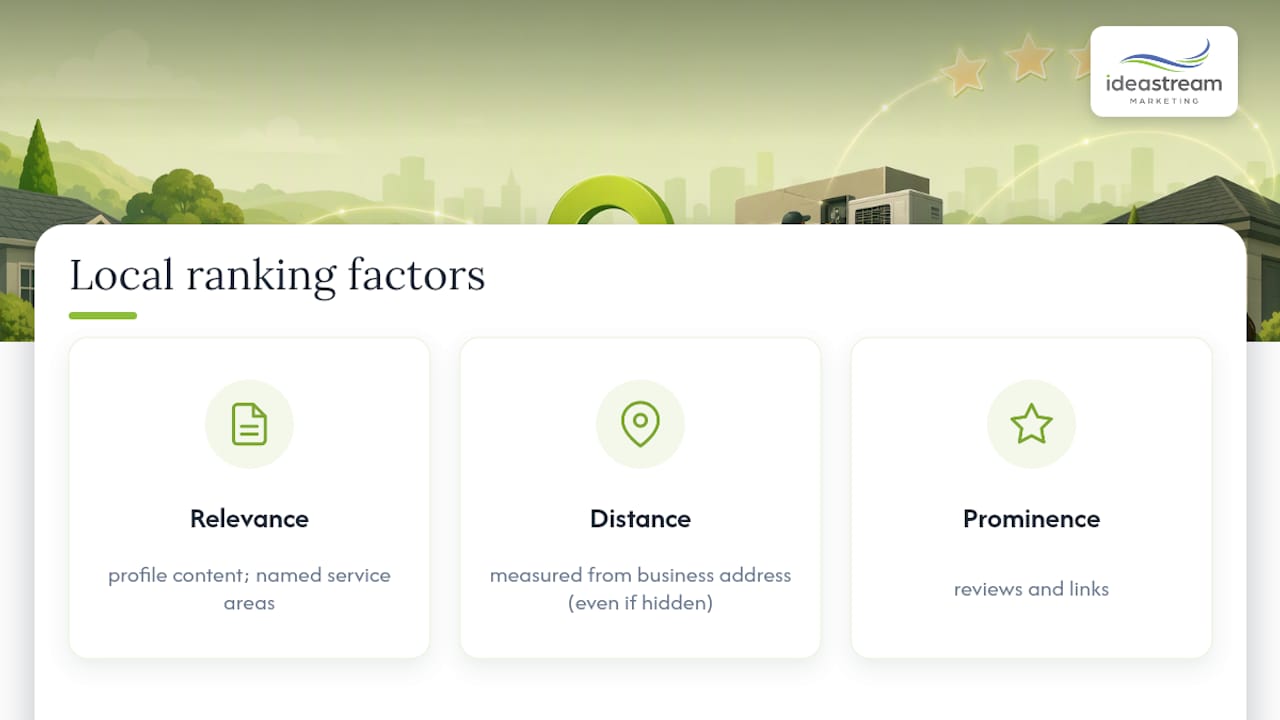
Here’s what trips up a lot of owners. The service area field is a disclosure to customers, telling them where you’re willing to work. It does not change how the algorithm calculates distance. Google still measures proximity from your business address, whether that address is visible on your profile or hidden from public view. If you don’t serve customers at your physical address, Google’s guidance is to remove that address from the profile, but the hidden coordinates still anchor your distance calculation behind the scenes.
That distance calculation is one leg of a three-part model. Google’s guidance on how it sources local ranking signals points to relevance, distance, and prominence as the factors that decide who shows up in local search. Relevance means how well your profile and content match the search. Distance means how close your listing sits to the searcher or the area they’re searching. Prominence covers your reputation and visibility signals, including reviews and links. A service area business has to work all three, because it can’t lean on foot traffic or a storefront to win by default.
Step-by-step: set up and manage your Google Business Profile for a service-area business
Before you touch the dashboard, gather your documentation. Have proof of the places you serve ready (invoices, service logs, or a coverage map), because Google may ask for verification that ties back to real activity in those areas.
- Decide whether customers ever visit your business address. If not, remove the address entirely and rely on the service area list.
- Add up to 20 service areas using cities, zip codes, or counties, prioritizing the places where you actually complete jobs.
- Put suite or unit numbers on address line 2, never line 1, since stacking them into a single line is a common trigger for geocoding errors.
- Choose the most specific primary category available rather than a broad catch-all, then list your services as short, descriptive sentences instead of single keywords.
- Complete verification, which for many service area businesses now involves a video walkthrough showing your equipment, signage, or workspace.
- If you’re expanding into a new region or adding a staffed location, treat it as a distinct setup step rather than an edit, since Google treats new physical presence differently from an added service area.
Our own Google Business Profile optimization guidance walks through category selection and services formatting in more depth if you want a second pass at your listing. For further tactical detail, the blog version of that guide covers service area specific edge cases.
Pro Tip: Film your video verification in daylight, show your vehicle or equipment clearly, and narrate what you’re showing so the reviewer has no ambiguity about what they’re looking at.
Service area pages: build pages that rank and convert
A service area page is different from a location page. A location page describes a physical address customers can visit. A service area page describes the work you do in a specific city or region you don’t have a storefront in, and it has to earn its ranking through content quality rather than proximity alone.
The pages that perform share a consistent anatomy:
- A headline naming the service and the specific area, not a generic template phrase.
- A short local intro that references the neighborhood, common local problems, or regional quirks relevant to the service.
- A services list with brief descriptions rather than a bare bullet dump.
- Local proof: a short case study, a couple of reviews from customers in that area, or job-site photos.
- A clear call to action, ideally paired with a phone number or booking link above the fold.
According to Search Engine Land’s coverage of localized SERPs, service area pages built with localized content, reviews, and photos are increasingly the pages that show up for local-intent searches and convert once they get there. Thin, duplicated pages that swap only the city name in a template are the fastest way to trigger a doorway page problem, so the local proof section is not optional decoration.
Short localized video works especially well here: a 30 second clip of a completed job in that town, or a client testimonial filmed on-site, gives the page something a competitor’s text-only page can’t match. Link each area page back to your Google Business Profile landing page, your homepage, and the relevant main service page so Google can connect the network.
Pro Tip: Reuse your video shoot footage across three formats: the full clip on the area page, a trimmed 15 second version for Instagram Reels or TikTok, and a still frame for the page’s featured image.
Address visibility and map-pin geocoding: diagnostics and fixes
Geocoding is how Google converts your written address into map coordinates. When the address is incomplete, oddly formatted, or hidden, Google sometimes falls back to a centroid, essentially the geographic middle of a zip code or city, which can place your pin far from where you actually operate.
Practitioner reporting from Search Engine Land on map-pin problems describes this centroid fallback as a common and frequently overlooked cause of ranking drops, often traced back to address formatting errors like suite numbers crammed into the main address line.
Hiding a business address without checking pin placement is one of the more common self-inflicted local ranking mistakes reported by industry analysts, who found that businesses showing a real, well-geocoded address often outperform those hiding an unverified one in local-pack results.
To diagnose and fix the problem:
- Search your business name directly in Google Maps and note exactly where the pin drops.
- Cross-check that location against the Geocoding API or a similar developer tool to see how your written address resolves.
- Fix formatting first: full street address on line 1, suite or unit on line 2, correct zip code, no abbreviations Google might parse inconsistently.
- Re-verify the profile after any address edit, since a saved change doesn’t always trigger automatic re-geocoding.
- If the pin still lands wrong after formatting fixes, consider whether a staffed location or a fresh listing is more realistic than continuing to fight a legacy geocoding error.
A support ticket alone rarely fixes a mis-geocoded pin. Correcting the address format, forcing re-verification, or starting a new listing for a genuinely staffed location tend to be the paths that actually work.
Prioritize and scale service-area coverage: which places to target first
Not every city in your coverage radius deserves its own page on day one. Start with data you already have.
- Pull GBP Insights to see which nearby areas are already generating impressions and calls.
- Cross-reference your actual completed job locations, since past demand tends to predict future demand.
- Favor areas within roughly a 17 to 20 minute drive time, a sweet spot where service businesses commonly see the best mix of demand and realistic response time.
- Check competition and search volume for each city before investing in a page, since a low-demand area with three entrenched competitors is a poor use of your time.
- Build a repeatable template with centralized elements (service descriptions, pricing structure) but keep local proof, photos, and testimonials unique per page.
Test three to five high-opportunity areas before rolling out a wider batch of pages. Our guide to scaling multi-location SEO covers the template and rollout process in more detail if you’re managing coverage across a dozen or more towns.
Reputation, reviews, and legal compliance for review use
Recent reviews with real detail carry more weight than a stockpile of old, generic five-star ratings. A large-sample analysis of near-me ranking factors found that recency and text-rich content in reviews correlate with stronger local visibility, not just star count.
Build a simple, ethical collection flow:
- Ask for the review at the close of the job, while the work is still fresh in the customer’s mind.
- Add a QR code to the invoice that links directly to your review page.
- Send a short follow-up email or text with a direct review link rather than a generic homepage URL.
The FTC’s rule effective October 21, 2024 prohibits buying or selling fake reviews and bars suppressing negative reviews through intimidation according to the FTC’s own guidance, which also requires businesses to disclose material connections when featuring testimonials. That means no incentivized five-star campaigns and no quietly burying complaints. When you feature city-specific reviews on an area page, quote them accurately and never edit out context that changes their meaning. Our piece on showcasing customer reviews covers display tactics that stay on the right side of that line.
Technical signals and measuring results
A few technical tasks round out the setup, and none of them take long once you know what to check.
- Add LocalBusiness schema in JSON-LD to your site and keep the service area, phone number, and category fields synced with your live GBP listing.
- Run a NAP consistency check across your website, directories, and social profiles, paying close attention to how address hiding affects what’s publicly listed elsewhere.
- Track GBP impressions, search queries, phone calls, website leads, and organic clicks to your area pages as your core KPIs, using tools to capture leads from your website form into a CRM without plugins for improved conversion.
- Review those numbers monthly and test small variations in area page headlines or calls to action rather than overhauling the whole page at once.
Our schema syncing guide walks through the JSON-LD setup step by step.
Pro Tip: Set a calendar reminder to audit NAP consistency every quarter, since directory sites update independently and drift happens quietly.
Agency perspective and practical examples from Idea Stream Marketing
A coordinated approach to service area SEO involves optimizing the Google Business Profile, developing area pages with local proof, and incorporating review capture and local video content.
In practice, that means short job-site videos in the 30 to 60 second range, testimonial clips trimmed for area pages and repurposed as Instagram Reels, Facebook Reels, TikTok videos, or YouTube Shorts, and a podcast episode occasionally cut into shareable social clips when a client wants a more conversational proof point. The process typically involves auditing profiles and pages, correcting setup issues, creating or updating area pages, initiating review capture campaigns, producing local video content, and ongoing measurement and adjustment.
Video and podcast production can be tailored to create authentic local proof rather than using generic content. A page with a real client on camera outperforms a page with stock photography almost every time.
What the data actually tells service area businesses to prioritize
Most advice on this topic treats the Google Business Profile and the service area pages as separate projects, one for the SEO team and one for the content team. That split creates weak results. The profile signals relevance and prominence, the pages prove it, and neither works well without the other.
The conventional wisdom overrates hiding your address as a privacy or branding move. It’s often a ranking decision made without checking pin placement first, and that single oversight explains a lot of the “we did everything right and still don’t rank” complaints owners bring to agencies. Check the pin before you decide to hide anything.
If I had to name the one thing most businesses skip, it’s local proof. A generic area page with a phone number and a paragraph of city names is not a strategy. A short video of real work in that town, paired with a review from a customer who lives there, tells Google and the searcher the same thing at once: this business actually shows up.
— Dean Spinato, CEO & Founder of Idea Stream Marketing
How Idea Stream Marketing helps service-area businesses execute this
Getting the Google Business Profile right, building area pages that hold up, and producing local video that actually looks local takes more coordinated effort than most in-house teams have time for. We handle it as one connected project instead of three separate vendors.
Services offered include Google Business Profile audits and corrections, service area page strategy and copywriting with local proof, local video production including job-site and testimonial videos, compliant review capture campaigns, and SEO planning for businesses expanding into new regions.
Clients receive an audit, a prioritized roadmap, and a defined set of deliverables tailored to their needs. Schedule a consultation to walk through where your profile and pages currently stand.
Sources
- Manage your service areas for service-area & hybrid businesses
- Localized SERPs: Winning traffic and leads with service area pages
- The Consumer Reviews and Testimonials Rule: Questions and answers | Federal Trade Commission
FAQ
What counts as a service area in a business’s Google profile?
A service area is the set of cities, zip codes, or counties a business travels to or delivers within, rather than a location customers visit. Google allows up to 20 named service areas per profile, with no radius option.
What does SEO for service businesses actually involve?
It involves optimizing the Google Business Profile, building content that proves local expertise in each area served, and earning reviews and links that signal credibility. For service area businesses specifically, it also means managing address visibility and pin accuracy carefully.
What does hiding the address on a Google Business Profile do?
Hiding the address stops it from displaying publicly, which Google recommends when customers never visit that address. The hidden address still anchors the distance calculation behind the scenes, so a poorly geocoded pin can hurt rankings even when the address itself is invisible, as industry reporting on map-pin issues has documented.
How is service area marketing different from location-based marketing?
Location-based marketing centers on a physical address customers visit, while service area marketing centers on proving relevance and trust in places you serve without a storefront. That shifts the emphasis toward area-specific content, reviews, and local video rather than foot traffic or signage.