



October 21, 2026




TL;DR:
- Running Google Ads without a structured management strategy can quickly exhaust your budget with minimal results. Effective management involves proper campaign setup, accurate data feeding to Google’s AI, and consistent performance monitoring. Prioritize thorough pre-launch audits, targeted ad copy, and ongoing optimization to maximize return on advertising spend.
Running Google Ads without a clear management strategy is one of the fastest ways to burn through a marketing budget with little to show for it. Many small and medium-sized business owners launch campaigns with good intentions, only to find their costs climbing and their phone staying quiet. Effective Google Ads management changes that equation. It means structuring your campaigns correctly, feeding the right data to Google’s AI, and staying on top of performance week after week. This guide walks you through exactly how to do that, from initial setup to advanced bidding strategies, so every dollar you spend works harder.
Table of Contents
- Key takeaways
- Google Ads management: what you need before you start
- Building campaigns that actually convert
- Bidding strategies: choosing the right approach
- Ongoing optimization: keeping your campaigns healthy
- Diagnosing problems and reading your metrics
- My honest take on Google’s AI
- Let Ideastreammarketing manage your Google Ads
- FAQ
Key takeaways
| Point | Details |
|---|---|
| Setup determines results | Accurate conversion tracking and a solid account structure are the foundation every profitable campaign is built on. |
| Smart Bidding needs real data | Google’s AI performs well only when you feed it accurate, revenue-tied conversion signals with sufficient volume. |
| Negative keywords save money | Adding a thorough negative keyword list can reduce wasted spend by 15 to 30% within the first month. |
| Weekly reviews are non-negotiable | Consistent monitoring of search terms, bids, and ad copy is what separates growing campaigns from stagnant ones. |
| Pre-launch audits prevent downtime | A pre-launch checklist cuts disapproval rates by 68 to 72%, avoiding costly gaps in ad delivery. |
Google Ads management: what you need before you start
Jumping into campaign creation before your account is properly configured is a common and costly mistake. Think of it like building a house without a blueprint. The structure might go up, but something critical will be missing.
Before you write a single ad, you need these building blocks in place:
- Google Ads account: Set up at ads.google.com. If you manage multiple clients or locations, a Google Ads Manager Account (MCC) lets you oversee everything from one place.
- Google Tag Manager: This tool makes it far easier to place and manage tracking codes on your website without touching code directly.
- Google Analytics 4: Link your Analytics account to Google Ads so you can see how paid traffic behaves after the click.
- Conversion tracking: Define exactly what a conversion means for your business. A phone call, a form submission, a purchase, or a booked appointment all count. Track them all, but be selective about which ones you feed to your bidding strategy.
Realistic budgets matter too. Professional management pays off most clearly when your monthly ad spend exceeds $1,500. If you are working with less than $1,000 per month, a one-time professional setup and some training may serve you better than ongoing monthly fees.
One feature that too many SMBs skip is Enhanced Conversions. This tool matches hashed customer data to Google accounts to recover conversions lost to browser privacy restrictions. Studies show it recovers 10 to 20% of conversions that would otherwise go untracked. That is not a small number when you are trying to teach an algorithm what your best customers look like.
Pro Tip: Limit your primary conversion actions to one to three high-value events. Tracking too many actions at once dilutes the signals your Smart Bidding algorithm receives, making it harder for Google to optimize toward your actual business goals.
| Tool | Purpose |
|---|---|
| Google Ads | Campaign creation and management |
| Google Tag Manager | Tag and tracking code deployment |
| Google Analytics 4 | Post-click behavior and attribution |
| Enhanced Conversions | Recovery of privacy-restricted conversion data |
Building campaigns that actually convert
Structure is where most small business campaigns fall apart. A well-organized campaign makes your ads more relevant, your Quality Scores higher, and your costs lower. Here is a step-by-step approach to getting it right.
- Organize campaigns by business objective. Separate campaigns for different products, services, or goals. A law firm, for example, should not put personal injury and estate planning keywords in the same campaign. Different goals need different budgets and bidding strategies.
- Build tightly themed ad groups. Each ad group should contain keywords that revolve around a single topic or intent. A group called “emergency plumber NYC” should not also contain keywords about bathroom renovations. Tight ad groups improve relevance and click-through rates.
- Choose keyword match types carefully. Broad match gives Google maximum reach but can trigger irrelevant searches. Phrase match offers more control. Exact match is the most precise. A balanced approach often works best: start with phrase and exact match, then expand cautiously with broad match once you have enough conversion data.
- Build a negative keyword list from day one. This is the highest-return task in pay-per-click advertising and one of the most frequently neglected. Adding comprehensive negative keywords reduces wasted spend by 15 to 30% within the first month alone.
- Write ads that match user intent. If someone searches “affordable HVAC repair Long Island,” your headline should speak directly to affordability and location. Generic headlines like “We Fix Your HVAC” do not convert as well because they ignore what the searcher actually wants.
Here is what strong ad copy includes:
- A headline that mirrors the search query or core intent
- A clear value proposition in the description line
- A specific call to action (“Get a Free Estimate Today”)
- Ad extensions: site links, callouts, and structured snippets to fill the search result with useful information
Landing page alignment is just as critical as the ad itself. If your ad promises a free consultation, your landing page must lead with that offer. Disconnect between ad and landing page kills conversion rates and raises your cost per click.
Bidding strategies: choosing the right approach

Google offers a range of Google Ads bidding strategies, from fully manual to fully automated. The right choice depends on your data volume, budget, and campaign goals.
Here is a side-by-side comparison of the most common options:
| Strategy | Best for | Requirement |
|---|---|---|
| Manual CPC | New accounts, limited data | No minimum conversions |
| Maximize Clicks | Driving traffic, low-data phase | No minimum, watch spend |
| Target CPA | Lead generation, stable conversion volume | At least 30 conversions per 30 days |
| Target ROAS | E-commerce, revenue-linked tracking | At least 50 conversions per 30 days |
| Maximize Conversions | Campaigns ready to scale | Sufficient budget flexibility |
Smart Bidding works well when you give it good data. The critical phrase there is “good data.” Smart Bidding requires accurate revenue-tied conversion data to optimize correctly. If you tell Google to track button clicks as conversions instead of actual sales or leads, the algorithm will optimize toward button clicks. You will get lots of them. You just won’t get customers.
Data-Driven Attribution (DDA) is another layer worth understanding. It distributes conversion credit across multiple touchpoints rather than giving all credit to the last click. DDA requires 300 conversions in a 30-day window to function at its best, which is a realistic target for many SMBs running focused campaigns.
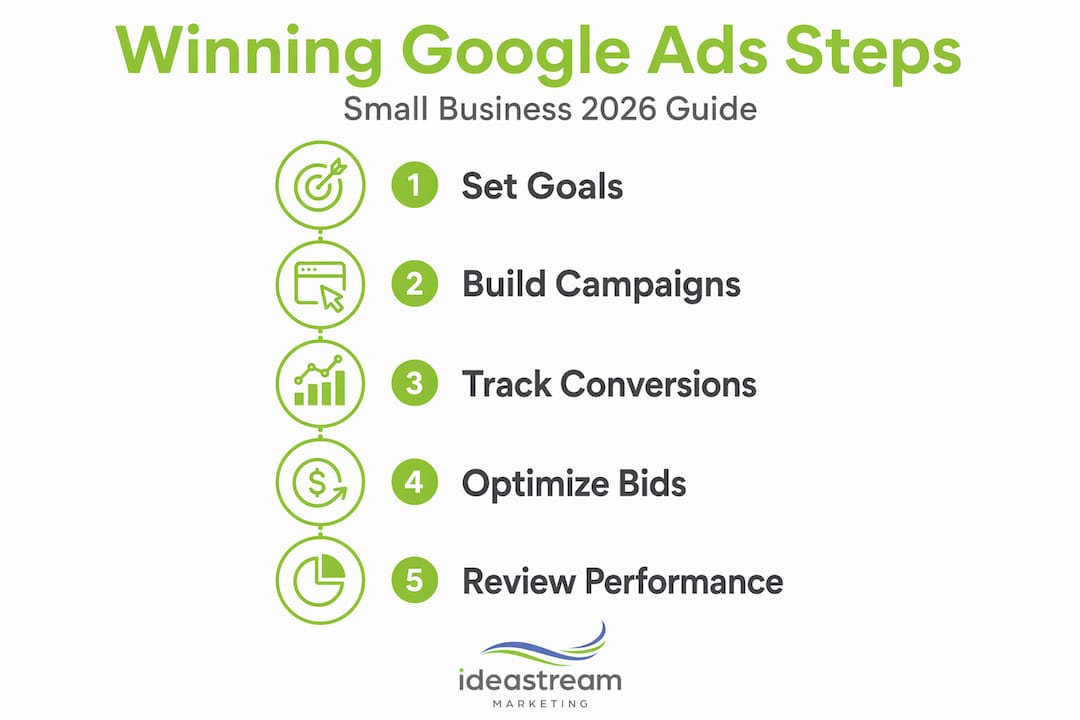
Performance Max campaigns deserve a mention here. They run across all of Google’s networks (Search, Display, YouTube, Gmail, Maps) using a single campaign. They work best as a complement to existing Search campaigns, not a replacement, especially while you are still building conversion history.
Pro Tip: When launching Smart Bidding for the first time, start with Maximize Conversions rather than Target CPA. Let it run for two to four weeks until it accumulates enough data, then switch to Target CPA once you have a reliable baseline cost per conversion to target.
Ongoing optimization: keeping your campaigns healthy
Campaigns do not run themselves. The SMBs that get the best results from Google Ads treat account management as an ongoing discipline, not a one-time task. Weekly reviews and adjustments of search terms, bid strategies, and ad copy consistently boost campaign performance over time.
Here is a practical weekly and monthly maintenance schedule:
- Review the Search Terms report weekly. Look for irrelevant or low-quality search queries that triggered your ads. Add them as negatives immediately. This single habit compounds into major savings over a quarter.
- Adjust bids by device, location, and time of day. If your data shows that mobile users convert at half the rate of desktop users, reduce your mobile bid modifier. If Tuesday afternoons produce strong conversions, increase bids during that window.
- A/B test your ad copy consistently. Run at least two or three ad variations per ad group. After a statistically meaningful sample (usually a few hundred impressions), pause the weaker performers and write new challengers to test against the winner.
- Allocate budget to what works. Sounds obvious, but many business owners let budget flow equally to all campaigns regardless of performance. Prioritize proven campaigns and pull back on those that consistently underperform.
- Monitor your landing page experience. Google scores your landing page relevance as part of your Quality Score. A slow or poorly matched landing page raises your costs. Use Google’s PageSpeed Insights to check load time and fix issues before they quietly inflate your CPC.
- Run a pre-launch checklist for every new ad. Pre-launch audits reduce disapproval rates by 68 to 72%. An ad that gets disapproved can cost you one to seven days of delivery while you wait for an appeal to process.
Diagnosing problems and reading your metrics
Even well-managed campaigns hit rough patches. Knowing how to read your data and identify the root cause of a problem is what separates business owners who get results from those who give up on paid advertising entirely.
Watch for these signs that something is off:
- High cost, low conversions: Often signals poor keyword targeting, a mismatched landing page, or a bidding strategy that lacks enough conversion data to perform.
- Low click-through rate: Usually points to weak ad copy or poor keyword-to-ad relevance. Review your ad group structure and tighten the match between keywords and headlines.
- Conversion tracking discrepancies: If Google Ads reports conversions but your CRM shows nothing, your tags may be misfiring. Use Google Tag Manager’s preview mode to verify tag triggers.
- Ad disapprovals: Check the policy violation reason in the Ads section of your account. Common causes include capitalization errors, restricted claims, and destination URL issues. You can appeal directly through the interface or fix the ad and resubmit.
Quality Score is one of the most underappreciated levers in AdWords campaign management. It is scored on a scale of one to ten and reflects expected click-through rate, ad relevance, and landing page experience. A higher Quality Score means you pay less per click for the same position. A score of seven or above is a healthy target for most campaigns.
Track your Cost per Conversion, Return on Ad Spend, Click-Through Rate, and Conversion Rate as your four primary performance indicators. These four metrics together tell you whether your campaigns are delivering value or just burning through budget.
Ad disapprovals also erode your account trust score over time, which affects your overall ad delivery and costs beyond just the disapproved ad. Keeping a clean account history is a long-term investment in better performance.
My honest take on Google’s AI
I have worked with enough small business accounts to have a clear opinion on this: Google’s AI is genuinely powerful, but it is not a substitute for strategic thinking.
I have seen business owners hand the keys over to Performance Max or Smart Bidding with optimistic expectations, only to find their budget evaporated in three weeks with almost nothing to show for it. The reason is almost always the same. The conversion data they fed the algorithm was either too thin or tied to the wrong signals. Google’s AI optimizes based on the data you give it. Feed it form fills from people who never buy, and it will find you more of those. Feed it actual closed deals or phone calls from paying customers, and it will find you more of those instead.
What I have learned is that the human role in Google Ads management is not to micromanage bids. It is to set up the right signals, monitor for drift, and make judgment calls that an algorithm cannot make. When should you pause a high-spend keyword that looks profitable on paper but never closes in your CRM? When should you test a completely different angle in your messaging? Those decisions require a person who understands the business, not just the data.
My advice: treat automation as a tool, not a manager. Review your campaigns with a critical eye every week. Ask whether the conversions Google is counting actually matter to your bottom line. And do not be afraid to override the algorithm when your business knowledge tells you something is wrong.
— Dean
Let Idea Stream Marketing manage your Google Ads
Managing Google Ads well takes time, structure, and consistent attention. At Idea Stream Marketing, we handle all of that for you. Our team builds campaigns from the ground up with proper conversion tracking, tightly structured ad groups, and Smart Bidding strategies calibrated to your actual revenue goals. We also pair paid advertising strategy with AI SEO and landing page design so your paid and organic presence work together. Whether you are just getting started or trying to fix a campaign that has been underperforming, we are ready to help. Explore our AI SEO services or contact us to schedule a consultation.
FAQ
What does Google Ads management actually include?
Google Ads management covers campaign setup, keyword research, ad copywriting, bid strategy selection, conversion tracking, and ongoing optimization tasks like negative keyword updates, A/B testing, and performance reporting.
How much should I spend on Google Ads as a small business?
Professional management delivers the best ROI when monthly ad spend exceeds $1,500. Businesses spending under $1,000 per month may benefit more from a one-time setup and training arrangement.
What is Smart Bidding and when should I use it?
Smart Bidding is Google’s automated bid management system that uses machine learning to optimize for conversions or revenue. It works best once you have at least 30 conversions per month for Target CPA or 50 for Target ROAS.
Why are my Google Ads not converting?
Low conversion rates typically point to one of three issues: poor keyword targeting that attracts the wrong searchers, a landing page that does not match the ad’s promise, or conversion tracking that is misfiring and giving Google bad signals to work with.
How often should I review my Google Ads account?
Weekly reviews of key metrics including search terms, bid performance, and ad copy are the standard for well-managed accounts. Monthly deep reviews of budget allocation and campaign structure keep the strategy on track over time.

