








TL;DR:
- Optimizing your Google Business Profile by verifying, choosing correct categories, and maintaining consistent information boosts local search visibility. Regular updates with photos, reviews, and posts further enhance your profile’s engagement and ranking potential. Active management and accurate data are essential for long-term success in local SEO efforts.
Your Google Business Profile exists right now, but if it’s sitting there with default settings, incomplete fields, and no recent activity, local customers are choosing your competitors instead of you. Google Business Profile optimization, officially managed through the Google Business Profile platform (formerly Google My Business), is the process of configuring every signal on your listing so Google ranks you higher in local search, the map pack, and discovery results. This guide walks you through exactly what to do in 2026 to turn a passive listing into a lead-generating asset.
Table of Contents
- Key takeaways
- Google Business Profile optimization: the foundation
- Category, description, and services optimization
- Photos, reviews, and posts that drive engagement
- Technical upkeep and long-term profile health
- My honest take on why optimized profiles still underperform
- Take your local visibility further with Ideastreammarketing
- FAQ
Key takeaways
| Point | Details |
|---|---|
| Verify before optimizing | Claim and verify your profile first; unverified listings have no ranking power. |
| Primary category drives eligibility | Choosing the wrong primary category blocks you from showing up in relevant searches. |
| Reviews need velocity, not just volume | Google reads review text and recency as ranking signals, not star averages alone. |
| NAP consistency is non-negotiable | Mismatched name, address, or phone across directories weakens your local ranking signals. |
| Treat it as a live platform | Regular posts, photo uploads, and Q&A responses signal active engagement to Google. |
Google Business Profile optimization: the foundation
Before you touch a single field, you need the basics locked in. The most common mistake small business owners make is trying to optimize a listing they have not formally claimed and verified. Verification gives you control over the data Google displays, and without it, anyone can suggest edits to your listing.
The first thing to confirm is that your business name exactly matches your real-world signage and legal registration. Using your official name without promotional add-ons or keyword insertions is mandatory. Adding words like “best” or your city name to your business name field violates Google’s guidelines and risks suspension.
Next, lock in your NAP: name, address, and phone number. NAP inconsistencies weaken your entity clarity in Google’s eyes and drag down local rankings. Check your website footer, Yelp listing, Facebook page, and any industry directories to make sure every version matches your Google profile exactly, down to how you abbreviate “Street” versus “St.”
Before you start editing, build a quick GBP truth checklist:
- Confirm your legal business name (no keywords, no locations added)
- Verify your physical address matches USPS records
- Confirm your primary phone number is a local number, not a call center line
- Check that your primary and secondary categories reflect what you actually do
- Make sure your website URL points to the correct page
Pro Tip: If you plan to make several updates at once, do them all in a single editing session rather than spreading them out over multiple days. Unstable editing behavior can reduce Google’s trust in your listing and trigger review delays.
Claiming and verifying your Google Business Profile is step one. Optimization built on an unverified or inaccurate foundation wastes every hour you spend on it.
Category, description, and services optimization
This is where most businesses leave real ranking potential on the table. Local Pack visibility is controlled by relevance and prominence signals, and your primary category is the single most powerful relevance lever you control.

Choose the most specific category that accurately describes your core service. A plumbing company that focuses on emergency calls should select “Emergency Plumber” rather than the generic “Plumber.” Category specificity controls eligibility for the searches that matter most to your revenue. From there, add secondary categories that reflect your other real services, but do not pad this list. Each secondary category should represent work you genuinely offer and handle.
Here is a step-by-step process for the core fields:
- Set your primary category by matching it to your single most important service or product. If you are not sure which to choose, search Google for that service in your city and study the categories your top local competitors are using.
- Write your business description in 750 characters or fewer. Be direct about what you do, who you serve, and what makes you worth calling. No URLs. No keyword stuffing. Google reads this field as a trust signal, not a keyword container.
- Complete the services section fully. List every service you provide, add short descriptions, and match the language to what people actually search for. This field gives Google specific signals about your relevance to queries your category alone might not cover.
- Fill out your attributes. Accessibility features, payment methods, appointment availability, outdoor seating, whether you offer delivery. These narrow details help complete your listing and improve your chances of showing up in filtered searches.
- Set accurate hours, including holiday hours when they apply. Inaccurate hours generate bad reviews and suppress trust signals.
Pro Tip: Write your business description as if you are explaining your business to a new neighbor. Natural language beats keyword-packed copy every time, and Google’s quality raters can tell the difference.
Photos, reviews, and posts that drive engagement
Content is what separates a profile that ranks from one that converts. Both matter. Active photo uploads increase clicks by 42% and direction requests by 35%, which makes photos one of the highest-ROI tasks you can do in under an hour.
The practical guidelines for visual content:
- Upload original photos taken at your actual location, not stock images
- Include shots of your exterior, interior, team, products, and finished work
- Aim for a consistent upload schedule, even if it is just two or three photos per week
- Add short, descriptive file names before uploading, since this supports local business optimization without any extra effort
Reviews deserve a dedicated strategy, not an afterthought. Review volume, recency, and sentiment all feed Google’s local ranking algorithm, and Google reads the actual text of reviews as entity signals. That means a review mentioning “roof repair in Smithtown” carries more signal weight than a five-star rating with no text.
Ask every satisfied customer for a review while the experience is fresh. Make it easy by creating a short review link through your Google Business Profile dashboard and sending it via text or email. Respond to every review within 48 hours, positive and negative. Your response is public-facing content that other potential customers will read.
Google Business Profile Posts work like a social feed attached to your listing. Use them to share promotions, announce new services, highlight seasonal offers, and post about community involvement. Posts stay visible for a week, so a consistent cadence matters. Think of each post as a short signal to Google that your business is active and current.
Pro Tip: When responding to negative reviews, keep your reply factual and professional. Never paste in promotional language. The goal is showing future customers that you handle problems with care, not winning an argument online.
Technical upkeep and long-term profile health
Optimization is not a one-time event. The profiles that consistently rank at the top of local search are actively managed, and Google Business Profile Insights give you the data to know what is working.
| Metric to monitor | What it tells you |
|---|---|
| Search queries | Which keywords trigger your listing |
| Direction requests | How many people wanted to visit in person |
| Phone calls | Direct call volume from your profile |
| Website clicks | Traffic driven from your GBP listing |
| Photo views | Whether your visual content is getting seen |
Check your Insights dashboard at least monthly. GBP performance metrics now include offer engagement data, meaning you can track how customers interact with your promotions directly from the listing.
The Q&A section on your profile is often overlooked and that is a real missed opportunity. Anyone on Google can post a question and anyone can answer it, including random users. Seed your own Q&A section with the questions your customers actually ask at intake. Answer them accurately and completely. This creates rich, searchable content on your listing and prevents misinformation from appearing before you notice it.
Citation consistency ties everything together. Beyond your Google profile, your business information needs to match across Google, Apple Maps, Bing Places, Yelp, and any industry-specific directories. Google treats your GBP as an entity, and conflicting data across platforms creates entity confusion that holds back your rankings.
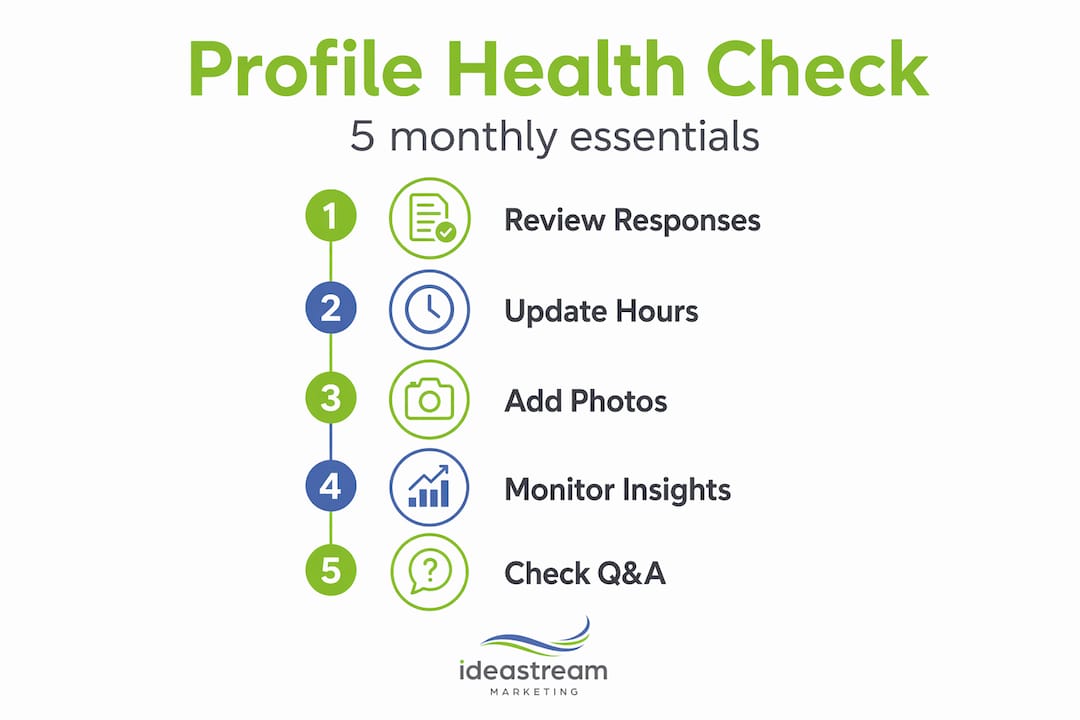
Build a simple monthly workflow: check for new reviews and respond, verify your hours and information are current, upload two to three new photos, post one update, review your Insights data, and scan for any unauthorized edits someone may have suggested.
Pro Tip: Set up a Google Alert for your business name. It catches mentions and potential duplicate listings before they cause ranking problems.
My honest take on why optimized profiles still underperform
I have worked on local SEO long enough to see a pattern that frustrates even experienced marketers. A business owner spends weeks building review velocity and posting content, then wonders why their ranking barely moved. Nine times out of ten, the issue is that fixing relevance baseline was skipped in favor of the more visible tactics.
Category accuracy is prerequisite work. It is not glamorous, but it is what determines whether your listing is even eligible to show for the searches you care about. I have seen profiles with hundreds of reviews sitting outside the Local 3-Pack simply because the primary category was set to something slightly too broad. Fix that one field and the results can shift noticeably within two to three weeks.
I have also dealt with suspended profiles firsthand. Reinstating them taught me more about profile management than any optimization sprint ever did. The common thread in almost every suspension is either keyword stuffing in the business name field, a sudden cluster of aggressive edits, or a service-area setup that does not match verifiable location data. The repair process is slow. Protecting a healthy profile is far cheaper than rebuilding a damaged one.
My practical advice: treat your Google Business Profile the way you would treat a client-facing team member. Keep it accurate, keep it active, respond when someone reaches out, and do not put words in its mouth that do not reflect reality. The profiles that win long-term are the ones that look like a real, engaged business, because that is exactly what Google is trying to surface.
— Dean
Take your local visibility further with Idea Stream Marketing
Your Google Business Profile is a critical starting point, but it works best when it connects to a wider local strategy. At Idea Stream Marketing, we help small and medium-sized businesses build that full picture.
We combine AI-powered SEO services with targeted local strategies that make your profile, your website, and your ad presence work together. From citation audits to conversion-focused web design, every piece is built to increase the calls, clicks, and foot traffic your business depends on. If you are ready to stop guessing and start seeing measurable growth from your local SEO strategies, our team is ready to build the plan with you. Schedule a consultation at ideastreammarketing.com/contact and let us show you what a fully integrated approach looks like in practice.
FAQ
What is Google Business Profile optimization?
Google Business Profile optimization is the process of completing and actively managing every field on your Google listing to improve visibility in local search results and the Google Map Pack. It includes accurate categories, photos, reviews, posts, and consistent business information.
How long does it take to see results from profile optimization?
Most businesses see measurable changes in Insights data within four to eight weeks of completing core optimization steps. Category corrections and active review building tend to produce the fastest visible shifts in local rankings.
Can keyword stuffing in my business name help me rank higher?
No. Adding promotional keywords to your business name violates Google’s guidelines and puts your entire profile at risk of suspension, eliminating any short-term ranking gain.
How many photos should I have on my Google Business Profile?
There is no fixed number, but active, regular uploads matter more than hitting a total count. Upload fresh, original photos consistently, with a realistic target of two to three new images per week, and your engagement metrics will reflect the effort.
What is the most important thing I can do to improve local rankings?
Set the correct primary category first. Relevance and prominence signals like reviews and posts can only move your ranking once your listing is eligible for the right searches, and category accuracy is what determines eligibility.

