



October 21, 2026




TL;DR:
- CRM automation uses integrated software workflows to handle repetitive tasks across sales, marketing, and service, freeing teams to focus on closing deals. Starting with a single high-volume workflow and incrementally scaling, SMBs can maximize ROI, improve data accuracy, and reduce administrative costs effectively. Proper trigger design, phased implementation, and focusing on native tools initially ensure reliable performance and growth potential.
CRM automation is the use of integrated software workflows to handle repetitive customer relationship management tasks across sales, marketing, and service, freeing your team to focus on work that actually closes deals. Platforms like Salesforce, HubSpot, and integration tools like Celigo automate cross-system workflows that keep data aligned from the moment a lead enters your pipeline to the day a deal closes. For small and medium-sized businesses, this is not a luxury. It is the difference between a sales team that spends its day selling and one that spends it copying data between tabs. The ROI case is clear, the implementation path is proven, and the pitfalls are avoidable if you know where to look.
What are the real CRM automation benefits for SMBs?
The numbers behind automated customer management are hard to ignore. Automated CRM data entry returns roughly 8 to 12 selling hours per rep per week, which translates to a 200 to 300% ROI and approximately a 30% efficiency gain across the sales organization. That means a five-person sales team effectively gains the output of one to two additional reps without adding headcount.

Manual data entry currently consumes 71% of reps’ time, leaving less than a third of the workday for actual selling. Automation flips that ratio. When your CRM automatically logs calls, updates deal stages, and triggers follow-up sequences, reps spend their hours on conversations rather than administration.
Beyond time savings, the revenue impact compounds. Higher data accuracy improves forecast reliability, which means sales managers make better decisions about where to focus resources. Cleaner pipeline data also surfaces at-risk deals earlier, giving teams a real chance to intervene before opportunities go cold.
Here is a summary of the core ROI drivers:
| ROI Driver | Business Impact |
|---|---|
| Time reclaimed per rep | 8 to 12 hours weekly returned to selling activities |
| Efficiency gain | Approximately 30% improvement in sales team output |
| Return on investment | $2.80 to $8.71 returned per $1 invested in automation |
| Data quality | Cleaner pipeline data improves forecast accuracy |
| Cost reduction | Lower administrative overhead and fewer manual errors |
The cost reduction angle matters especially for SMBs operating with lean teams. Every hour saved on data entry is an hour redirected toward lead generation and relationship building, which compounds over time into measurable revenue growth.
How does CRM automation work, and where do you start?
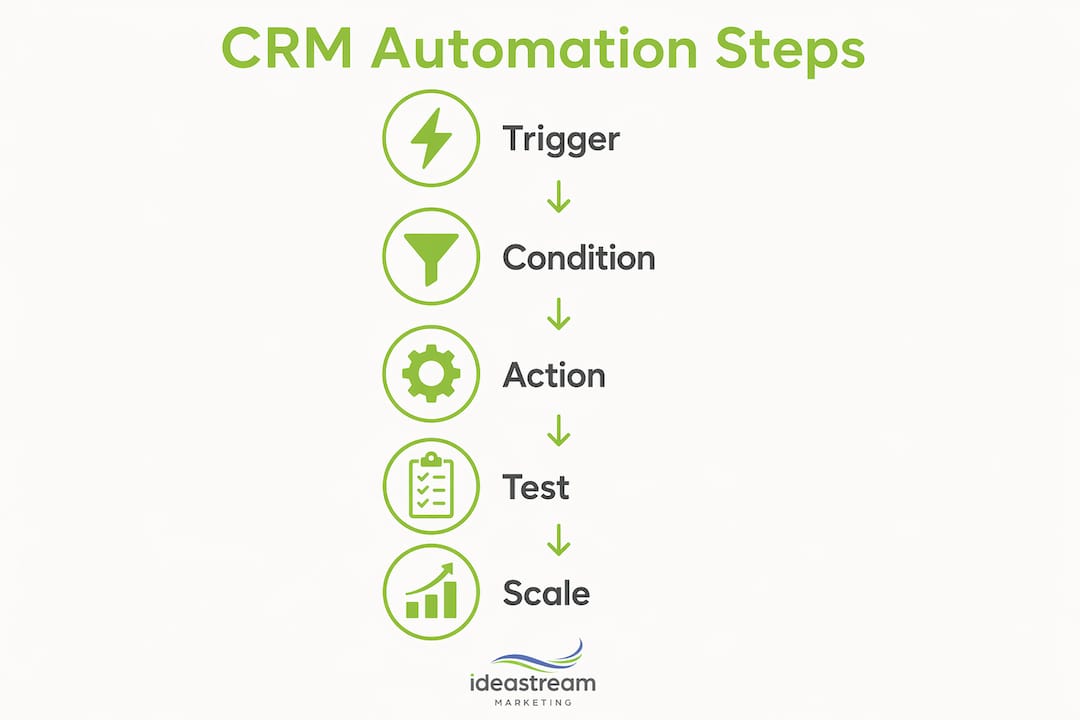
CRM workflow automation runs on three components: triggers, conditions, and actions. A trigger is the event that starts the workflow, such as a web form submission or a deal moving to a new stage. Conditions filter which records the workflow applies to. Actions are what the system does automatically, such as sending an email, assigning a task, or updating a field.
The most effective implementation approach for SMBs is phased. Start with a single high-volume workflow like lead follow-up, build a simple pipeline around it, and run the automation for 90 days before expanding. This reduces risk and gives you real performance data before you commit to more complex sequences.
A practical rollout looks like this:
- Week 1: Map your highest-volume repetitive task. Lead follow-up after a web form submission is the most common starting point for SMBs.
- Week 2: Build a simple pipeline with three to five stages and define the next action at each stage.
- Week 3: Build the automation sequence triggered by the web form. Set it to assign a rep, send an introductory email, and schedule a follow-up task.
- Days 30 to 90: Monitor open rates, response rates, and conversion at each stage. Iterate on email copy and timing before adding new automations.
Phased rollouts with testing reduce the blast radius of errors and keep your team aligned with what the automation is actually doing. The worst outcome is an automation running silently in the background doing the wrong thing for three months.
Pro Tip: Start with one measurable automation, run it for two weeks, and document what it does before you build the next one. Teams that automate everything at once rarely know which workflow is producing results and which is creating noise.
What are common CRM automation trigger pitfalls and how do you avoid them?
Trigger design is where most CRM automation projects quietly fail. 79% of CRM workflow performance problems trace back to trigger design decisions, particularly triggers that are too broad. This is the single most underestimated technical challenge in CRM automation for SMBs.
The three main trigger types are:
- Record-based triggers: Fire when a record is created or updated. The most common and the most abused.
- Time-based triggers: Fire after a set period, such as three days after a deal is created with no activity.
- Event-based triggers: Fire on a specific action, such as a contact clicking a link or submitting a form.
The most common mistake is setting a record-based trigger to fire on “any field update.” This causes the workflow to execute every time any field on a record changes, including system updates, which creates massive execution waste and slows your CRM to a crawl. Reducing trigger scope to a specific field change, such as “Deal Stage changes to Proposal Sent,” prevents this problem entirely.
Execution order matters just as much as trigger scope. When multiple workflows fire on the same record simultaneously, race conditions can produce inconsistent results. For example, a discount calculation must complete before a quota update fires, and both must complete before a notification goes out. Ordered trigger execution with defined priority levels, data modification first, calculations second, notifications third, prevents these conflicts.
Actions must also match their trigger context. Workflow actions set to run on an entry trigger are skipped if the server trigger context does not match, which means your automation appears to run but does nothing. This is one of the most frustrating silent failures in CRM systems.
Pro Tip: Before you build any workflow, document the trigger, the condition, and the expected action in a simple table. Share it with whoever manages your CRM. Catching mismatches on paper takes five minutes. Catching them in production takes five weeks.
How do you choose and scale the right CRM automation tools?
Native CRM automation built into platforms like HubSpot or Salesforce handles most SMB needs at the deal stage and contact enrollment level. But native automation hits its ceiling when you need workflows that span your CRM, your billing system, your ecommerce platform, and your support desk simultaneously. That is where integration platforms, called iPaaS tools, become necessary.
Here is how native CRM automation compares to integration platforms:
| Capability | Native CRM Automation | Integration Platform (e.g., Celigo) |
|---|---|---|
| Deal stage updates | Yes | Yes |
| Contact enrollment | Yes | Yes |
| Cross-system data sync | Limited | Full orchestration |
| ERP and billing triggers | Rarely | Yes |
| Governance and error handling | Basic | Advanced |
| Cost for SMBs | Included in CRM plan | Additional subscription |
For most SMBs starting out, native automation inside HubSpot or Salesforce is the right first move. It is lower cost, faster to configure, and sufficient for the first 12 to 18 months of automation maturity. Once your team is running three or more connected workflows and your CRM needs to talk to your accounting software or ecommerce platform, an integration layer becomes worth the investment.
When evaluating any automated CRM software, prioritize four criteria: ease of configuration without developer support, error logging that tells you when a workflow fails, scalability as your contact database grows, and governance controls that prevent unauthorized workflow changes. AI-driven marketing strategies are increasingly built on top of these automation foundations, so choosing a platform that supports future AI integrations is a smart long-term decision.
Measure success at 30, 60, and 90 days using three metrics: workflow execution rate, error rate, and the business outcome the automation was designed to improve, such as lead response time or deal stage conversion rate.
Key takeaways
CRM automation delivers its strongest returns when SMBs start with a single high-volume workflow, design triggers precisely, and scale only after measuring results from the initial sequence.
| Point | Details |
|---|---|
| Time savings are immediate | Automation returns 8 to 12 selling hours per rep weekly from day one. |
| Start with one workflow | Lead follow-up is the highest-impact first automation for most SMBs. |
| Trigger scope determines performance | Broad triggers cause 79% of CRM workflow failures; narrow them to specific field changes. |
| Native tools work first | HubSpot and Salesforce native automation covers most SMB needs for the first 12 to 18 months. |
| Measure before expanding | Run each automation for 30 to 90 days and validate results before adding new sequences. |
Why I think most SMBs automate in the wrong order
After working with growth-stage businesses on their digital systems, the pattern I see most often is this: a business owner gets excited about automation, buys a CRM, and immediately tries to build 12 workflows at once. Six months later, half of them are broken, nobody knows which ones are running, and the team has quietly gone back to using spreadsheets.
The businesses that get real results from CRM automation do the opposite. They pick one workflow, usually lead follow-up, and they obsess over it. They watch the data, fix the copy, adjust the timing, and only when that single sequence is producing consistent results do they build the next one. It sounds slow. It is actually faster, because you are not spending weeks debugging a system nobody understands.
The other thing I would push back on is the idea that more automation is always better. Some customer interactions should not be automated. A long-term client who just renewed a major contract deserves a personal call, not a triggered email. The best CRM automation strategies I have seen are deliberate about what they leave human. They use automation to handle volume and use people to handle relationships.
The future of this space is moving toward AI agents that can update CRM records, prioritize leads, and suggest next actions based on behavioral signals. That is genuinely exciting. But the businesses that will benefit most from those tools are the ones that already have clean data, defined pipelines, and a culture of actually using their CRM. Build that foundation first. The AI layer will be much more powerful when it has something real to work with.
For SMBs thinking about scaling their lead follow-up processes, the question is not which tool to buy. It is whether your pipeline is clean enough and your team is disciplined enough to let automation do its job.
— Dean
How Idea Stream Marketing helps SMBs turn automation into growth
At Idea Stream Marketing, we work with SMBs across Long Island and the United States to build the digital infrastructure that makes CRM automation worth the investment. Automation only produces results when your pipeline is fed with qualified leads, and that starts with search visibility.
Our AI SEO services are built to drive more of the right traffic into your CRM workflows, so your automated sequences are working with real prospects, not cold contacts. We connect organic search strategy directly to lead generation systems, giving your sales team a pipeline that fills itself. If you are ready to build a digital marketing system that works alongside your CRM, schedule a consultation with our team and we will show you exactly where to start.
FAQ
What is CRM automation?
CRM automation is the use of software to handle repetitive customer relationship management tasks automatically, including data entry, lead assignment, follow-up emails, and deal stage updates. It spans platforms like Salesforce and HubSpot and can extend across ERP, billing, and support systems through integration tools.
How many hours can CRM automation save per week?
Automated CRM data entry returns approximately 8 to 12 selling hours per rep per week by eliminating manual logging and administrative tasks. This translates to a 200 to 300% ROI for most SMB implementations.
What is the best first CRM automation to build?
The highest-impact starting point for most SMBs is an automated lead follow-up sequence triggered by a web form submission. Build a simple pipeline, run the automation for 90 days, and measure conversion rates before expanding to additional workflows.
Why do CRM automation workflows fail silently?
Most silent failures occur when automation actions do not match the trigger context, causing the system to skip actions without logging an error. Broad triggers that fire on any field update also cause execution waste that degrades CRM performance over time.
Do SMBs need an integration platform or is native CRM automation enough?
Native automation inside HubSpot or Salesforce is sufficient for most SMBs during the first 12 to 18 months. Integration platforms like Celigo become necessary when workflows need to span multiple systems, including ERP, billing, and ecommerce platforms simultaneously.

