



October 21, 2026




TL;DR:
- A digital marketing workflow is a step-by-step process that moves campaigns from idea to publication. It includes tasks, roles, triggers, timelines, and tools that ensure consistency and accountability. Building and maintaining well-documented workflows with clean data and regular reviews lead to more reliable marketing results.
A digital marketing workflow is a defined sequence of tasks, roles, and triggers that moves a marketing campaign from idea to published result. Without one, teams repeat work, miss deadlines, and lose track of who owns what. The right workflow system turns scattered effort into a repeatable process that produces consistent results. This digital marketing workflow guide covers every stage, from mapping your first workflow to selecting tools and avoiding the mistakes that derail most teams in 2026.
What are the essential components of a digital marketing workflow?
A digital marketing workflow has five core components: tasks, roles, triggers, timelines, and tools. Each component serves a specific function. Tasks define what gets done. Roles define who does it. Triggers define what starts the process. Timelines set the deadline for each step. Tools are the platforms that track and execute the work.
Common workflow types include:
- Content marketing workflow: Brief creation, writing, editing, SEO review, design, scheduling, and publishing
- Email marketing workflow: List segmentation, copy drafting, design, A/B test setup, send scheduling, and performance review
- Social media workflow: Content calendar planning, asset creation, copy approval, scheduling, and engagement monitoring
- Paid campaign workflow: Audience research, ad copy creation, creative production, campaign setup, launch, and optimization
One distinction matters more than most teams realize. Workflows define ownership and process structure. Automation executes the repetitive steps inside that structure. Automating a flawed workflow does not fix it. It accelerates the errors. Build the workflow correctly first, then layer in automation.
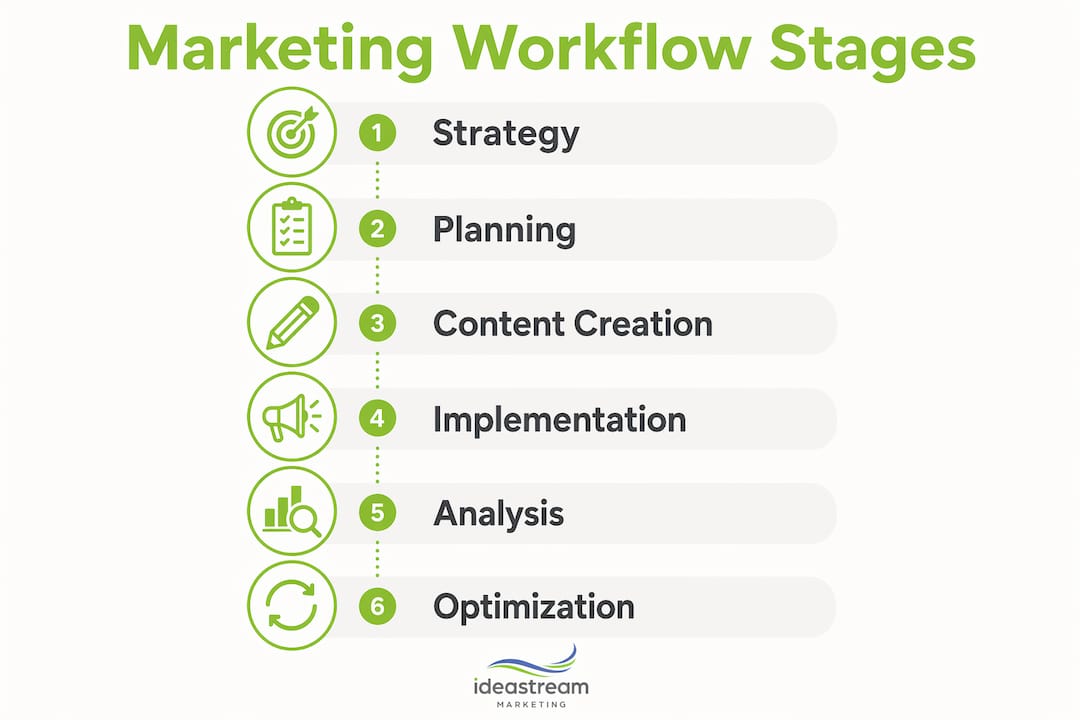
The digital marketing process also runs through six broader stages: strategy, planning, content creation, implementation, tracking, and optimization. Your individual workflows live inside these stages. A content creation workflow, for example, sits within the planning and content creation stages of your overall marketing process.

How do you design an effective digital marketing workflow step by step?
Building a workflow from scratch follows a clear sequence. Skipping steps creates gaps that show up later as missed handoffs or unclear ownership.
- Define your goal and trigger. Every workflow starts with a specific outcome and a starting condition. A welcome email workflow triggers when a new subscriber joins your list. A content workflow triggers when a new topic is approved. Without a defined trigger, the workflow never starts reliably.
- Map every task and handoff. Write out each task in order. Identify where one person’s work ends and another’s begins. These handoff points are where most workflows break down. A content workflow might hand off from writer to editor, then from editor to designer, then from designer to the publishing team.
- Assign roles and responsibilities. Each task needs one owner, not a team. Shared ownership creates confusion. Assign a primary owner and a backup for time-sensitive steps.
- Set timelines and service-level expectations. Define how long each task should take. A blog post draft might have a 48-hour turnaround. An approval step might have a 24-hour window. Mapped workflows reduce drop-off by 45% and increase repeat sales by 40% within six months. Clear timelines are the main reason.
- Integrate into your project management tool. Move the workflow from a document into a platform where tasks can be assigned, tracked, and updated in real time. Project management tools like Asana, Monday.com, or Trello work well for this step.
- Test the workflow before full deployment. Run one complete cycle manually before automating anything. Catch gaps, unclear instructions, and missing assets at this stage rather than after launch.
Pro Tip: Build your first workflow around a process your team already runs manually. You already know the steps. Documenting what you do today is faster than designing something new, and it gives you a real baseline to improve.
| Workflow stage | Key action | Common mistake |
|---|---|---|
| Goal and trigger | Define the starting condition clearly | Vague triggers that fire inconsistently |
| Task mapping | List every step, including approvals | Skipping handoff documentation |
| Role assignment | One owner per task | Assigning tasks to “the team” |
| Timeline setting | Set per-task deadlines, not just final deadlines | Only tracking the end date |
| Testing | Run one full manual cycle | Automating before testing manually |
What are the best practices and common pitfalls in workflow implementation?
Clean data is the foundation of every effective marketing workflow. 30% of automation failures trace back to poor data hygiene. That means duplicate contacts, inconsistent field naming, and disconnected platforms cause nearly one in three automation projects to fail. Audit your CRM and email list before building any automated workflow on top of them.
Start with high-impact, low-complexity workflows. Most marketing automation value comes from roughly seven core workflows, not dozens of complex sequences. Welcome email sequences, lead nurturing paths, and abandoned cart recovery deliver the most return for the effort invested. Adding complexity beyond that often dilutes results rather than improving them.
Best practices that experienced teams follow:
- Separate workflow design from automation setup. Design the process on paper or in a flowchart tool first. Automate only after the logic is confirmed.
- Build feedback loops into every workflow. Schedule a monthly review of each active workflow. Check open rates, completion rates, and task turnaround times.
- Use lead nurturing strategies to guide contacts through each stage rather than sending the same message to your entire list.
- Document every change. When you update a workflow, record what changed and why. This prevents teams from reverting to old versions.
- Integrate your CRM, email platform, and analytics tools. Disconnected platforms create data gaps that break automation logic.
“Optimization in digital marketing is continuous. Marketers who succeed start by mastering one or two channels and then expand. Trying to run every channel at once before any single workflow is proven leads to diluted effort and inconsistent results.”
Pro Tip: When a workflow underperforms, check the trigger first. Most failures start there. A trigger that fires too broadly or too narrowly sends the wrong message to the wrong person at the wrong time.
Which tools and technologies support digital marketing workflows in 2026?
The right tool depends on your workflow type and team size. Every effective marketing automation tool operates on the same four-part logic: trigger, condition, action, and timing. Understanding this framework makes any platform easier to configure. The trigger starts the sequence. The condition filters who qualifies. The action defines what happens. The timing controls when it fires.
| Tool category | Best for | Key features |
|---|---|---|
| Project management platforms | Task tracking and team coordination | Task assignment, deadlines, status views, integrations |
| Email marketing platforms | Automated email sequences and segmentation | Trigger-based sends, A/B testing, list management |
| CRM platforms | Contact tracking and sales pipeline management | Lead scoring, deal stages, activity logging |
| Social media schedulers | Content calendar and publishing automation | Bulk scheduling, analytics, approval workflows |
| Analytics platforms | Performance tracking and reporting | Conversion tracking, attribution, dashboard reporting |
CRM automation for SMBs connects contact data directly to your marketing workflows, so every trigger fires based on real behavior rather than guesswork. When a contact opens three emails in a row, a CRM-connected workflow can automatically move them to a higher-priority nurture sequence.
When evaluating tools, match the platform to your current workflow complexity. A small team running five workflows does not need an enterprise marketing platform. Start with a tool that covers your highest-volume workflow, then expand as your process matures. The marketing automation checklist for SMBs is a practical reference for evaluating which features matter at each stage of growth.
Key Takeaways
A well-built digital marketing workflow requires clean data, defined triggers, clear role ownership, and continuous optimization to produce consistent, measurable results.
| Point | Details |
|---|---|
| Define triggers clearly | Every workflow needs a specific starting condition to fire reliably and consistently. |
| Separate workflow from automation | Build and test the process manually before adding any automation layer. |
| Prioritize data hygiene | Poor data causes 30% of automation failures, so clean your CRM before building workflows. |
| Start with seven core workflows | Welcome sequences, lead nurturing, and cart recovery deliver the most value with the least complexity. |
| Review workflows monthly | Continuous optimization, not one-time setup, is what keeps workflows producing results. |
Why most workflow advice misses the real problem
Most guides on marketing workflows focus on tools. Pick the right platform, connect your integrations, and results will follow. That framing gets it backwards. The tool is the last decision, not the first.
The teams I’ve seen struggle most with workflow implementation are not using the wrong software. They are automating processes they have never actually documented. They know roughly how a campaign runs, but no one has ever written it down step by step. When you automate an undocumented process, you lock in the chaos.
The fix is almost embarrassingly simple. Sit down with your team and walk through one workflow from start to finish. Write every step on a whiteboard. Find the handoffs that no one owns. Find the approvals that happen informally over Slack. Find the tasks that only one person knows how to do. That exercise alone will surface more improvements than any tool switch.
Digital marketing success comes from mastering a few channels before expanding, and the same principle applies to workflows. Get one workflow running cleanly, measure it, and improve it. Then build the next one. Teams that try to automate everything at once end up with a complicated system no one trusts and everyone works around.
The other thing most guides skip: workflows need owners, not just documentation. Assign one person to maintain each workflow. That person reviews performance monthly, updates the steps when the process changes, and flags problems before they compound. Without a named owner, even a well-built workflow drifts out of alignment with how the team actually works.
— Dean
How Idea Stream Marketing supports your marketing workflow goals
Building effective workflows requires more than a checklist. It requires the right content, the right systems, and a team that understands how each piece connects to your broader marketing goals.

Idea Stream Marketing provides full-service digital marketing built around structured processes, from content creation and SEO to video production, social media management, and AI-powered automation. Every campaign we build follows a documented workflow designed to produce consistent, trackable results. Whether you need help mapping your first content workflow or scaling a full campaign system, our team works alongside you to build something that performs. Reach out to Idea Stream Marketing to start building a marketing process that works every time.
FAQ
What is a digital marketing workflow?
A digital marketing workflow is a documented sequence of tasks, roles, and triggers that guides a marketing activity from start to finish. It defines who does what, in what order, and by when.
How is a workflow different from marketing automation?
A workflow defines the process and assigns ownership. Automation executes the repetitive steps within that process. You need a working workflow before automation adds value.
How many workflows should a small business start with?
Start with one to three high-impact workflows such as a welcome email sequence, a lead nurturing path, or a content publishing process. Most automation value comes from roughly seven core workflows total.
Why do marketing automation workflows fail?
30% of automation failures result from poor data hygiene. Duplicate contacts, inconsistent field data, and disconnected platforms are the most common causes.
How often should you review and update your workflows?
Review each active workflow monthly. Check trigger accuracy, task completion rates, and output quality. Continuous optimization is what separates workflows that improve over time from ones that stagnate.

