



October 28, 2026



A good Google reviews strategy comes down to four habits: make leaving a review easy, ask every customer at the right moment, reply to every review, and stay inside Google’s and the FTC’s rules. Do those four things consistently and your profile builds trust and visibility without any shortcuts. Skip the rules and you risk losing the reviews you worked for.
Below, we walk through each habit step by step, with request templates, a simple weekly routine, and the numbers worth tracking. We work with Long Island and New York businesses every day, so we also show where video and short-form content can make the whole system work harder.
TL;DR
- Reviews are a prominence signal for local search and a trust signal for the people reading them, so treat them as an ongoing process, not a one-time push.
- Send every customer a direct review link or QR code right after a good moment, in a short, personal message.
- Never offer discounts, gifts or payment for reviews, and never ask only your happiest customers. Google and the FTC both draw hard lines here.
- Reply to positive and negative reviews alike, calmly and specifically, and flag anything that breaks Google’s policies.
- Track profile interactions (calls, direction requests, website clicks) alongside your rating and review count.
Table of Contents
- Why reviews deserve a strategy
- Step 1: Make it easy to leave a review
- Step 2: Ask at the right moment, in the right way
- Step 3: Stay inside the rules
- Step 4: Reply to every review
- A weekly routine that keeps the system running
- What to track
- How to use reviews beyond the profile
- Our perspective
- Where Idea Stream Marketing fits in
- FAQs
- Sources
Why reviews deserve a strategy
Google reviews work in two ways at once. They act as a prominence-based ranking factor that influences local search visibility, and they act as social proof for the person deciding between you and the next business on the map. Search Engine Land’s guide also notes that reviews can support E-E-A-T signals by showing that real people have direct experience with a business.
A strategy can realistically influence three things: how prospects perceive you, how many of them contact you after finding you, and how well you compete in the local pack. It cannot guarantee a ranking position, and it cannot fix a service problem. If customers are unhappy, reviews will say so, and that is useful information too.
For a law firm, a medical practice, a contractor or a restaurant, the review section is often the first thing a stranger reads. That is why we treat it as part of the same system as your website, your Google Business Profile and your video content, not as a separate chore.
Step 1: Make it easy to leave a review
Before you ask anyone, confirm the basics work.
- Claim and complete your profile. Customers can only review a verified, accurate listing. If yours is thin, start with our guide to Google Business Profile optimization for local businesses.
- Get your review link. Google’s own guidance says you can share a review link or QR code so customers go straight to the review form instead of hunting for your listing.
- Put the link where customers already are. Email signatures, invoices, receipts, text follow-ups, your website’s thank-you page and printed cards all work.
- Test it on a phone. Most reviews are written on mobile. If the link takes more than two taps to reach the star rating, shorten the path.
A customer needs a Google account to post, so keep your message simple and mention that it takes about a minute. The fewer steps between “sure, I’ll do that” and “posted,” the more reviews you collect.
Step 2: Ask at the right moment, in the right way
Timing
The best time to ask is right after a positive moment: a finished project, a resolved issue, a delivered order, a successful appointment. The experience is fresh and the customer is already feeling good about you. Retail and ecommerce businesses usually wait a few days so the product has arrived and been used. Service businesses can ask at a natural touchpoint such as project completion or a renewal.
Build the request into your workflow so it does not depend on anyone remembering. Add it to the final invoice, the closing checklist, or the follow-up automation in your CRM.

Personal beats generic
A request that names the specific job gets a better response than “Please review us.” Reference what you did, thank the customer by name, and let them write in their own words. Never hand them a script to post. Google expects reviews to reflect a genuine customer experience, and a pile of near-identical reviews looks suspicious to readers too.
Request templates you can adapt
Text message, after a service call
Hi Maria, thanks for having us out today. If you were happy with the work, would you share a quick review? It helps other Long Island homeowners find us. [link]
Email, after a project closes
Hi David, it was a pleasure working with you on the new office build-out. Your feedback helps us improve and helps other businesses decide who to hire. If you have a minute, you can leave a review here: [link]. Thank you.
In person, at the end of an appointment
If you had a good experience, we would really appreciate a Google review. Here is a card with a QR code. If something fell short, tell me now so I can fix it.
Notice that the last line invites problems to surface privately, but it does not discourage anyone from posting. More on that boundary next.
Step 3: Stay inside the rules
This is where well-meaning businesses get into trouble, so read it twice.
No incentives
Google’s policy prohibits offering free or discounted goods or services in exchange for posting, changing or removing a review. That covers the “10% off your next visit if you review us” idea, entry into a raffle, and gift cards.
The federal rule is just as direct. Under the FTC’s Consumer Reviews and Testimonials Rule, which took effect in 2024, businesses cannot offer compensation, discounts or free goods in exchange for reviews that express a particular sentiment, positive or negative. The same rule prohibits unfounded legal threats, physical threats and intimidation aimed at preventing or changing a review.
No cherry-picking, no suppression
Asking only the customers you are sure are delighted, while steering unhappy ones to a private form, is often called review gating. The safest practice is to ask everyone you serve on the same terms and to let the results fall where they may. The FTC also warns that organizing reviews in a way that makes negative ones hard for consumers to find could violate the FTC Act, which is a good reason to avoid any widget or display that hides the lower ratings.
What about the “20% rule”?
You may have seen a “Google 20% rule” mentioned in advice about reviews. We could not find it in Google’s review documentation, and the only rules we would build a process around are the ones Google and the FTC publish: no incentives, genuine experiences only, no suppression. Plan around those instead of a rule of thumb. If you want a realistic sense of volume, base it on your own data: divide the reviews you earn each month by the customers you serve, and aim to improve that ratio.
Do not buy or fake reviews
Purchased reviews, reviews written by employees or relatives, and reviews you write for yourself are all violations. They put your profile at risk and can expose you to FTC enforcement. Slow, honest growth always outlasts a spike you had to explain.
Step 4: Reply to every review
Responding is the part of a Google reviews strategy most businesses underuse. Google recommends replying to reviews to show engagement, keeping replies professional, polite, short and helpful. Google’s own best practices playbook cites a Soci consumer behavior finding that 65% of consumers are more likely to choose a business that actively responds to reviews.
Positive reviews
- Thank the reviewer by name.
- Mention one specific detail from their review, such as the technician, the dish or the result.
- Keep it to two or three sentences, and vary the wording so replies do not read like a template.
Negative reviews
Take a breath before you type. Then:
- Thank the reviewer for the feedback.
- Acknowledge the specific issue without arguing or blaming.
- State what you will do, or have done, to address it.
- Offer a direct contact (a phone number or email) to continue privately.
- Leave out private details. Never reveal anything about the customer’s account, case, treatment or purchase.
This last point matters most for medical practices, law firms and other professional services, where confirming that someone was even a client can create a privacy problem. Keep replies general and move the conversation offline. For healthcare in particular, check with your compliance lead or attorney on what your replies may say.
A calm, specific reply does two jobs. It tells the unhappy reviewer you listened, and it tells every future reader how you behave under pressure. Google notes that thoughtful replies can help rebuild trust and may lead some customers to update their reviews.
Fake or policy-violating reviews
If a review is spam, off-topic, from someone who never used your business, or otherwise breaks Google’s content policies, flag it through your Business Profile rather than arguing in public. A short, factual public reply can still help while the report is pending: state that you cannot find a record of the interaction and invite the person to contact you. Keep a log of what you flagged and when.
A weekly routine that keeps the system running
A strategy only works if someone owns it. Here is a routine most small teams can sustain in under an hour a week.
| Frequency | Task | Owner |
|---|---|---|
| Every customer | Send review link or QR code after a completed job | Front desk, technician or account manager |
| Daily | Check for new reviews and reply within one or two business days | Office manager or marketing lead |
| Weekly | Flag suspicious reviews and log patterns in complaints | Marketing lead |
| Monthly | Review volume, rating, interactions and common keywords in reviews | Owner or marketing manager |
| Quarterly | Update request wording, link placement and staff training | Owner |
If you manage several locations, standardize this routine and assign a named owner for each profile. Our approach to multi-location SEO covers how to keep that consistent as you grow.
What to track
Star rating and total reviews are the obvious numbers, but they are not the whole picture. Business Profile performance reports show interactions such as views, calls, messages, bookings, direction requests and website clicks. Watch those alongside your review numbers to see whether stronger reviews coincide with more people contacting you.
A practical monthly scorecard:
- Review volume: new reviews per month, and how that compares with the number of customers served.
- Recency: a steady trickle looks healthier to readers than a burst followed by months of silence.
- Average rating and rating mix: look at the spread, not just the average.
- Response rate and speed: the share of reviews you answered and how quickly.
- Themes: the words customers repeat, such as “on time,” “clear communication” or “clean.” Use them in your service pages and in how you train staff.
- Profile interactions: calls, direction requests and website clicks.
Correlation is not proof, so avoid claiming that reviews caused a specific jump in calls. Over a few quarters, though, the trend will tell you whether your process is paying off.
How to use reviews beyond the profile
Once you have a steady flow of honest reviews, put them to work.
- Feed your website. Quote real reviews on service pages, with the reviewer’s permission where you use a name. Our post on boosting your business rankings with customer reviews goes deeper on this.
- Turn the best ones into video. A written review is a lead for a customer testimonial video. Invite the reviewer to tell the story on camera in two minutes, and you have an asset for your site, YouTube and social channels.
- Cut short-form clips. A 30-second testimonial or a behind-the-scenes clip works as an Instagram Reel, Facebook Reel, TikTok video or YouTube Short. Ending the clip with a prompt to look you up on Google keeps the loop going.
- Repurpose podcast conversations. If you host a business podcast, pull client-story moments from recorded episodes into social clips. It is one recording session feeding many channels.
- Keep your data consistent. Reviews carry more weight when your name, address and phone number match everywhere. See our guide to local citation building.
A word of caution on testimonials: do not edit or script them to say something the customer did not say. The FTC’s rule covers fake and misleading testimonials as well.
Our perspective
Most of the businesses we meet treat reviews as a thing to fix when the rating dips. We see them as one of the few marketing assets your customers build for you, which means the job is to make it effortless for them and honest for you.
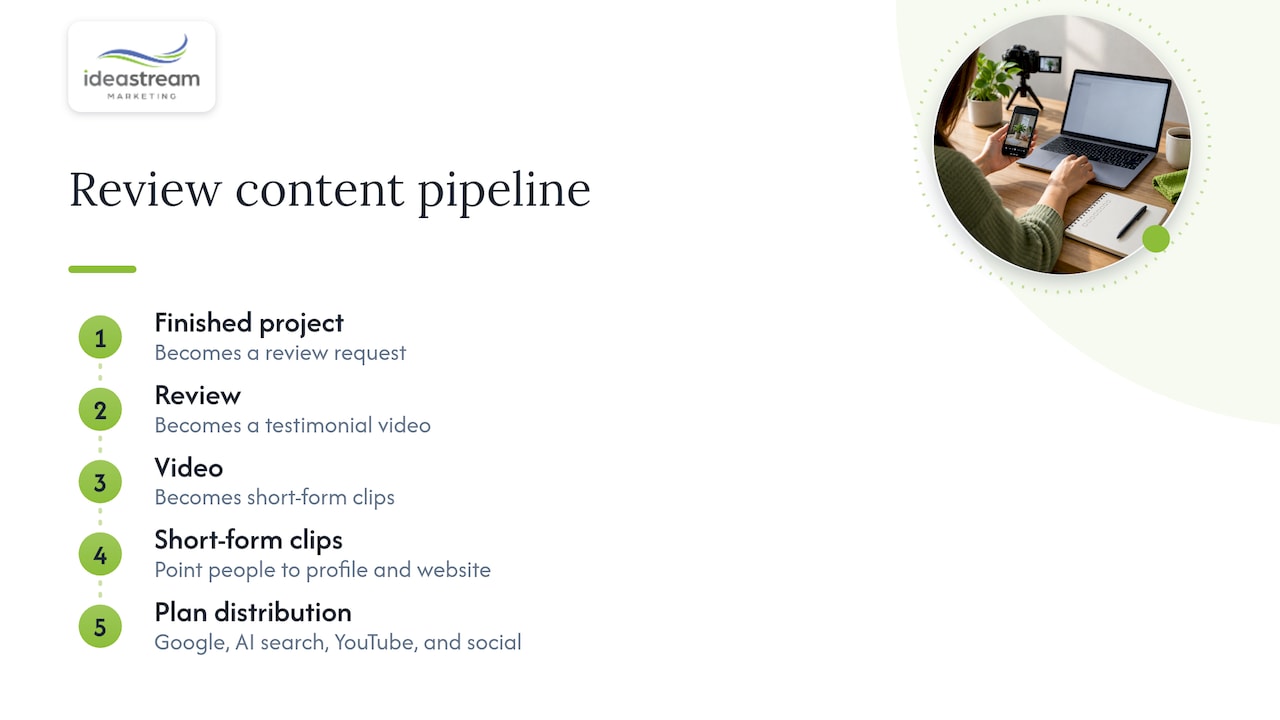
The pattern we see work is the same one we use for video and SEO: one system, many outputs. A finished project becomes a review request, a review becomes a testimonial video, the video becomes a handful of short-form clips, and those clips point people back to a profile and a website built to convert. Every piece is planned for discoverability in Google, AI search, YouTube and social platforms.
Our advice to owners is to start small and stay consistent. Pick one moment in your customer journey, add the review link there, reply to every review for ninety days, and look at what changes. Then add the video layer.
— Dean Spinato, CEO & Founder of Idea Stream Marketing
Where Idea Stream Marketing fits in
If you would rather not build this alone, we can help on both sides of the process: the marketing systems that bring in and manage reviews, and the video and podcast content that makes them work harder. We handle local SEO, Google Business Profile optimization, website design, professional video production, podcast production and short-form social video for businesses across Long Island and New York.

We can start with a review of your current profile and recommend what to fix first. Explore our services, learn more about our local SEO work on Long Island, or visit Idea Stream Marketing to SCHEDULE A CONSULTATION or a studio session.
FAQs
How do I ask customers for Google reviews without breaking the rules?
Ask every customer on the same terms, right after a good experience, with a direct link or QR code. Do not offer discounts, gifts or payment, and do not script what they should say. Google and the FTC both prohibit incentives in exchange for reviews.
Should I reply to every Google review?
Yes, where you can. Google recommends replying to reviews, and replies show future customers how you treat people. Keep them short, specific and professional, thank positive reviewers, and respond to negative reviews with a fix and a way to continue privately.
What should I do about a fake or unfair review?
Flag it through your Business Profile if it breaks Google’s content policies, and keep a record of the report. If it is a genuine but harsh customer opinion, it is not removable, so answer it calmly and factually. Never threaten the reviewer, because the FTC’s rule prohibits unfounded legal threats and intimidation over reviews.
How many reviews do I need?
There is no magic number. What matters more is a steady flow of recent, detailed, honest reviews compared with the competitors in your local results. Look at the businesses ranking around you, set a monthly target based on how many customers you serve, and track your progress.
Can I use short-form video to get more reviews?
Yes. A short Reel, TikTok or YouTube Short that shows a happy customer story or explains how to leave a review can remind people to act. Just make sure the video does not promise anything in return for a review.
Sources
- Tips to get more reviews, Google Business Profile Help
- The Consumer Reviews and Testimonials Rule: Questions and Answers, FTC
- Google Reviews & SEO: Advanced Strategies That Scale, Search Engine Land
- GBP Best Practices Playbook 2026, Google
- Understand your Business Profile performance and insights, Google

