



October 26, 2026


The fastest, highest-return way to turn one episode into a week of content is a transcript-first, AI-assisted clipping workflow. Export the transcript, mark seven to ten candidate moments, batch-edit them together, and export each in 9:16 with captions burned in. Aim for a few finished clips per episode before you touch a distribution calendar.
TL;DR:
- Creating three to five high-quality clips per episode, focused on insight, story, debate, how-to, or emotional moments, maximizes engagement and shareability.
- Using a transcript-first, AI-assisted workflow streamlines clipping, captioning, and exporting, saving time across multiple platforms and aspect ratios.
- Strong clip performance relies on metrics like completion rate, shares, and click-throughs, not just views, with regular analysis to refine future selection.
- Maintaining brand consistency and aligning clip content with audience expectations prevents attracting the wrong followers and diluting the show’s message.
- Professional post-production can improve quality and speed for high-volume or polished clip needs, especially when in-house capacity is limited.
Table of Contents
- Why Podcast Clips for Social Media Actually Drive Growth
- What Kind of Moments Make the Best Podcast Sound Bites
- The Transcript-First Clipping Workflow, Step by Step
- Editing and Captioning Rules That Keep Clips Watchable
- Platform Specs: Matching Clip Length to Each Feed
- Turning Clips Into Listeners and Leads
- When Professional Post-Production Makes Sense
- Legal Considerations for Sharing Podcast Clips
- Tracking Clip Performance to Improve the Next Batch
- Choosing Segments That Match Your Brand and Audience
- A Founder’s Take on Clip-First Production
- Let Idea Stream Marketing Handle Your Clip Production
- Sources
- FAQ
Why Podcast Clips for Social Media Actually Drive Growth
Clips are not just promotion. They’re the discovery engine for the whole show. Listeners rarely stumble onto a 45-minute episode cold. They find a 40-second clip first, and the clip has to earn the click to the full conversation.
One campaign example cited by ReachCat turned 30 short clips into more than 150,000 clip views, a reach multiplier that a feed of full-episode posts almost never touches. Video-first clips also beat static audiograms on TikTok, Instagram Reels, and YouTube Shorts, because those platforms are built for motion, faces, and captions, not waveforms.
Set expectations before you start cutting:
- Three to five strong clips per episode, not fifteen mediocre ones.
- Video clips outperform audio-only or waveform-style posts on nearly every short-form platform.
- Clips function as top-of-funnel content. The full episode is still the product; the clip is the invitation.
What Kind of Moments Make the Best Podcast Sound Bites
Not every good quote makes a good clip. The strongest podcast highlights for Instagram, TikTok, and LinkedIn fall into a handful of repeatable types, and Conbersa’s B2B distribution research breaks them down by how they perform.
- The insight or number-bomb. A sharp stat or a counterintuitive fact delivered in one clean sentence.
- The story. A mini narrative with a beginning, a turn, and a payoff, self-contained enough to land without setup.
- The debate. Two hosts or guests disagreeing, which almost always drives comments.
- The how-to. A specific, replicable tip. These tend to have the longest shelf life since they get saved and rewatched.
- The emotional moment. A pause, a laugh, a vulnerable admission. These generate shares more than any other type.
Scan the transcript for tells: strong opinion phrases (“Here’s what nobody tells you”), a stat dropped mid-sentence, a story that resolves within 60 to 90 seconds, or a visible emotional shift in tone. The rule that separates a real clip from a random cut: it has to make complete sense with zero episode context. If a viewer needs to know who the guest is or what came before, keep looking.
Pro Tip: Read the transcript, not the episode description, when hunting for clips. Guests often bury their best line in the middle of a rambling answer, and you will only catch it in text.
The Transcript-First Clipping Workflow, Step by Step
This is the process behind nearly every efficient clip pipeline, and it works whether you’re a solo host or running a two-person production team.
- Generate and clean the transcript. Export as SRT or VTT, fix obvious misspellings and names, and confirm speaker labels are correct before you touch the timeline.
- Mark candidates. Read straight through and flag seven to ten moments. AI clipping tools can surface suggestions automatically, but a manual pass still catches nuance the software misses, per Riverside’s clip production guide.
- Batch-edit with labels and captions. Set in and out points directly in the transcript editor rather than scrubbing the timeline, a method Transcriptr notes runs five to ten times faster than manual audio scrubbing.
- Export in every format you need, in one session. Vertical for TikTok and Reels, square for feed posts, horizontal for YouTube, done together instead of separately.
Divide the labor this way:
- Host: flags favorite moments right after recording, while context is fresh.
- Editor: owns captioning, color, and brand consistency across every clip.
- Automation or AI tools: handle first-pass moment detection and reframing, freeing the editor to focus on polish instead of grunt work.
Batching all four steps in one sitting, rather than clipping one episode at a time as it airs, is what separates a team publishing five clips a month from one publishing five a week.
Editing and Captioning Rules That Keep Clips Watchable
Most short podcast videos get watched with the sound off first. If the words aren’t legible in two seconds, the scroll wins.
- Use speaker-labeled captions for interviews and two-person conversations; a cleaner karaoke-style caption works better for single-speaker monologue clips, a distinction Transcriptr’s caption guidance flags as critical for comprehension.
- Keep captions high-contrast and placed in the lower third, clear of platform UI like the TikTok comment icon or the Reels caption bar.
- Frame faces centered and above the bottom third so nothing critical gets covered by on-screen buttons.
- Normalize loudness across every clip so viewers aren’t reaching for the volume dial between posts.
- End on a complete thought, never mid-sentence. A cut that lands on a cliffhanger without payoff reads as broken, not intriguing.
Before export, run a final pass: captions synced, speaker labels correct, audio levels even, first frame is a face not a slate. A transcript-first, AI-assisted approach to moment detection and captioning is now the dominant method behind most repeatable clip operations, according to Riverside, largely because it removes the guesswork from steps that used to eat hours per episode.
Platform Specs: Matching Clip Length to Each Feed
One well-cut clip can serve five platforms if you export it correctly the first time. Choppity’s platform guide recommends producing once in multiple aspect ratios rather than re-editing per channel.
- TikTok and Instagram Reels: 15 to 60 seconds, hook in the first second, vertical 9:16.
- YouTube Shorts: up to 60 seconds works best, though Shorts tolerates slightly longer explainer-style cuts than TikTok; vertical 9:16.
- LinkedIn: 60 to 90 seconds, positioned around insight or expertise rather than personality, square 1:1 or 9:16 both perform.
- X (formerly Twitter): shorter is safer, 30 to 45 seconds, horizontal 16:9 or square works fine.
- Export once, reuse everywhere: cut the master in 9:16, then generate 1:1 and 16:9 companions from the same edit instead of recutting.
Add a caption hook and a simple text overlay for the thumbnail frame, then space posts across the week instead of dropping all five clips on the same day.
Turning Clips Into Listeners and Leads
A clip that racks up views but never sends anyone to the full episode isn’t doing its job. Every post needs a path back to the show.
- Prioritize by objective. B2B shows aiming for leads should post to LinkedIn first; shows chasing broad discovery should lead with TikTok, Reels, and Shorts.
- Treat every clip as an invitation, not the finished product. Put a direct call to action in the caption and link to the full episode in your show notes or bio link.
- Layer in light paid amplification behind your two or three best-performing organic clips once you see which ones are already earning saves and shares, rather than boosting everything blindly.
- Hold to a cadence. Three to five clips per episode, spread across two to four weeks, avoids flooding one feed and cannibalizing your own reach, a pacing both Choppity and Conbersa recommend.
- Reuse assets. A clip that performed well in month one can resurface as a “throwback” post or get repackaged with a new caption angle later.
Tools built for planning a content calendar help here, since staggering clips across weeks requires actually tracking what’s scheduled where. For caption copy tailored per platform, a social post generator can speed up the version-per-channel work that eats time when you’re publishing five variations of the same clip.
When Professional Post-Production Makes Sense
Most creators hit a wall the same way: the clipping method works, but the volume of editing, captioning, and exporting outpaces what one person can do alongside recording and guest booking.
Professional post-production adds:
- Color grading and consistent branding across every clip, not just the hero cuts.
- Motion graphics and lower-third titles that make a clip look intentional, not thrown together.
- Multi-aspect exports handled in a single pass instead of re-editing per platform.
Idea Stream Marketing delivers podcast video editing with a 4 to 8 hour post-production turnaround, which matters most once weekly clip volume or polish expectations outgrow in-house editing capacity. If you’re producing one episode a week and need five to eight clips out the door fast, that’s the point where hiring a partner usually pays for itself in time saved.
Legal Considerations for Sharing Podcast Clips
Clipping your own podcast for your own social channels is generally straightforward: you own the recording, so you can cut and repost it however you want. The complications start the moment a guest, a piece of licensed music, or a third-party clip enters the frame.
Guest appearances typically fall under whatever release or consent language your podcast agreement already covers, but if you never signed anything explicit, it’s worth confirming in writing that guests are comfortable with their segments being clipped and distributed separately from the full episode. Some guests, particularly public figures or those under a competing brand’s media policy, may have restrictions on how their likeness gets used in promotional content.
Music is the more common trap. A song playing under your intro or as a transition, even for a few seconds, can trigger a copyright claim or takedown on TikTok, Instagram, or YouTube if you don’t hold a license for that specific use case. Platform audio libraries built for creators are the safer default for background music in clips, rather than commercial tracks.
If you’re clipping someone else’s podcast, whether for commentary, reaction, or a roundup, you’re on much shakier ground. Short excerpts used for genuine critique or commentary may qualify for fair use in the United States, but fair use is a legal defense you’d have to argue after the fact, not a guarantee, and it depends heavily on how much you use and why. When in doubt, get explicit permission from the show before republishing its content, and never assume a public podcast is public domain.
Tracking Clip Performance to Improve the Next Batch
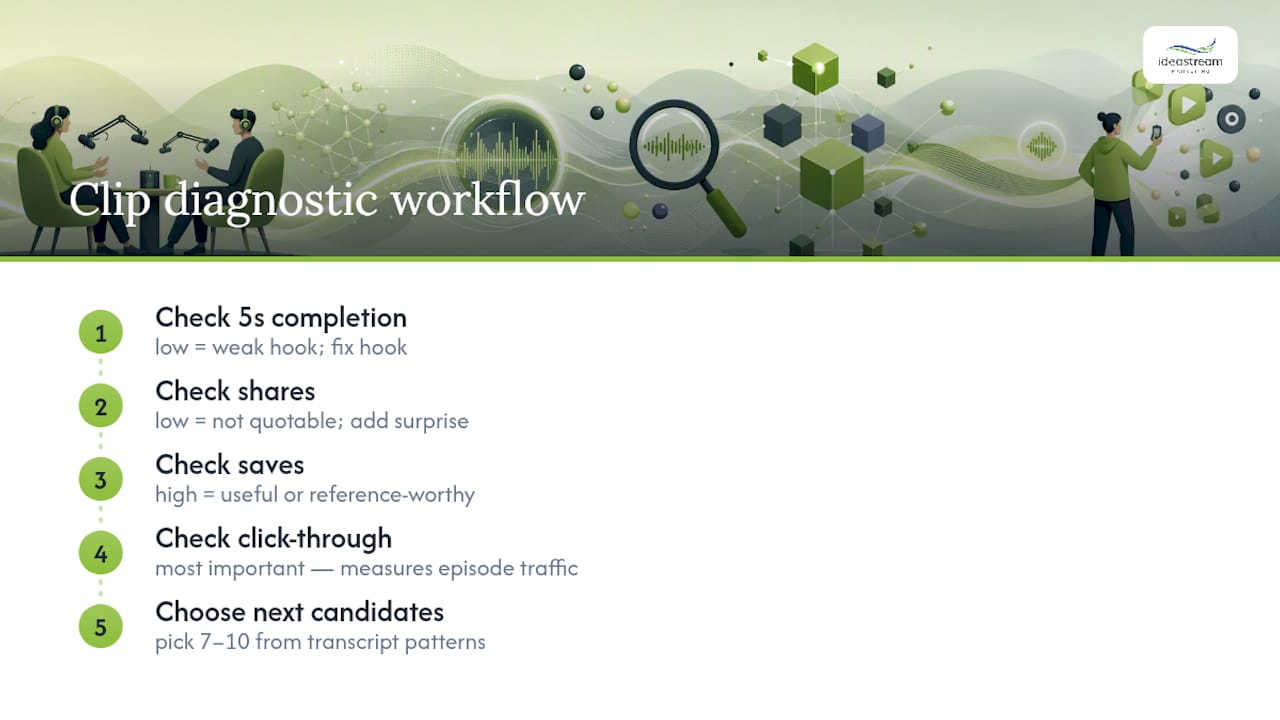
Views alone tell you almost nothing useful. The metrics that actually predict whether a clip is working are completion rate, saves, shares, and, most importantly, the click-through to your full episode or show notes link.
Watch completion rate first. A clip that loses most viewers in the first five seconds has a hook problem, not a content problem, no matter how good the moment is. If completion is strong but shares are flat, the content resonates but isn’t surprising or quotable enough to pass along. If saves are high, you’ve likely made something useful or reference-worthy, which tends to correlate with how-to and insight-style clips more than emotional ones.
Track performance by clip type, not just by platform. If your debate-style clips consistently outperform your story-style clips on LinkedIn but underperform on TikTok, that’s a signal about where to spend your editing time next, not just where to post. Compare clips against each other within the same episode rather than against clips from months ago, since platform algorithms shift and a fair comparison needs similar conditions.
Revisit your three to five best clips from the past month every few weeks and look for a pattern in the transcript, not just the metrics. Was it the phrasing, the topic, the guest, or the moment in the episode where it landed? That pattern is what should shape which seven to ten candidates you mark next time you sit down with a fresh transcript.
Choosing Segments That Match Your Brand and Audience
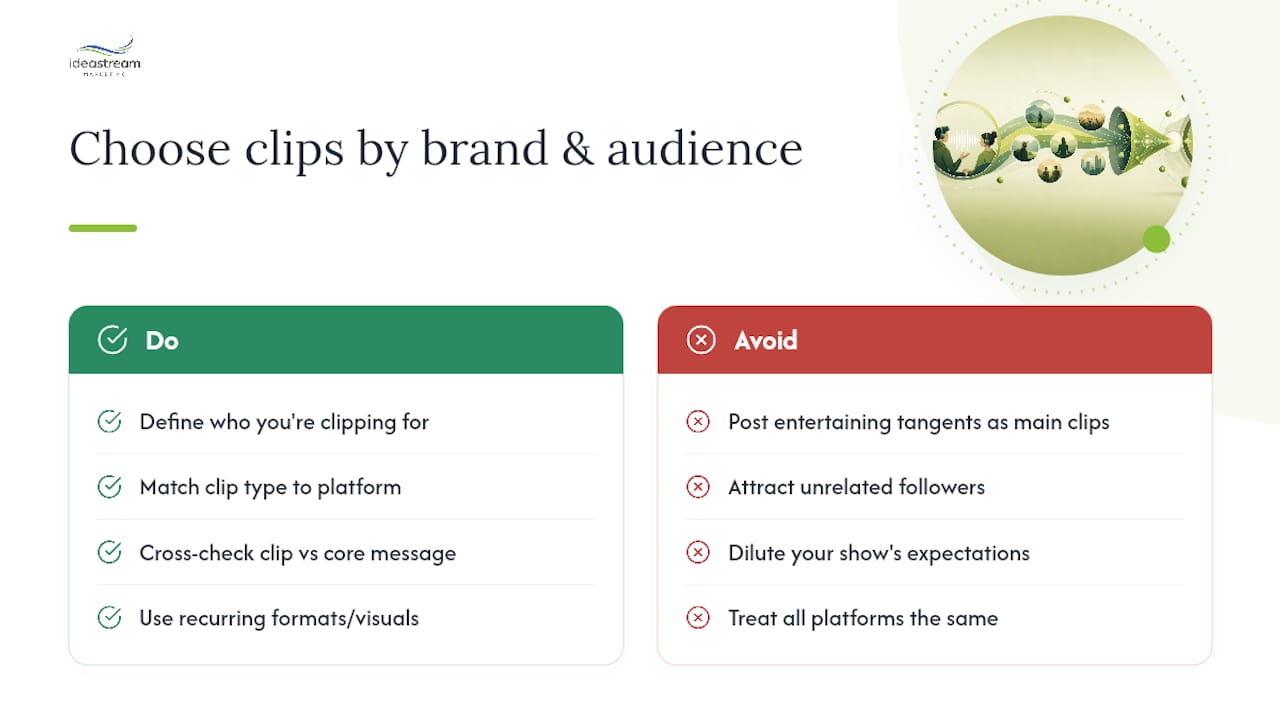
The best clip in isolation isn’t always the best clip for your show. A hilarious tangent might get views, but if it has nothing to do with what your audience actually came to your podcast for, it can attract the wrong followers or dilute what people expect from your brand.
Start by defining, even loosely, who you’re actually clipping for. A B2B founder audience on LinkedIn wants insight and credibility clips, the kind that make a listener think “this person knows what they’re talking about.” A general entertainment audience on TikTok responds more to story and emotional clips. If your show serves both audiences on different platforms, it’s reasonable to clip the same episode differently for each one, pulling the analytical moment for LinkedIn and the personal story for TikTok.
Cross-check every candidate clip against your show’s core message before cutting it. If your podcast is built around practical financial advice, a tangent about a host’s vacation, however charming, probably doesn’t belong in your clip queue even if it’s entertaining. Save it for a behind-the-scenes post instead, if it fits anywhere at all.
Recurring guests and formats also help build brand recognition across your clips. If viewers start to recognize your show’s visual style, whether that’s a consistent caption font, a signature intro graphic, or a familiar host framing, they’re more likely to associate a random clip they see on their feed with your podcast specifically, rather than just enjoying it and scrolling past without remembering the source.
A Founder’s Take on Clip-First Production
Plan for clips before you hit record, not after. Shows that discuss talking points in advance generate cleaner, more self-contained moments and cut editing time significantly. The recurring mistakes I see are inconsistent captions between episodes and clients forgetting to request multiple aspect ratios until after the edit is finished. My fix on every client podcast: build the vertical export first, then generate square and horizontal from that same file.
Let Idea Stream Marketing Handle Your Clip Production
Idea Stream Marketing is the alternative to piecing together your own clipping workflow from software subscriptions and trial and error. Instead of learning captioning tools, reframing settings, and export formats one platform at a time, you hand off the transcript and get back branded, caption-ready clips built for TikTok, Reels, Shorts, and LinkedIn in a single turnaround window.
A studio and post-production team can build clip-first podcasts from the recording stage forward, so the best moments are already flagged before editing even starts. That can include video production support for paid amplification once you know which clips are earning shares organically, and a distribution approach that treats every clip as a lead-generation asset, not just a view counter. If your show is generating episodes faster than you can turn them into social content, schedule a consultation with Idea Stream Marketing and get a clip production plan built around your recording schedule, your platforms, and your growth goals.
Sources
- How to Make Viral Podcast Clips for Social Media (Step-by-Step, 2026) | Transcriptr
- Podcast Marketing Strategy for Brands in 2026: How to Turn Episodes Into Growth Engines – ReachCat
- How to Make Shareable Podcast Clips for Social Media in 2026 | Riverside
- Podcast Clips for Social Media: Complete Guide for 2026 – Choppity
FAQ
What Makes a Good Social Media Post for a Podcast?
The strongest posts pair a self-contained 30 to 60 second clip with a caption that states the takeaway in one line and links to the full episode, rather than relying on the clip alone to explain itself.
How Can I Create Podcast Clips Quickly?
Export the transcript, mark seven to ten strong moments in the text, set in and out points using the transcript editor rather than the audio timeline, then batch-export in vertical, square, and horizontal formats in one session.
Is It a Copyright Issue to Clip a Podcast?
Clipping your own show is generally fine since you own the recording, but background music without a license and clipping someone else’s podcast without permission both carry real copyright risk.
What Are the Top Podcasts Right Now?
Rankings shift constantly by platform and category, so check Apple Podcasts or Spotify’s own charts for current top shows rather than relying on a fixed list, since any specific ranking goes stale within weeks.

