



October 26, 2026




Use the native Google Ads tag, deployed through Google Tag Manager, as your primary biddable conversion source, and treat GA4 imports as a secondary reporting layer only. Turn on Enhanced Conversions and Consent Mode v2 immediately, since browser restrictions and consent gaps quietly erode signal every month you skip them. Audit the setup monthly with Tag Assistant and Google Ads Diagnostics. Everything else in conversion tracking for ads is a variation on that core structure.
TL;DR:
- Using the native Google Ads tag through Google Tag Manager is the best practice for primary conversion tracking, while GA4 imports should be kept secondary for reporting purposes.
- Ensure only high-value actions are counted as primary conversions to prevent low-value signals from skewing Smart Bidding performance.
- Regularly audit for duplicate conversions, GCLID capture issues, and correct setup of Enhanced Conversions to maintain signal integrity.
- Implement offline conversions with GCLID capture if your sales cycle involves long delays between ad click and sale, especially for B2B or service businesses.
- Prioritize fixing duplicate primary conversions first, as they cause the most significant distortions in bidding and campaign performance.
Table of Contents
- What Is Google Ads Conversion Tracking, and Why the Setup Order Matters
- Quick Checklist: What to Confirm Before You Touch Anything
- How Do I Set Up Conversion Tracking: Google Tag, GTM, or GA4 Import?
- Fixing Duplicate Conversions Before They Wreck Smart Bidding
- Enhanced Conversions and Server-Side Tagging: Recovering Lost Signal
- How to Capture and Upload Offline Conversions Using GCLID
- Testing and Auditing: The Monthly Checklist That Actually Works
- Attribution Models and Conversion Windows: Getting the Math Right
- Consent Mode and Modeled Conversions: What to Trust
- An Agency View: What Conversion Audits Usually Uncover
- What I’d Prioritize First
- Get a Conversion Tracking Audit From Idea Stream Marketing
- Sources
- FAQ
What Is Google Ads Conversion Tracking, and Why the Setup Order Matters
Conversion tracking measures the actions that matter after someone clicks your ad: a purchase, a form fill, a phone call, a booked appointment. Google Ads uses that data to train Smart Bidding, so the accuracy of what you feed it determines how well your campaigns actually perform. Get the primary signal wrong and Smart Bidding optimizes toward the wrong outcome, sometimes for months before anyone notices.
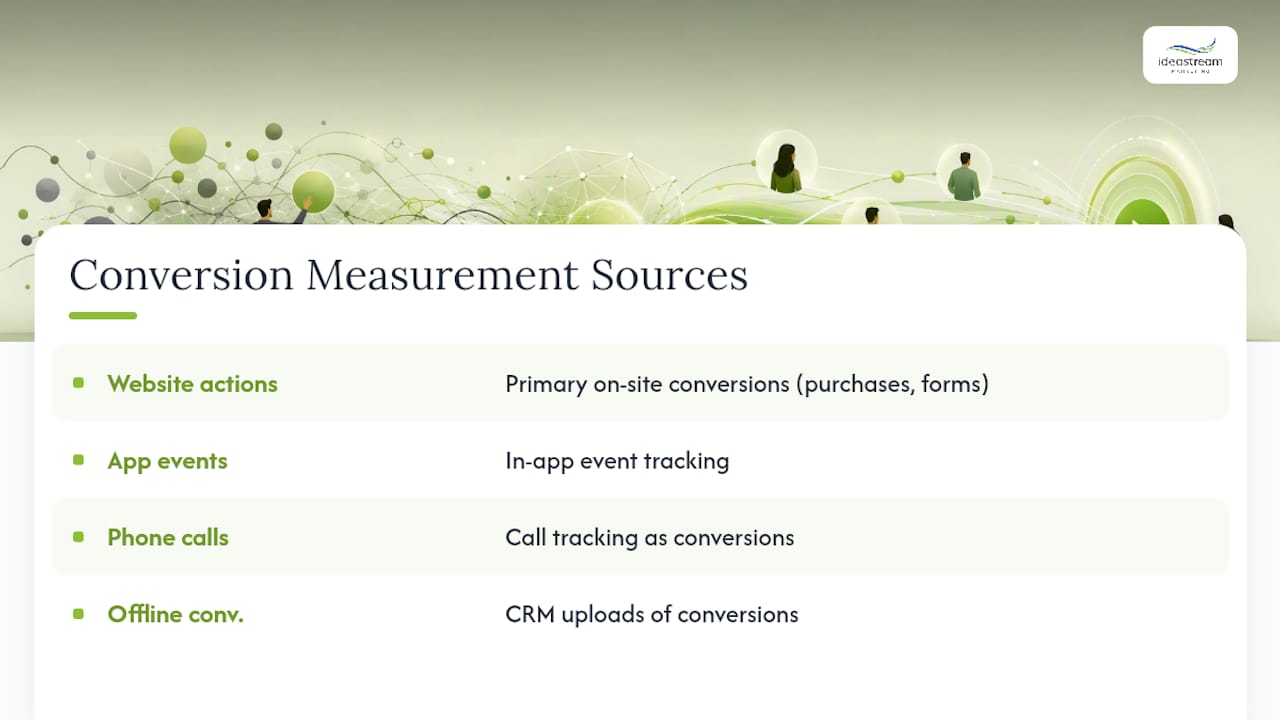
The standard industry term for this discipline is “conversion measurement,” and it covers four data sources: website actions, app events, phone calls, and offline conversions uploaded from a CRM. Google’s own guidance is direct on this point: primary conversions feed Smart Bidding, and configuring low-value micro-conversions as primary can degrade bidding quality across the entire account. That single misstep is behind more underperforming campaigns than any bidding strategy or budget issue we see at Idea Stream Marketing.
Quick Checklist: What to Confirm Before You Touch Anything
Before you build a single tag, confirm these basics. Skipping this step is the fastest way to end up rebuilding your tracking setup in three months.
- Choose one to three primary conversions that reflect real revenue outcomes, not clicks or page views.
- Confirm you have admin access to Google Ads and, if used, a linked GA4 property.
- Install a sitewide Google tag or GTM container, plus the Conversion Linker tag.
- Decide now whether you’ll need offline conversion imports, since that requires GCLID capture on every lead form.
- Turn on auto-tagging in your Google Ads account settings, since it’s what generates the GCLID parameter in the first place.
Pro Tip: Auto-tagging is on by default for most accounts, but agencies inheriting an account from a previous manager should verify it manually. A disabled GCLID parameter silently breaks offline conversion imports with no error message.
How Do I Set Up Conversion Tracking: Google Tag, GTM, or GA4 Import?
You have three implementation paths, and picking the right one depends on how your site is built and who maintains it.
Use the Google tag (gtag.js) when you manage a small site directly in code and want the simplest setup. Use Google Tag Manager when multiple tools need tags on the same pages, since it centralizes tag governance without touching code again. Use GA4 import only for reporting context, never as your primary bidding signal, because it introduces a second data pipeline that frequently overlaps with the native tag.
Here’s the sequence for a GTM-based setup, the path most SMBs should follow:
- In Google Ads, go to Goals and create a new Website conversion action; name it clearly (e.g., “Contact Form Submit,” not “Conversion 1”).
- Copy the conversion ID and conversion label from the tag setup screen.
- In GTM, install the Conversion Linker tag first, firing on all pages, so the GCLID persists across sessions.
- Add a Google Ads Conversion Tracking tag, paste in the ID and label, and set the trigger to the thank-you page URL or a custom event (form submission, phone click, checkout complete).
- For dynamic values like order total, map the transaction data into a GTM variable rather than hardcoding a flat number.
Google documents this exact flow, including event snippets and cross-domain linker setup for sites that route through a separate checkout domain. Follow their naming conventions early. A messy list of “Conversion 1,” “Conversion 2 copy,” and “test tag” is the single most common thing our audits have to clean up before we can even assess bidding performance.
Fixing Duplicate Conversions Before They Wreck Smart Bidding
Primary conversions should be limited to high-value outcomes, since Smart Bidding treats every primary signal as equally worth optimizing toward. A newsletter signup marked primary alongside a completed purchase will pull your bidding toward cheap, low-value clicks.
Double-counting happens in two predictable ways: GA4 imports a key event as primary while the native Google Ads tag records the same conversion, or a pixel fires on a redirect page and again on the final destination page. Analytics Mania’s breakdown of GTM-based tracking points to a single fix: designate one source of truth for bidding and demote the other to secondary status.
- Assign a unique
transaction_idorevent_idto every conversion so duplicate fires get collapsed instead of double-counted. - Set GA4 imported events to secondary if a native Google Ads tag already tracks the same action.
- Check the Conversions list monthly and cross-reference against Diagnostics for overlapping tags on the same page.
Enhanced Conversions and Server-Side Tagging: Recovering Lost Signal
Enhanced Conversions match ad clicks to conversions using hashed first-party data, like email or phone number, which recovers signal that cookie restrictions and ad blockers would otherwise erase. Google’s own data indicates Enhanced Conversions deliver partial recovery of lost conversions, and that recovery improves further when paired with Consent Mode v2.
Implement Enhanced Conversions through GTM, gtag directly, or a server-side container, depending on your existing stack. Server-side GTM (sGTM) is worth the added complexity mainly for accounts with heavy ad spend or severe browser blocking, where the accuracy gain outweighs the setup and hosting cost.
- Confirm your consent management platform sends both
ad_storageandad_user_datasignals correctly under Consent Mode v2. - Validate hashed data fields (email, phone, address) are populating in Tag Assistant before assuming the setup works.
- Check the Enhanced Conversions status column in Google Ads for a “Recording conversions” confirmation, not just “Active.”
Pro Tip: If your Enhanced Conversions status shows “Active” but never flips to “Recording conversions” after a week of traffic, the hashing step is likely failing silently. Check the network request in Tag Assistant before assuming the tag itself is broken.
How to Capture and Upload Offline Conversions Using GCLID
Offline conversion tracking matters most for businesses where the ad click and the actual sale happen weeks apart, like law firms, home services, or B2B sales cycles. The mechanism runs on a single value: the GCLID.
- Capture the GCLID URL parameter in a hidden form field on every lead form, and store it alongside the lead record in your CRM.
- When a lead closes, upload the conversion through Google Ads’ Conversions > Uploads tool, using a manual CSV, or connect your CRM through an API integration for automatic syncing.
- Respect the upload window: GCLID-based offline conversions must be uploaded within 90 days of the original ad click, so B2B sales cycles running longer than that will lose the ability to credit the original click.
- Upload closed-won revenue data specifically, not just “lead created,” since that closed-loop data is what materially improves Smart Bidding for lead-generation accounts.
Ecommerce businesses rarely need this workflow since the purchase happens in one session. B2B and service businesses depend on it entirely.
Testing and Auditing: The Monthly Checklist That Actually Works
Use GTM Preview mode, the Tag Assistant Companion extension, and Google Ads Diagnostics together to confirm each tag fires exactly once per conversion event, not zero times and not twice.
Site changes and CMS updates break data layers more often than any other cause of silent tracking failure, which is exactly why a monthly audit cadence beats a “set it and forget it” approach.
- Check that each conversion action fires from exactly one tag source.
- Review the “Last conversion recorded” timestamp on each action; a stale date means something broke.
- Compare Google Ads reported conversions against your CRM or ecommerce platform totals; a gap within 10% after normalizing for time zones and attribution windows is normal, a wider gap is not.
- Recheck duplicate detection, Enhanced Conversions status, and conversion window settings every cycle.
Attribution Models and Conversion Windows: Getting the Math Right
Data-Driven Attribution should be your default model wherever Google Ads makes it eligible, since it distributes credit based on actual conversion path data rather than a fixed rule. Under low conversion volume, the account falls back to last-click, and that’s expected behavior, not a bug to fight.
Conversion windows need to match how your customers actually buy. A 7-day window suits impulse ecommerce purchases. A 30 to 90-day window fits considered purchases and most B2B sales cycles. Set the window too short for a business with a long sales cycle, and Smart Bidding never sees the conversions it needs to learn from, which quietly starves your best-performing keywords of budget.
- Check attribution eligibility under Settings > Attribution in Google Ads; the interface will flag if your account lacks sufficient data for Data-Driven Attribution.
- Match your conversion window to your actual average sales cycle length, not a default setting nobody reviewed.
Consent Mode and Modeled Conversions: What to Trust
Consent Mode v2 changes tag behavior based on two signals: ad_storage and ad_user_data. When a visitor denies consent, Google Ads doesn’t just drop the data. It builds modeled conversions using aggregated, privacy-safe patterns from consented users to estimate what likely happened.
Design your tagging so it falls back gracefully to modeled data when consent is denied, rather than recording nothing at all. Treat modeled conversions as directionally useful for trend analysis, but weight actual, non-modeled conversions more heavily when making concrete bidding or budget decisions.
An Agency View: What Conversion Audits Usually Uncover
Idea Stream Marketing runs conversion tracking audits as a standard part of Google Ads management for clients across Long Island and beyond, and the pattern repeats: duplicate primary conversions inflating perceived cost per lead, GCLID capture missing on one form out of five, or Enhanced Conversions sitting “Active” but never actually recording. Correcting those signal issues typically changes how Smart Bidding allocates budget within a few weeks. We pair that tracking work with conversion-focused video landing pages, since better creative and cleaner data compound each other.
What I’d Prioritize First
If you only fix one thing this quarter, fix duplicate primary conversions. That single error skews bidding faster than any budget or keyword mistake I’ve seen. Audit monthly, and split ownership across a developer for tag deployment, an analyst for the numbers, and an agency when server-side tagging or CRM integration gets involved. Call in outside help the moment your GCLID pipeline touches a CRM you don’t control internally.
Get a Conversion Tracking Audit From Idea Stream Marketing
Most agencies hand you a tracking setup once and move on. Idea Stream Marketing treats conversion tracking as an ongoing discipline tied directly to the Google Ads management we run for clients across Long Island and nationwide, which means someone is actually watching for the duplicate conversions and broken GCLID pipelines that quietly cost you money between quarterly reviews.
Our team builds out GTM and gtag implementations, sets up GCLID capture pipelines tied to your CRM, and recommends server-side tagging when the spend justifies it. We also pair that technical work with video-driven landing pages built to convert the traffic your ads are already earning, so the fix isn’t just cleaner data, it’s better performance on both ends of the funnel. If your last conversion tracking review happened more than a few months ago, schedule a consultation with Idea Stream Marketing and get a straight answer on what your Smart Bidding is actually optimizing toward.
FAQ
How do I track conversions in Google Ads?
Create a conversion action under Goals in Google Ads, then deploy the Google tag or GTM container with a Conversion Linker tag to capture the GCLID and fire the conversion event on the appropriate trigger.
How do I change conversion tracking settings in Google Ads?
Open the Conversions section under Goals, select the conversion action, and edit its count setting, attribution model, or conversion window without needing to redeploy any tags on your site.
When should I use conversion tracking?
Set up conversion tracking before launching any campaign, since Smart Bidding needs conversion data from day one to learn which clicks are worth pursuing.
How many types of conversion tracking are there in Google Ads?
Google Ads tracks four main conversion data sources: website actions, app events, phone call conversions, and offline conversions uploaded from a CRM using GCLID matching.
What’s the difference between primary and secondary conversions?
Primary conversions actively feed Smart Bidding and should be limited to high-value outcomes like purchases or qualified leads, while secondary conversions are tracked for reporting but don’t influence bidding decisions.

