



October 26, 2026

Start with a short, story-arc question set matched to your final clip length, and send 2 to 3 of those prompts to the customer before you ever hit record. That single habit, used correctly by production guides across the industry, solves most of the awkward, rambling footage marketers end up scrapping. The rest of this piece gives you copy-paste question sets by format, a full narrative-arc question bank, and the outreach and editing steps that turn a 15-minute interview into usable marketing footage.
TL;DR:
- Asking only 2 questions for social clips ensures punchy sound bites that highlight the most compelling results in under 20 seconds.
- Structuring longer testimonials around a five-act story arc with specific prompts for each act results in more engaging and convincing videos.
- Providing only 2 to 3 questions during outreach helps preserve natural answers and reduces the risk of canned responses from customers.
- Recording remote sessions with proper lighting, framing, and a short warm-up significantly improves footage quality and authenticity.
- Editing should follow the story arc, using quick cuts and visual proof to create tight, credible testimonials that hold viewer attention within 90 seconds.
Table of Contents
- Testimonial Video Questions by Format and Placement
- The Story-Arc Question Bank: Hook, Problem, Solution, Results, Recommendation
- How Many Questions to Ask and What Length Answers to Target
- How to Ask for a Video Testimonial Without Losing the Customer
- Setting Up a Remote Recording Session That Actually Works
- Editing a Testimonial Down to 60 to 90 Seconds
- Getting More From a Single Testimonial Session
- A Producer’s Take on What Actually Makes Footage Usable
- Let Idea Stream Marketing Handle Your Next Testimonial Shoot
- Sources
- FAQ
Testimonial Video Questions by Format and Placement
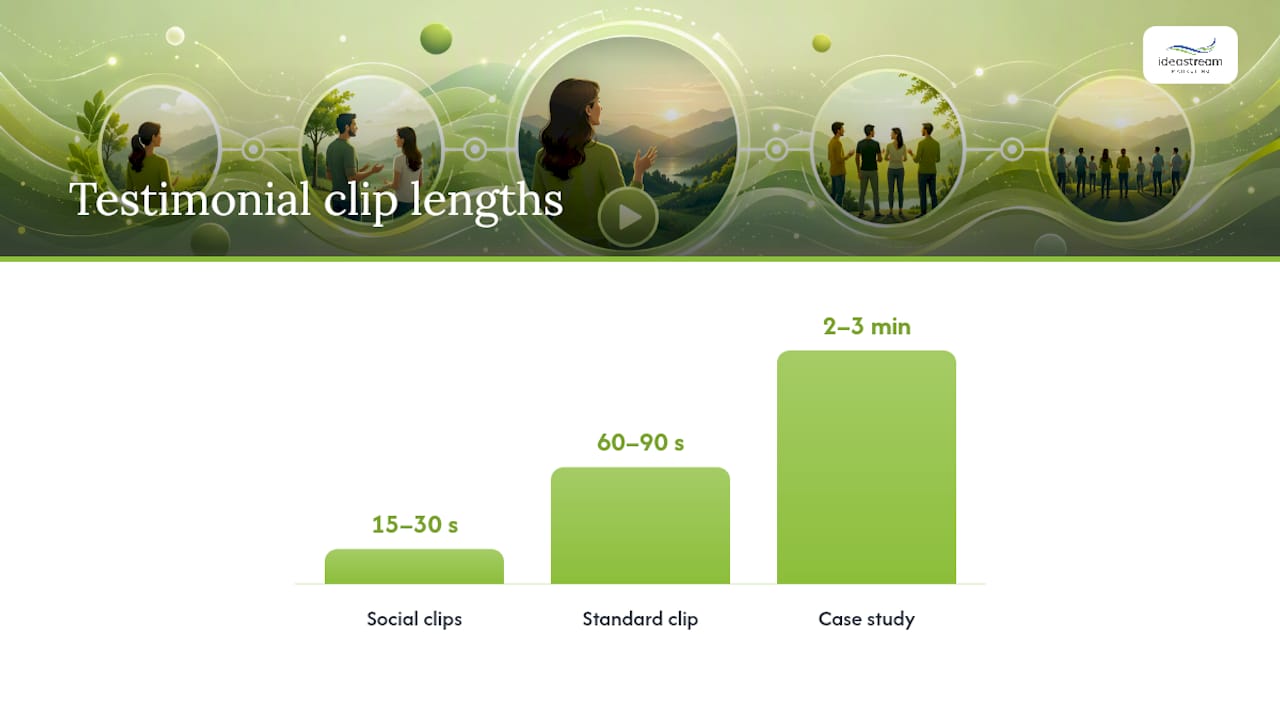
The questions you ask should depend entirely on where the clip will live. A 15-second Instagram Reel needs a different interview than a 2-minute case study video embedded on a landing page, and asking the wrong depth of question for the format wastes everyone’s time.
Social clips (15 to 30 seconds). These run on Instagram Reels, TikTok, Facebook Reels, and YouTube Shorts, so they need to hit hard and fast. Two questions is plenty:
- “In one sentence, what almost stopped you from buying or signing up?”
- “What’s the single biggest result you’ve seen since working with us?”
Both are built to produce a sound bite, not a story. You are not trying to capture nuance here. You are hunting for one quotable line that can headline a caption or open a paid ad.
Standard testimonials (60 to 90 seconds). This is the workhorse format for homepages, YouTube, and email campaigns, and it maps directly onto the story arc that performs best on landing pages. Four to five questions, asked in this order, tend to produce the cleanest edit:
- What was going on in your business before you found us?
- What almost stopped you from moving forward?
- Walk me through what changed after you started working with us.
- What result are you most proud of, and can you put a number on it?
- What would you tell someone on the fence about working with us?
Case study videos (2 to 3 minutes). These live on dedicated case study pages or in sales decks, where the audience has already opted into more depth. Five to six questions works here, with room for a follow-up like “Can you give me a specific example of that?” whenever an answer stays vague. The extra length means you can afford one or two questions purely about process, something the shorter formats can’t accommodate.
Match the format to the placement before you write a single question. A product page wants a tight 60-second clip focused on results. A YouTube channel can support a longer case study. An ad campaign almost always wants the 15-second hook clip cut down even further, because video testimonials reportedly lift conversion by as much as 80 percent in some marketing guides, and that lift depends on people actually watching to the end.
The Story-Arc Question Bank: Hook, Problem, Solution, Results, Recommendation
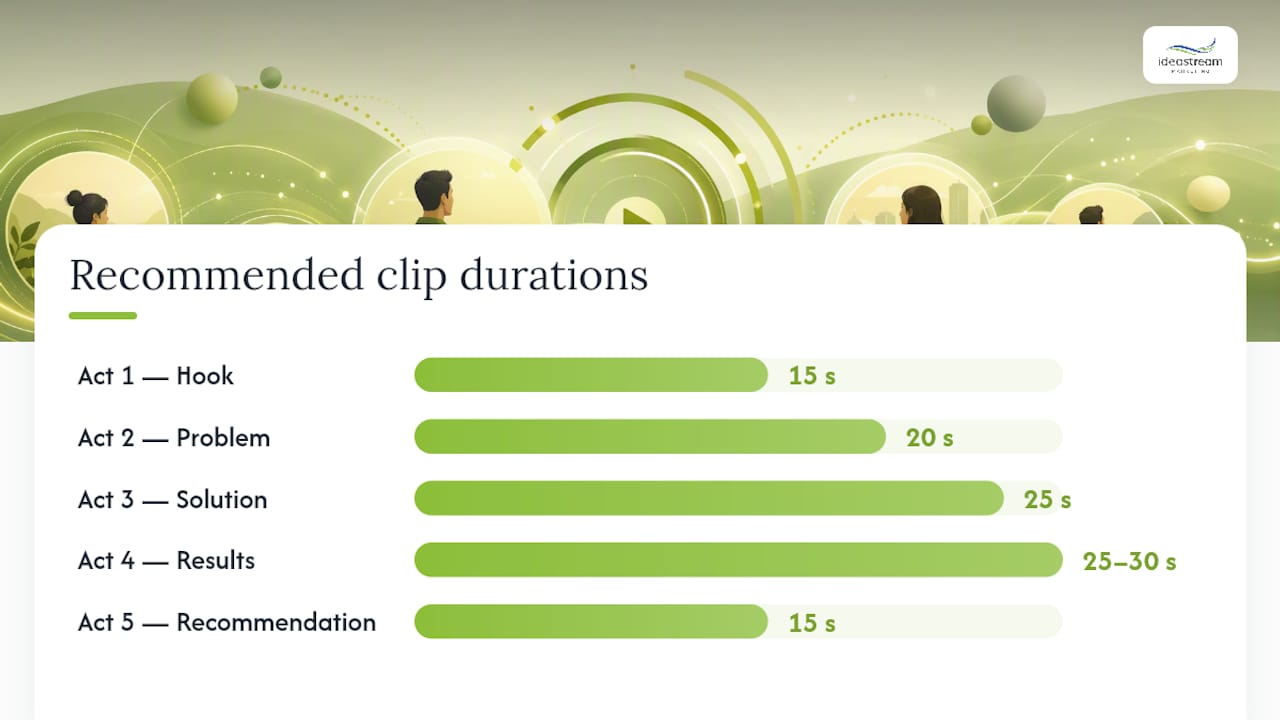
Every testimonial that keeps viewers watching follows a five-act shape: hook, problem, solution, results, recommendation. Structuring your interview prompts around this arc is what separates a testimonial that feels like marketing copy from one that feels like a friend’s recommendation, and it’s the same structure production guides point to when they say edited testimonials of 60 to 90 seconds convert best.
Act 1: The hook (aim for a 15-second answer). You want one punchy line that could open the video on its own.
- “If you had 10 seconds to tell someone why they should work with us, what would you say?”
- “What’s the one thing you tell colleagues about us?”
Act 2: The problem (aim for 20 seconds). This is where you dig for buyer language, the actual words a prospect would use to describe their own frustration.
- “What was the specific moment you realized you needed to make a change?”
- “What had you already tried that didn’t work?”
- “What was this problem costing you, in time, money, or stress?”
Act 3: The solution (aim for 25 seconds). Prompts here should surface what actually made the difference, not just that something did.
- “What made you choose us over other options you were considering?”
- “What surprised you about the process once you started?”
- “Was there a specific moment you knew this was working?”
Act 4: The results (aim for 25 to 30 seconds, and push hard for specifics here). This is the most important act to get right, because vague praise is forgettable and numbers are not.
- “Can you put a number on the result? A percentage, a dollar figure, hours saved, anything concrete.”
- “What does that look like compared to before?”
- “Is there a specific example or story that shows this result in action?”
Act 5: The recommendation (aim for 15 seconds). This should sound like peer advice, not a sales pitch.
- “Who would you recommend this to, and why?”
- “What would you say to someone who’s hesitant to get started?”
Pro Tip: Ask the results question twice, in different words, if the first answer comes back vague. “That’s great, can you put a rough number on that?” almost always produces a better clip than the original answer.
Notice that none of these questions can be answered with a flat “yes” or “no.” Every one forces a story, a comparison, or a specific detail. That’s deliberate. A closed question gives you nothing to cut around in the edit, while an open one gives your editor three or four usable clips from a single answer.
How Many Questions to Ask and What Length Answers to Target
Fewer, sharper questions beat a long list every time. A production guide is right to recommend preparing 8 to 10 questions but planning to actually use only 4 to 5 in the session itself. The extras exist so you can pivot mid-interview if an answer opens up a better story, not so you can ask all ten.
Here’s how the counts break down by format:
- Social clips: 2 questions, targeting 15 to 20 second answers.
- Standard testimonials: 4 to 5 questions, targeting 20 to 40 second answers each.
- Case study videos: up to 6 questions, with some answers running 40 to 60 seconds when the story warrants it.
Short answers aren’t a limitation. They’re the goal. Answers in the 20 to 40 second range are far easier to cut cleanly than five-minute monologues, and they hold viewer attention better on phones and social feeds, where most testimonials get watched today.
If a customer is giving long, meandering answers after your third question, don’t push through it. Book a second, shorter session instead. A tired or rambling subject at minute 25 produces worse footage than a fresh one at minute 10, and it’s easier to fix with a follow-up call than a miracle edit.
How to Ask for a Video Testimonial Without Losing the Customer
Timing matters more than wording. The best moment to ask is right after a customer hits a measurable win, a renewal, a strong result, a milestone, because that’s when goodwill is highest and the story is freshest in their mind.
Here’s a simple outreach sequence that works for most B2B and service businesses:
- Send the ask within days of the win. Keep it short: “You just hit [result]. Would you be open to sharing a quick 10-minute video about your experience? We’ll send you the questions in advance and you can review the final cut before it’s published.”
- Offer two paths. Give them a self-record option (a one-click link they can film on their phone) and a guided 10 to 15 minute video call with a producer. Offering both formats removes the biggest reason people decline, which is not knowing what to expect.
- Send the pre-read packet. Include 2 to 3 of the actual questions, a two-minute tech checklist, a realistic time estimate, and a clear statement that they’ll approve the final cut before it goes anywhere.
- Confirm permissions upfront. Get a simple release form signed before the session, and flag that any specific numbers or claims they mention on camera will be reviewed with them before publishing.
Pro Tip: Never send the full question list. Sending only 2 to 3 prompts, as recommended in most production guides, keeps answers natural instead of memorized and stiff.
Setting Up a Remote Recording Session That Actually Works
Most testimonials today get recorded remotely, over Zoom or a dedicated recording link, which means the technical setup carries more weight than it used to. A short checklist prevents almost every common problem:
- Shoot landscape, not portrait, even for social clips (you can crop down later, but you can’t crop up).
- Sit facing a window or another natural light source, never with a bright window behind you.
- Use a headset mic or earbuds instead of a laptop’s built-in microphone whenever possible.
- Frame the shot from mid-chest up, camera at eye level, phone or laptop propped steady rather than handheld.
These basics, confirmed by production guides across the industry, fix the majority of footage that would otherwise get scrapped.
Spend the first 3 to 5 minutes on warm-up before you start recording anything usable. Ask easy, low-stakes questions, “How’s your week going?”, “How long have we worked together?”, just to get the customer talking naturally and settle their nerves. Once they’re relaxed, ease into the real questions.
Pro Tip: Ask for one specific screenshot or on-screen number during the call, a dashboard, a before/after chart, an analytics panel. That single visual, captured live during the interview, often becomes the most persuasive frame in the entire edit.
Editing a Testimonial Down to 60 to 90 Seconds
Editing is where a decent interview becomes a great testimonial, and the arc you built into your questions should drive the edit structure directly: hook, then problem, then solution, then results, then recommendation. Cut in that order even if the customer answered out of sequence. Viewers don’t need to know the interview’s actual timeline, they need the story’s timeline.
A few practical rules keep the cut tight:
- Splice between soundbites using a quick cutaway to B-roll (a product shot, a screen recording, your logo) rather than a hard jump cut, which reads as choppy.
- Drop in visual proof wherever a number gets mentioned, a screenshot, a before/after graphic, a chart, so viewers see the claim, not just hear it.
- Trim filler words and false starts aggressively, but never trim so much that the customer’s actual voice and phrasing disappear. Authenticity is the entire point.
- Add captions for every version, since most social placements default to sound off.
Before anything goes live, run a short final check: confirm every specific claim or number against what the customer actually said and approved, confirm the signed release form is on file, and confirm the caption file matches the final audio. Skipping the claim check is how testimonials end up disputed months later, so treat it as non-negotiable, not optional.
Getting More From a Single Testimonial Session
A single well-run 15-minute interview can produce far more than one final video. A producer-led session typically opens with two or three easy warm-up questions, moves through the standard five-question arc, and closes by asking the customer to repeat their strongest line once more, cleanly, for use as a standalone social hook.
That one session can yield a full 60 to 90 second testimonial, two or three short social clips pulled from the same footage, and a handful of still frames for graphics or case study pages. Capturing metadata during the shoot, the customer’s name, company, result figures, and date, also makes the footage easier to optimize later for video SEO and search visibility.
Self-recording works fine for a quick social clip. A producer-led interview makes more sense once you need multiple deliverables from one session or footage polished enough for a homepage or ad campaign.
A Producer’s Take on What Actually Makes Footage Usable
The most common mistake isn’t a bad answer, it’s a vague one. Producers hear “it’s been great working with them” a dozen times a session, and it never makes the final cut, because it says nothing a skeptical viewer can verify. The fix is always the same: ask for a number, an example, or a specific moment, and ask again if the first answer stays soft.
The best testimonials pair real emotion with a real figure. A customer who sounds genuinely relieved and names a specific result builds more trust than either alone. If your team doesn’t have the bandwidth to chase that balance on every shoot, that’s exactly the gap a dedicated production partner is built to close.
Let Idea Stream Marketing Handle Your Next Testimonial Shoot
Chasing down customers, writing question sets, checking lighting, and editing footage down to 60 seconds takes real time away from running your business. Idea Stream Marketing handles the entire process end to end, from outreach templates and interview scripts through filming, editing, captioning, and hosting, so your team’s only job is picking the customer and showing up on camera.
A typical engagement covers short social clips for Instagram Reels, TikTok, and YouTube Shorts, a standard 60 to 90 second testimonial for your homepage or ads, and a longer case study video if the story supports it, usually delivered within a few weeks of the shoot. You provide the customer and the story; Idea Stream Marketing provides the corporate interview production, the editing, and the repurposing into short-form clips ready for every platform your audience actually uses.
If you’re ready to turn your next customer win into usable footage instead of another good story that never gets recorded, schedule a consultation with Idea Stream Marketing and get a studio session on the calendar.
Sources
- Video Testimonial Interview Questions: Scripts and Examples — Say About Us
- How to make a testimonial video — Shopify
- Video Testimonials: How to Collect, Record, and Host Them — Swarmify
FAQ
What are good testimonial video questions?
The strongest questions follow a story arc: what problem existed before, what almost stopped them from buying, what changed, what specific result they got, and who they’d recommend it to. Open-ended phrasing that requests a number or example, rather than a yes-or-no answer, produces the most usable footage.
How many questions should I ask in a video testimonial interview?
Two questions for a short social clip, four to five for a standard 60 to 90 second testimonial, and up to six for a longer case study video. Preparing 8 to 10 questions but only asking 4 to 5 in the actual session keeps you flexible without stretching the edit.
Can you give examples of good video testimonials?
Effective examples share three traits: a punchy opening line, a specific number or measurable result, and a clear recommendation at the close. A homepage clip might open with “This saved us 15 hours a week” rather than a generic compliment, then back it up with the customer’s own numbers.
How do you ask for a testimonial without making it awkward?
Ask right after a measurable win, keep the initial message short, and offer both a self-record link and a brief guided call. Sending 2 to 3 questions in advance, along with a realistic time estimate and approval rights over the final cut, removes most of the hesitation customers feel about being on camera.
How long should a testimonial video be?
Most edited testimonials perform best between 60 and 90 seconds for landing pages and homepages, while social clips run about 15 to 30 seconds and case study videos can stretch to 2 or 3 minutes when the story earns it.

