






Core Web Vitals are three measurements Google uses to judge how a page feels to real visitors: how fast the main content loads, how quickly the page responds to a tap or click, and whether the layout jumps around. They are part of how Google’s ranking systems assess page experience, and they decide whether a visitor stays or leaves before they ever call you. For a business owner, the practical answer is to treat them as a site-quality standard: measure them with Google’s own tools, fix the worst pages first, and build the site so new pages and videos never undo the work. That is the kind of technical SEO and WordPress development we do at Idea Stream Marketing for Long Island and New York businesses.
TL;DR
- Core Web Vitals are LCP (loading), INP (responsiveness) and CLS (visual stability). Google’s recommended targets are LCP within 2.5 seconds, INP under 200 milliseconds and CLS under 0.1.
- Google’s ranking systems use them as part of page experience, alongside relevance and content quality. Strong scores support your SEO; they do not replace good content.
- Scores come from real visitors’ data, judged at the 75th percentile, so lab tests are a starting point and Search Console is your scoreboard.
- Fix URLs labeled Poor first, then the pages that matter most to revenue, such as service pages, landing pages and your homepage.
- Video, plugins, fonts and ad scripts are the usual culprits on small business sites, and all of them can be handled with the right build.
Table of Contents
- What Core Web Vitals measure
- Do Core Web Vitals affect SEO and rankings?
- Why it matters to leads, not just rankings
- How to check your Core Web Vitals
- How to improve Core Web Vitals, in priority order
- Video, podcasts and Reels: keep the media, protect the speed
- What to avoid when chasing scores
- How Core Web Vitals fit a wider SEO plan
- A look at the numbers
- Where we come in
- Our perspective
- FAQ
- Sources
What Core Web Vitals measure
Google describes Core Web Vitals as metrics that measure real-world user experience for loading performance, interactivity and visual stability. There are three of them, and each answers one question a visitor silently asks.
| Metric | What it answers | Good target |
|---|---|---|
| Largest Contentful Paint (LCP) | How long until the biggest thing on screen, usually a hero image, video poster or headline, appears? | 2.5 seconds or less |
| Interaction to Next Paint (INP) | When I tap a menu or button, how fast does the page react? | 200 milliseconds or less |
| Cumulative Layout Shift (CLS) | Does the page stay put while it loads, or do buttons slide away as I reach for them? | 0.1 or less |
These targets appear in Google’s Search documentation and in web.dev’s Web Vitals guide. The same guide notes that stable Core Web Vitals do not change more than once a year, and that INP replaced the older First Input Delay metric when it became stable in 2024.
You may also see TTFB, FCP and TBT in speed reports. web.dev treats these as supporting diagnostic metrics, useful for finding why a Core Web Vital is slow, but they are not Core Web Vitals themselves.
The “poor” lines
Google also publishes where a metric tips from “needs improvement” into “poor”. According to web.dev’s threshold definitions, poor means LCP above 4,000 milliseconds, INP above 500 milliseconds and CLS above 0.25. A page is rated good for a metric when at least 75% of page views meet the good threshold. That 75th-percentile rule matters: one fast test on your office Wi-Fi does not tell you how the page performs for a customer on a phone in a weak-signal spot.
Do Core Web Vitals affect SEO and rankings?
Yes, with a sensible sense of proportion. Google’s page experience documentation explains that there is no single page experience signal. Its ranking systems use Core Web Vitals as part of a broader view of how a page serves visitors, and it advises site owners to aim for an overall great page experience rather than fixating on one or two aspects.
The same page is candid that good scores in Search Console or third-party tools do not guarantee top rankings. Relevance and helpful content still come first. Search Engine Journal’s overview of page speed as a ranking factor traces the history: Google announced speed as a desktop ranking factor in 2010 and extended it to mobile in 2018.
What does that mean for a Long Island law firm, medical practice or contractor? Two things.
- When competing pages are equally relevant, experience can be the difference. In local markets like Suffolk and Nassau County, many businesses publish similar service pages. A page that loads fast and stays stable gives your content a fair shot.
- The bigger payoff is what happens after the click. A page that ranks but stalls on a phone loses the visitor. That is a lead problem as much as a ranking problem.
The page speed searches that bring most owners here are really the same question: will a faster site bring me more business? The honest, useful answer is that speed supports both rankings and conversions, and it works best as part of a complete technical SEO program.
Why it matters to leads, not just rankings
Web.dev’s guide for business decision makers makes a point we agree with: performance is not only a developer concern. Content, design and advertising choices all shape it, and faster-loading, faster-responding sites tend to show higher engagement and conversions. It also notes that an LCP above 4 seconds is a poor experience.
Think about how your customers actually arrive:
- A homeowner searches “roofing contractor near me” on a phone in the driveway.
- A patient looks up a specialist on a lunch break.
- A buyer clicks a Google Ads link to a landing page.
In each case, the first three seconds decide whether the form gets filled out. If you pay for clicks, a slow landing page wastes ad budget directly. We cover that angle in our guide to PPC landing pages that convert, and the broader picture in our conversion optimization strategies.

How to check your Core Web Vitals
The key distinction is between field data and lab data. Web.dev’s measurement guide explains that field data, collected from real users, is what Google uses to judge whether you meet the thresholds. Lab data, from a simulated test, is for debugging.
The data behind this comes from opted-in Chrome users and is aggregated in the Chrome User Experience Report, which feeds both PageSpeed Insights and Search Console, as the business decision-maker article describes.
A simple routine
- Open the Core Web Vitals report in Search Console. Per Google’s Search Console Help, it uses actual user data and groups similar URLs together. A group’s status defaults to its worst-performing metric, so one slow metric can hold back a whole group of pages.
- Run your top pages through PageSpeed Insights. Check the field data section first, then the lab diagnostics for causes.
- Test mobile and desktop separately. Web.dev notes that pages are assessed by device type, and most local searches happen on phones.
- Record a baseline. Note scores for your homepage, your top three service pages and your main landing page, so you can see what each change does.
- Recheck after changes. Field data is collected over a rolling window, so improvements take time to show up in reports. Re-test with lab tools right away, then watch Search Console over the following weeks.
Web.dev’s guidance also explains why Google looks at the 75th percentile rather than the average: medians and averages hide the slow experiences some visitors have. A site that feels fine to you can still fail for a meaningful share of visitors.
How to improve Core Web Vitals, in priority order
Google’s own Search Console guidance recommends fixing URLs labeled Poor first, then prioritizing by the number of affected URLs or by business importance, and working through the highest-impression pages for the greatest effect. We use the same logic, with revenue pages first.
Fix LCP: get the main content on screen quickly
On most business sites, the largest element is a hero image or a video. Common problems:
- Oversized, uncompressed images. Resize to the dimensions actually displayed and use modern formats.
- A hero image that loads late because it is lazy-loaded like everything else. The main image should load first.
- Slow hosting or no caching, which delays everything.
- Render-blocking scripts and styles loaded before the page can paint.
On WordPress, plugin bloat and heavy themes are the usual cause. Our page on WordPress speed optimization goes deeper on what slows a site down and how we approach it.
Fix INP: make the page respond
Web.dev calls INP a tricky metric to optimize, because it reflects how all interactions across a visit perform, not just the first. The causes are typically too much JavaScript running at once: chat widgets, tracking tags, sliders, pop-ups and booking tools stacking up on the main thread. The fix is to remove what you do not use, delay non-essential scripts until after the page is interactive, and keep the tag manager under control.
Fix CLS: stop the page from jumping
Layout shifts usually come from elements without reserved space:
- Images and embedded videos with no set width and height.
- Banners, cookie notices and ad slots that push content down after loading.
- Web fonts that swap in and reflow the text.
Reserve space for every image, video and ad slot in the page design, and the page stays still. This is a design-stage decision, which is why it is cheaper to build it in than to patch it later.
A worked example
Imagine a Long Island home services company whose homepage has a full-width autoplaying video, a chat widget, three tracking scripts and a pop-up offer. Search Console shows its mobile service pages grouped as Poor for LCP. A sensible order of work:
- Replace the autoplay hero with a compressed poster image and load the video only when a visitor taps play, which addresses LCP.
- Set fixed dimensions on the video container and the pop-up, which addresses CLS.
- Delay the chat widget and secondary tags until after the page is usable, which addresses INP.
- Retest in PageSpeed Insights, then monitor the Search Console group for improvement.
That is an illustration of the method, not a client result.
Video, podcasts and Reels: keep the media, protect the speed
Video builds trust, and a business that invests in it should not have to choose between a rich site and a fast one. The way a video is placed on the page matters as much as the video itself.
- Use a poster image and load the player on interaction. Embedding a full player at the top of a page is a frequent LCP problem.
- Reserve the video’s space. A fixed aspect ratio prevents layout shift.
- Host and compress video properly. Deliver a size suited to the device instead of one huge file.
- Put transcripts and structured data around the video. This helps search engines understand it. See our video SEO best practices.
The same thinking applies to podcast episodes and short-form clips. When you repurpose a podcast recording into Instagram Reels, Facebook Reels, TikTok videos or YouTube Shorts, the clips live on those platforms, while the website page that hosts the episode should stay light: one embedded player, a written summary and a few key clips rather than a dozen players loading at once. Because we produce video and podcasts and also build and optimize websites, we plan the media and the page together from the start.
What to avoid when chasing scores
Google’s page experience documentation says that pursuing a perfect score purely for SEO may not be the best use of time. A few practical cautions follow from that:
- Do not optimize the Lighthouse number at the expense of the real experience. Field data is the measure that counts.
- Do not stop at the homepage. Group status in Search Console is by URL pattern, so your service pages and blog templates matter.
- Do not redesign without a plan. A new site can lose both rankings and speed if redirects, image handling and scripts are not planned. Our guide to website redesign SEO covers how to protect what you have.
- Do not forget the rest of the picture. Content quality, local signals and structured data work alongside speed, and increasingly feed visibility in AI search too. See our overview of AI search visibility.
How Core Web Vitals fit a wider SEO plan
Speed is one layer of a stack. A practical order for a small or mid-sized business looks like this:
- Foundation: a clean, mobile-friendly, well-hosted site that meets the Core Web Vitals targets.
- Technical SEO: crawlability, internal linking, schema markup and a site structure Google and AI assistants can read.
- Content: service pages, location pages and video that answer what customers actually ask. If you serve several areas, see how we handle local landing pages.
- Conversion: forms, calls to action and landing pages built to turn visits into leads, as described in our high-converting website guide.
- Monitoring: Search Console and analytics checked on a regular schedule so regressions are caught early.
If you want a broader checklist, our digital marketing checklist for SMB growth places speed work in context.
A look at the numbers
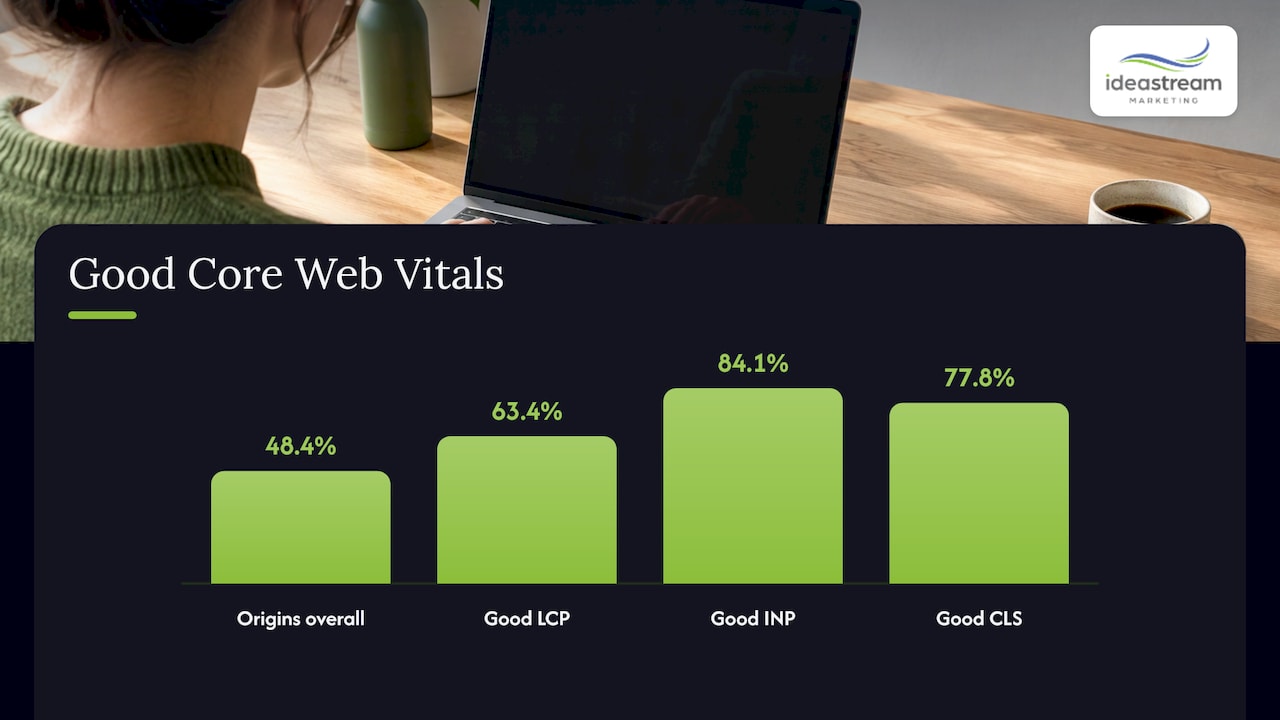
It helps to know where your site sits against the web at large. Chrome’s CrUX release notes report that in June 2024, 48.4% of origins had good Core Web Vitals overall, with 63.4% good on LCP, 84.1% good on INP and 77.8% good on CLS. In other words, loading speed is where most sites fall short, which is why LCP is usually where we start. These are published figures for that period, and the data is refreshed regularly, so check the live reports for current numbers.
Where we come in
Core Web Vitals sit at the point where design, development, media and SEO meet, and that is hard to fix piece by piece. Idea Stream Marketing is a full-service agency in Kings Park, Long Island, serving Suffolk County, Nassau County, New York City and clients nationwide. We offer technical SEO, AI SEO, custom WordPress website design and development, video production and podcast production under one roof, so the people who build your pages also understand how your video and content will load on them.

If you would like to know where your site stands and what to fix first, book a consultation with our team. You can also look at our AI SEO services or our website design and development work. If video or podcast content is part of your plan, schedule a studio session and we will plan it so your site stays fast.
Our perspective
We see Core Web Vitals as a quality standard for the whole experience, not a one-time speed fix. A website is a sales tool: the page has to load quickly, respond instantly and hold still, so a visitor can watch your video, read your offer and reach you without friction.
That is why we do not treat web development, SEO and video as separate jobs. Every video and every strategy we create is developed for visibility in Google, AI search, YouTube and social platforms, and that includes how the content sits on the page. A beautiful brand film that slows your service page helps no one, and a perfectly tuned page with nothing compelling on it does not win customers either.
Our advice to business owners on Long Island and across New York: measure with real-user data, fix the pages that earn you leads first, and build every new page and media asset with speed in mind from day one. Do that consistently and your search visibility, your conversions and your brand all benefit.
Dean Spinato, CEO & Founder of Idea Stream Marketing
FAQ
Are Core Web Vitals a Google ranking factor?
Google says its ranking systems use Core Web Vitals as part of page experience, though there is no single page experience signal. Relevance and content quality remain primary. Treat strong Core Web Vitals as a way to give good content the best chance, and to keep visitors on the page.
What is a good Core Web Vitals score?
Google’s targets are an LCP of 2.5 seconds or less, an INP of 200 milliseconds or less and a CLS of 0.1 or less. A page counts as good when at least 75% of visits meet each target, measured separately for mobile and desktop.
How long does it take to see improvements in Search Console?
The Core Web Vitals report relies on real-user data collected over time, so changes do not show immediately. Lab tools such as PageSpeed Insights reflect a fix right away, while Search Console group statuses update as enough new visits are recorded. Check back over the following weeks.
Does video on my website hurt Core Web Vitals?
It does not have to. Problems arise when a full player loads at the top of the page or when the video has no reserved space. Using a poster image, loading the player on interaction and setting a fixed aspect ratio keeps LCP and CLS healthy while the video does its job.
Which pages should I fix first?
Start with URLs Search Console labels Poor, then prioritize pages tied to revenue: your homepage, top service pages and paid landing pages. Google’s own guidance suggests working through high-impression pages first for the biggest impact on status.
Sources
- Understanding Core Web Vitals and Google search results
- Understanding Google Page Experience
- Web Vitals, web.dev
- Defining the Core Web Vitals metrics thresholds, web.dev
- Get started measuring Web Vitals, web.dev
- Optimize Core Web Vitals for business decision makers, web.dev
- Core Web Vitals report, Search Console Help
- Chrome UX Report release notes
- Page Speed As A Google Ranking Factor, Search Engine Journal

