






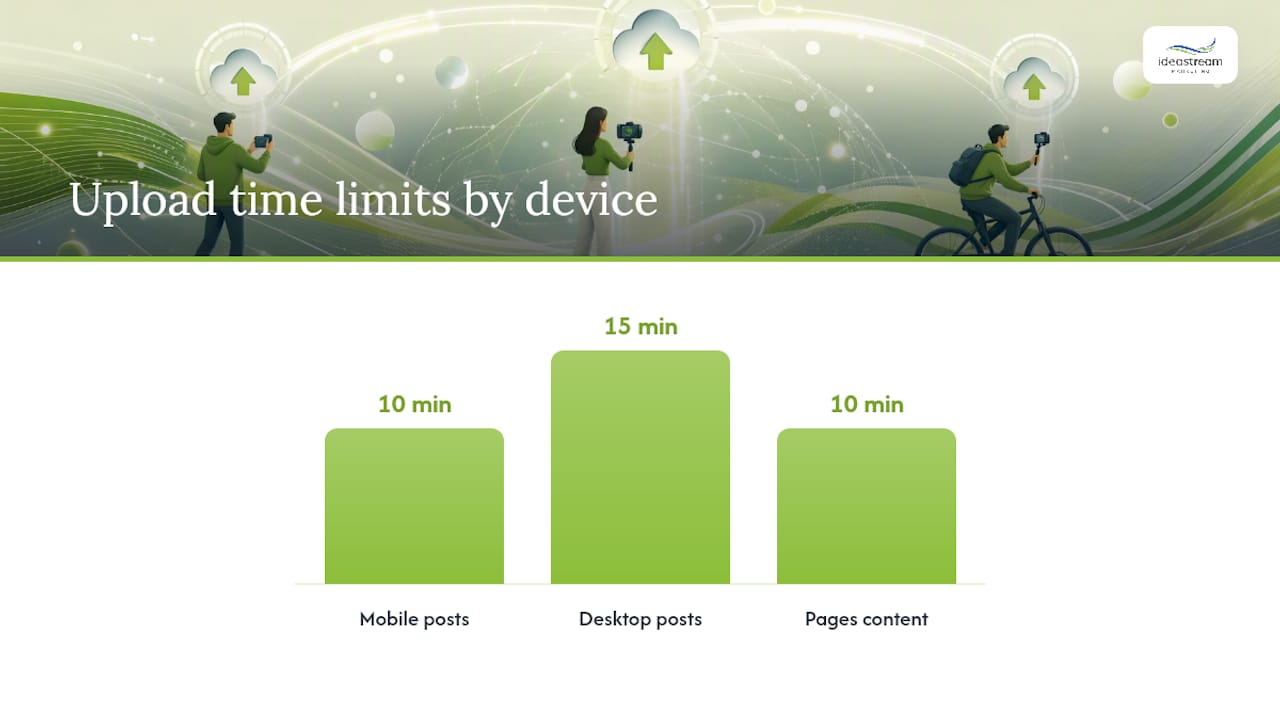
Upload LinkedIn native videos as MP4 with H.264 video and AAC audio, staying under 5 GB and within 10 minutes from mobile or 15 minutes from desktop. Sponsored video ads follow a tighter rule set: MP4 only, a smaller file-size ceiling, and a strong preference for 15 to 30 second creative. Both formats trace back to the same two authoritative sources: LinkedIn’s own video specifications for Pages and Career Pages and the developer-facing Videos API documentation on Microsoft Learn.
Here’s what to lock in before you export anything:
- Container/codec: MP4, H.264 video, AAC audio
- Native max file size: 5 GB (minimum 75 KB)
- Native duration: 10 minutes mobile, up to 15 minutes desktop for member posts (Pages often capped at 10 minutes)
- Ad file size: notably lower than native; MP4 only, no exceptions
- Recommended aspect ratios: 9:16, 4:5, 1:1, 16:9
- Resolution range: 256×144 up to 4096×2304
The one-line action item: re-encode everything to MP4/H.264 with AAC audio, attach an .srt caption file, and double-check your ad export sits under the ad file-size cap before you touch upload.
Key Takeaways
Meeting LinkedIn’s 2026 video specs comes down to exporting MP4/H.264 with AAC audio, respecting the 5 GB native and lower ad file-size limits, and matching aspect ratio to placement.
| Point | Details |
|---|---|
| Use one export standard | MP4 container, H.264 video, AAC audio clears processing with the fewest errors. |
| Respect duration by device | Native posts run up to 10 minutes mobile or 15 minutes desktop; ads perform best at 15 to 30 seconds. |
| Match aspect ratio to placement | Use 9:16 for vertical discovery, 4:5 or 1:1 for main feed, 16:9 for desktop. |
| Caption every upload | Attach .srt files, since failed caption processing blocks ads from serving entirely. |
| Watch API versioning | Migrate off deprecated Marketing Version 202507 to avoid broken integrations. |
Table of Contents
- LinkedIn Video Specs 2026 for Native Feed and DM Posts
- LinkedIn Video Ad Specs: What Sponsored Content Requires
- Which Aspect Ratio and Pixel Size Should You Export?
- Best File Format, Codec, Frame Rate, and Bitrate Settings
- How Captions, Thumbnails, and Uploads Work Across Devices
- Developer Notes for the Videos API and Common Permission Errors
- A Production-to-Upload Checklist for 2026
- Getting Your Video Production Studio-Ready for LinkedIn
- Why the Specs Matter Less Than the Workflow Behind Them
- Sources
- FAQ
LinkedIn Video Specs 2026 for Native Feed and DM Posts
Native uploads, the videos you post to your feed or send as a direct message, are the most forgiving format on the platform. LinkedIn Help sets a minimum clip length of 3 seconds and a maximum file size of 5 GB, with a 75 KB floor. Duration is where things get slightly murky across sources: Pages content typically caps at 10 minutes, while member post uploads can stretch to 15 minutes depending on upload path. If you’re posting from a company Page, plan around the shorter window; personal posts have more runway.
Resolution accepted ranges from a scrappy 256×144 up to a sharp 4096×2304, though nobody should be exporting at either extreme.
- Minimum duration: 3 seconds
- Maximum duration: 10 minutes (Pages) or up to 15 minutes (member posts)
- Maximum file size: 5 GB
- Resolution range: 256×144 to 4096×2304
- Captions: .srt files supported on upload
One nuance that trips up teams: a failed caption upload on a regular feed post usually still lets the video serve. That grace period doesn’t extend to paid media, which brings us to the next section.
LinkedIn Video Ad Specs: What Sponsored Content Requires
Sponsored video ads run on a stricter rulebook than organic posts. The Video Ads guidance on Microsoft Learn confirms that ad creative must be MP4, encoded with H.264 and AAC, and must clear LinkedIn’s Advertising Specifications before Campaign Manager will accept it. The file-size ceiling for ads sits meaningfully below the native 5 GB allowance, so a video that uploads fine to your feed can still get bounced from a campaign.
Technically, duration maximums for ads mirror the general Videos API window, but LinkedIn’s own performance data and most current 2026 guides converge on a much shorter practical sweet spot of 15 to 30 seconds for paid placements. Longer ad creative technically renders, but completion rates drop off fast once you pass the 30 second mark, so the “allowed” maximum and the “smart” maximum are two very different numbers.
Before you upload a sponsored creative, run this check:
- File size confirmed under the ad-specific cap, not the native 5 GB limit
- Codec verified as H.264 video and AAC audio inside an MP4 container
- Thumbnail attached or system fallback confirmed
- Caption file processed successfully, since ad caption failures block serving entirely
Which Aspect Ratio and Pixel Size Should You Export?
Pick your aspect ratio based on where the video lives, not just personal preference. Vertical 9:16 dominates LinkedIn’s mobile discovery feed and typically pulls stronger reach there, according to aggregated 2026 spec data. Square 1:1 and portrait 4:5 both perform well in the main scrolling feed across devices, while 16:9 landscape remains the safest bet for desktop viewing and repurposed YouTube content.
| Aspect Ratio | Recommended Pixel Size | Best Use Case |
|---|---|---|
| 9:16 | 1080p vertical | Vertical mobile discovery feed |
| 4:5 | 1080p portrait | Main feed, mobile and desktop |
| 1:1 | 1080×1080 | Feed posts, balanced cross-device display |
| 16:9 | 1080p landscape | Desktop viewing, repurposed landscape content |
LinkedIn’s technical floor allows resolutions as low as 256×144, but nothing below roughly 640×360 looks acceptable once it’s compressed and re-encoded on delivery.
Best File Format, Codec, Frame Rate, and Bitrate Settings
The format question has one clean answer: export MP4 with H.264 video (baseline or main profile) and AAC audio. That combination clears LinkedIn’s processing pipeline with the fewest errors, and it’s the setting most 2026 spec guides converge on as the practical default.
For frame rate, match your source footage when possible; 30 fps is the standard recommendation, and LinkedIn’s accepted range runs roughly 10 to 60 fps. Bitrate matters more than most creators realize:
- Target 5 to 8 Mbps for 1080p exports, which balances visual quality against upload speed
- Use a keyframe interval of about 2 seconds, or 60 frames at 30 fps
- Set audio sample rate to 48 kHz, especially for ad creative
- Two-pass encoding produces cleaner results than single-pass at the same bitrate
Pro Tip: Export at 1080p instead of 4K. LinkedIn’s re-encoding often flattens the bitrate advantage of 4K anyway, so you get nearly identical playback quality with a smaller, faster-processing file.
How Captions, Thumbnails, and Uploads Work Across Devices
Caption support runs through .srt files, and the Videos API exposes an uploadCaptions field for developers building custom upload flows. Feed videos with failed caption processing generally still go live; sponsored ads do not get that leniency, since a stalled caption file can trigger a processing error that blocks the creative from serving.
Thumbnails work similarly: an uploadThumbnail field lets you attach a custom frame, and LinkedIn’s system generates a fallback if you skip it.
initializeUploadRequest.fileSizeBytestells LinkedIn’s servers what to expect, and larger files get chunked automatically- Confirm your codec and file size locally before initializing the upload to avoid wasted processing cycles
- Mobile uploads for member posts typically cap around 10 minutes; desktop uploads can stretch to 15 minutes
- Pages content generally follows the tighter 10 minute ceiling regardless of upload device
Developer Notes for the Videos API and Common Permission Errors
Engineering teams building upload integrations need to send the Linkedin-Version header in YYYYMM format alongside X-Restli-Protocol-Version, per the Videos API documentation. That same documentation flags a hard deprecation: Marketing Version 202507 is being sunset, and integrations still calling it need to migrate to a current version or risk broken uploads.
Key fields worth knowing before you write integration code:
initializeUploadRequest.fileSizeBytessets expectations for chunked upload handlinguploadCaptionsanduploadThumbnailhandle secondary asset attachmentcaptionsUploadUrlandthumbnailUploadUrlreturn the endpoints for those secondary uploadsdownloadUrlExpiresAtgoverns how long a processed asset stays retrievable
Permission scopes gate everything here. Missing w_organization_social or w_member_social scopes are the most common cause of a 403 error, and it’s worth checking token scopes first before assuming the upload payload itself is broken.
A Production-to-Upload Checklist for 2026
Getting the export settings right is only half the job. Here’s the sequence that keeps processing errors and rejected ads to a minimum:
- Export three versions of your master file: a 9:16 vertical cut for mobile discovery, a 1:1 or 4:5 cut for main feed, and a 16:9 cut for desktop or repurposed use, each at 1080p with 5 to 8 Mbps bitrate.
- Match duration to the format’s job: keep sponsored ad creative between 15 and 30 seconds, thought-leadership native posts under roughly 60 to 90 seconds, and vertical discovery clips in the 15 to 60 seconds range for the strongest completion rates.
- Attach captions and a custom thumbnail every time, since silent autoplay means most viewers read before they listen.
- A/B test aspect ratio and hook length, then watch completion rate and click-through rate in Campaign Manager or your API logs to catch processing failures early.
A structured pre-publish workflow like the one in our video content checklist for marketing pros keeps this repeatable instead of reinvented every upload cycle, and pairing it with solid video SEO practices helps that content surface in search long after the feed algorithm moves on.
Getting Your Video Production Studio-Ready for LinkedIn
Specs are only useful if the footage behind them is worth watching. Idea Stream Marketing builds video campaigns, from corporate storytelling to sponsored ad creative, with these exact export requirements baked into post-production from day one, so nothing gets rejected or re-encoded at the last minute. Our team handles everything from scripting and filming through color grading, captioning, and platform-specific formatting, which means your 9:16 discovery cut and your 16:9 desktop version come out of the same production pipeline instead of a rushed afterthought.
If your team needs a partner who understands both the creative side and the technical delivery requirements platforms like LinkedIn demand, our video advertising services are built around exactly that gap.
Why the Specs Matter Less Than the Workflow Behind Them
Most articles on this topic treat specs like a checklist to memorize once and forget. That’s backward. LinkedIn’s numbers shift enough between documentation updates, mobile versus desktop duration being the clearest example, that memorizing today’s figures guarantees you’ll be wrong in six months. What actually holds up is a repeatable export workflow: one master file, three aspect ratio cuts, captions and thumbnails attached by default, bitrate targets set once in your encoder preset.
The conventional advice oversells maximums. LinkedIn allows 5 GB and 15 minutes, but nothing in the platform’s own performance patterns rewards using that ceiling. Shorter, captioned, vertically-formatted content wins the attention battle before a viewer ever notices your resolution. Marketing teams that treat the developer documentation and the creative brief as two separate conversations end up with content that’s technically compliant and creatively forgettable. The teams that win treat them as one process, built once and reused every upload.
Prioritize the workflow over the spec sheet. The numbers will change again next year. A solid production pipeline won’t.
— Dean
Sources
- Create and Manage Video Ads – LinkedIn | Microsoft Learn
- Video specifications for your LinkedIn Pages and Career Pages
- LinkedIn Video Size: 1920×1080 (16:9) Updated …
FAQ
What Size Should a LinkedIn Video Post Be in 2026?
LinkedIn accepts native video files up to 5 GB with a resolution range of 256×144 to 4096×2304, but exporting at 1080p keeps quality high without a bloated file size.
What Is the Ideal Aspect Ratio for a LinkedIn Video?
There isn’t a single ideal ratio; 9:16 vertical performs best on the mobile discovery feed, while 4:5 and 1:1 work well in the main scrolling feed and 16:9 suits desktop viewing.
Should LinkedIn Video Be 4:5 or 9:16?
Use 9:16 when targeting LinkedIn’s vertical discovery feed and mobile-first reach, and use 4:5 when your primary audience scrolls the main feed on both desktop and mobile.
What Is the 5-3-2 Rule on LinkedIn?
The 5-3-2 rule is a content-mix guideline suggesting five shares of others’ content, three original posts, and two personal or off-topic posts per week; it’s a posting cadence framework, not a video spec requirement.
How Long Can a LinkedIn Video Ad Be?
LinkedIn’s technical limits allow much longer, but 15 to 30 seconds is the practical sweet spot for sponsored ad creative based on completion-rate performance.

