



October 21, 2026




TL;DR:
- A social media management workflow is a six-phase, repeatable process that ensures content moves efficiently from idea to post with clear roles and deadlines. Implementing this system reduces turnaround time, improves consistency, and prevents common bottlenecks like approval delays. Committing to the process for at least 30 days helps measure its effectiveness and build sustainable social media success.
A social media management workflow is a repeatable, six-phase process that moves content from idea to published post with clear roles, deadlines, and accountability at every step. Teams that follow a structured process cut content turnaround time by 40–60% and reduce reporting time from hours to minutes. That kind of efficiency is not accidental. It comes from treating social media like a production system, not a daily improvisation. For social media managers at small to medium-sized businesses, a defined workflow is the difference between consistent growth and constant catch-up.
What are the six essential phases of a social media management workflow?
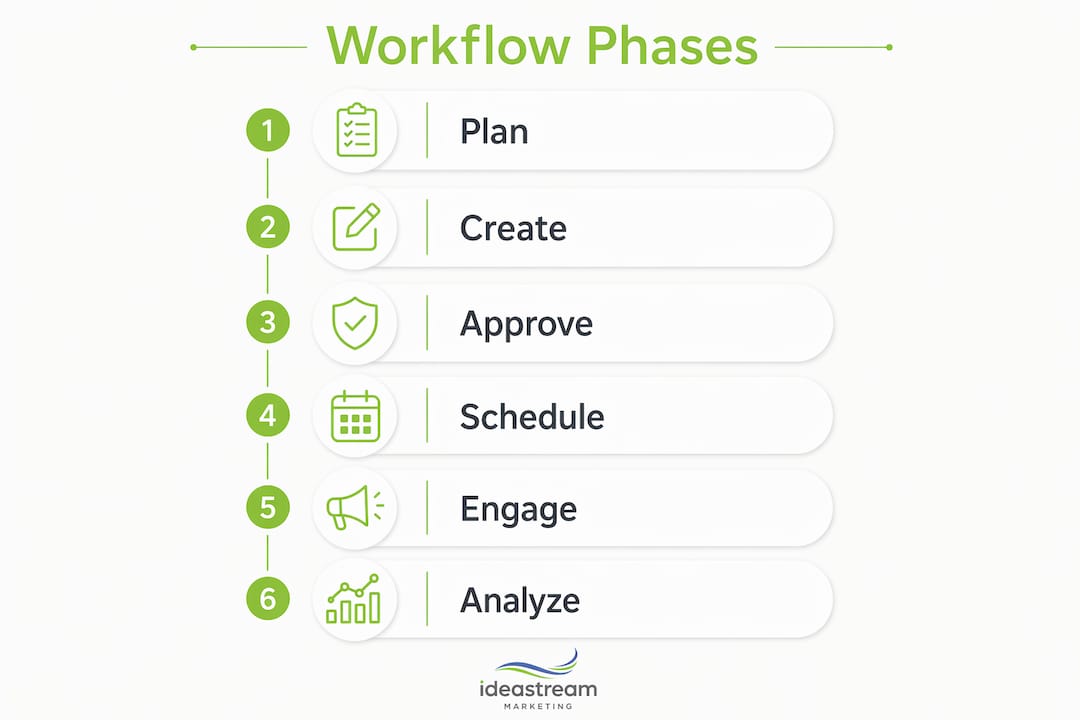
Every effective social media management workflow follows six phases: plan, create, approve, schedule, engage, and analyze. Each phase has a specific purpose, a clear owner, and a defined output. Skipping any one of them creates a gap that shows up later as missed deadlines, off-brand posts, or wasted ad spend.

| Phase | Key Activities | Problem Prevented |
|---|---|---|
| Plan | Set goals, assign owners, map campaign themes | Reactive, unfocused posting |
| Create | Write copy, design graphics, produce video | Last-minute scrambles and poor quality |
| Approve | Structured review by designated stakeholders | Errors, off-brand content, compliance issues |
| Schedule | Queue posts with correct timing and platform settings | Inconsistent publishing and missed windows |
| Engage | Respond to comments, DMs, and reactions | Missed conversations and lost audience trust |
| Analyze | Review performance data and feed insights into planning | Repeating what does not work |
The planning phase sets the foundation. You define campaign goals, assign ownership for each content piece, and set hard deadlines. Without this step, the creation phase becomes a free-for-all where everyone assumes someone else is handling it.
The approval phase is where most teams lose time. A structured review process with a named approver and a fixed turnaround window prevents the endless back-and-forth that kills publishing schedules. The analyze phase closes the loop. Top-performing teams design workflows around ownership roles rather than platform requirements, so accountability stays clear from planning through analysis.
How can social media managers optimize workflows through batching and role assignment?
Batching is the single most effective productivity method for social media teams. Grouping similar tasks like writing all captions in one session, designing all graphics in another, and recording all video in a third reduces cognitive load and produces more consistent, high-quality content. Context switching between writing, designing, and approving in the same hour is one of the fastest ways to produce mediocre work.
Role assignment turns batching into a system. When each person owns a specific phase, accountability is built into the process rather than assumed. A content creator should not also be the final approver. A social media manager should not be chasing down feedback from five different people.
Here is how to structure roles for a small team:
- Content strategist: Owns the planning phase, sets themes, assigns deadlines, and maintains the content calendar.
- Content creator: Produces copy, graphics, and video assets according to the brief.
- Approver: Reviews content for accuracy, brand voice, and compliance before scheduling.
- Community manager: Handles the engagement phase, responding to comments and DMs within a defined window.
- Analyst: Pulls performance reports and feeds insights back into the next planning cycle.
For solo operators, you wear all five hats. The key is to batch each role separately rather than trying to do everything at once.
Pro Tip: Keep at least one week of content queued and approved at all times. This buffer protects you from publishing emergencies caused by holidays, illness, or unexpected business demands.
Role-based permissions inside your content tools reinforce this structure. When a creator can submit but not publish, and an approver can approve but not create, the workflow enforces itself without requiring constant oversight.
What are realistic time commitments and weekly rhythms for managing social media effectively?
A solo or small business social media workflow typically requires 5–7 focused hours per week. That number surprises most managers who feel like they spend far more time on social media. The difference is usually unstructured time spent reacting rather than executing a plan.
A sustainable weekly rhythm looks like this:
- Monday (45–60 minutes): Planning. Review last week’s performance data, confirm the week’s content themes, and assign any remaining tasks. This session feeds directly from the previous week’s analysis phase.
- Tuesday (90–120 minutes): Creation. Write all captions, finalize graphics, and prepare video assets for the week. Batch everything before moving to the next phase.
- Wednesday (30–45 minutes): Approval. Send all content to the designated approver with a clear deadline. Use a shared folder or collaboration tool so feedback is centralized, not scattered across email threads.
- Thursday (30–45 minutes): Scheduling. Queue approved posts using a cross-platform scheduler with data-driven time slots. Set platform-specific settings like hashtags, alt text, and first comments at this stage.
- Daily (15–20 minutes): Engagement. Check comments, DMs, and mentions every day. This is not optional. Skipping engagement undermines the reach of every post you publish.
- Friday (30–45 minutes): Analysis. Pull the week’s performance metrics, note what worked, and document insights for Monday’s planning session.
The most common mistake is skipping the review step to save time. That shortcut compounds over weeks. Without analysis feeding back into planning, you repeat the same content mix regardless of what the audience actually responds to.
Social media experts recommend committing to this system for at least 30 days before evaluating performance or making changes. Thirty days gives you enough data to see patterns rather than reacting to single-post results.
What are the best tools and practices for an efficient social media workflow?
The right tools do not replace a good process. They enforce it. Each phase of your workflow needs a different category of tool, and understanding which tool serves which phase prevents overlap and confusion.
| Tool Category | Workflow Phase | Primary Function |
|---|---|---|
| Content calendar | Plan | Maps timing and themes across platforms |
| Design and writing tools | Create | Produces visual and copy assets |
| Collaboration and approval tools | Approve | Centralizes feedback and sign-off |
| Cross-platform scheduler | Schedule | Queues posts with platform-specific settings |
| Unified inbox | Engage | Aggregates comments and DMs in one place |
| Analytics dashboard | Analyze | Tracks performance and generates reports |
The most important distinction in tool strategy is the difference between a content calendar and a workflow. A calendar manages timing, meaning when content goes live. A workflow manages movement, meaning how content progresses through creation, review, and approval. Teams that use only a calendar know what is publishing but not whether it is ready. Teams that use both have full visibility into timing and status simultaneously.
Automation fits into the scheduling and engagement phases, but with limits. Scheduling posts in advance is a proven practice. Automating responses to comments or DMs risks sounding generic and erodes the audience trust you are working to build. Use automation for distribution, not for conversation.
Pro Tip: Combine your social media content calendar with a task-based workflow tool. The calendar shows what publishes when. The workflow tool shows who is responsible for each step and whether it is on track.
A true workflow, as distinct from a calendar, manages the “how” of publication rather than just the “when.” Combining both tools maximizes team efficiency and gives every stakeholder clear visibility into content status at any moment.
How do you troubleshoot common social media workflow bottlenecks?
Approval is the number one bottleneck in social media workflows. 70% of approval delays come from unstructured feedback loops, meaning no named approver, no deadline, and no centralized place for comments. The fix is simple: assign one approver per content type, set a 24-hour feedback window, and use a shared tool where all comments live in one place.
Common bottlenecks and how to address them:
- Unclear roles: When two people think the other is approving, nothing gets approved. Document who owns each phase and share it with the whole team.
- No content buffer: Publishing the same day you create leaves no room for error. A one-week buffer gives you time to catch mistakes before they go live.
- Reactive daily posting: Creating and publishing on the same day destroys consistency. Batch creation and schedule in advance.
- Feedback scattered across channels: Email, Slack, and verbal notes create conflicting versions. Centralize all feedback in one tool.
- Skipping the analysis phase: Without data, planning is guesswork. Block time every week for performance review, even if it is only 30 minutes.
Approval bottlenecks are almost never about the content itself. They are about unclear ownership and missing deadlines. Fix the process, and the content moves faster.
When scaling from a solo operation to a small team, the biggest risk is assuming the old informal process will hold. It will not. Document every phase, assign named owners, and run a short onboarding session so every new team member understands the workflow before they touch a piece of content. Balancing automation with personal engagement becomes more critical at scale. Automation handles distribution. People handle conversation. Keep those two responsibilities separate and your audience will notice the difference.
Key Takeaways
A structured social media management workflow, built on six defined phases and clear role ownership, is the most reliable way to produce consistent, high-quality content without burning out your team.
| Point | Details |
|---|---|
| Six-phase structure | Plan, create, approve, schedule, engage, and analyze form the complete workflow cycle. |
| Batching by task | Group similar tasks in dedicated sessions to reduce errors and improve content consistency. |
| Approval is the bottleneck | Assign one named approver with a 24-hour deadline to eliminate 70% of common delays. |
| Calendar plus workflow | Use a content calendar for timing and a workflow tool for tracking content movement and status. |
| Weekly time commitment | A focused 5–7 hours per week covers all six phases for solo operators and small teams. |
Why discipline beats tools every time
I have worked with social media managers who had access to every tool on the market and still missed deadlines every week. I have also worked with solo operators running a tight workflow from a simple spreadsheet who published consistently for two years without a single gap. The difference was never the software. It was the discipline to follow the same process every single week.
The teams that struggle most are the ones that treat social media as a series of individual tasks rather than a production system. They write a caption, post it, respond to a comment, then wonder why their content feels scattered. The digital marketing workflow approach changes that entirely. When you batch creation, assign clear owners, and protect your approval step, the whole operation gets faster and less stressful within a few weeks.
My honest advice: resist the urge to evaluate your new workflow after one week. Commit to 30 days. The first week will feel slower because you are building habits. By week four, the system runs itself. That is when you start seeing the real payoff in content quality, engagement rates, and your own sanity.
The approval step is where most teams push back. They see it as bureaucracy. It is not. It is the one step that prevents an off-brand post, a factual error, or a tone-deaf caption from going live. Fresh eyes catch what tired eyes miss. Build it in, protect it, and never skip it to save 20 minutes.
— Dean
How Idea Stream Marketing supports your social media workflow
Managing a consistent social media presence takes more than good intentions. It takes a system, and sometimes it takes a team.
Idea Stream Marketing works with social media managers and marketing professionals at small to medium-sized businesses to build and execute social media marketing strategies that produce real results. From content creation and scheduling to engagement management and performance reporting, we handle every phase of the workflow so your team can focus on growth. Our digital marketing services combine professional content production with data-driven strategy, giving your brand a consistent, credible presence across every platform. If you are ready to move from reactive posting to a process that actually scales, we are ready to build it with you.
FAQ
What is a social media management workflow?
A social media management workflow is a repeatable, six-phase process covering planning, content creation, approval, scheduling, engagement, and analysis. It assigns clear roles and deadlines to each phase to keep content moving efficiently from idea to publication.
How many hours per week does social media management take?
A solo or small business social media workflow typically requires 5–7 hours per week when structured across all six phases. Unstructured, reactive management consistently takes longer and produces weaker results.
What is the difference between a content calendar and a workflow?
A content calendar manages timing, meaning when posts go live. A workflow manages movement, meaning how content progresses through creation, review, and approval. Using both together gives teams full visibility into status and schedule simultaneously.
Why is approval the biggest bottleneck in social media workflows?
70% of approval delays come from unstructured feedback loops with no named approver and no deadline. Assigning a single approver with a fixed turnaround window resolves most delays immediately.
How long should I run a new workflow before evaluating it?
Social media experts recommend committing to a consistent system for at least 30 days before evaluating performance or making changes. One month provides enough data to identify real patterns rather than reacting to short-term fluctuations.

