



October 21, 2026




TL;DR:
- Many small businesses underestimate the complexity of website development, including decision-making and ongoing costs. Proper planning, strategic goal-setting, and choosing the right technology ensure a successful launch and long-term growth. Continuous maintenance and optimization are essential to sustain website performance and achieve business objectives.
Getting a website built sounds straightforward until you are actually in it. Most small and medium business owners quickly discover that website development involves far more decisions than they anticipated: technology choices, design direction, content strategy, budget trade-offs, and a process that can stretch for weeks if not managed well. This guide breaks down everything you need to know, from setting goals and choosing the right tools, to executing a clean launch and maintaining your site over time. Whether you are starting fresh or rebuilding, you will find a clear path forward here.
Table of Contents
- Key takeaways
- Website development: what to do before you build
- The website development process, step by step
- Responsive web design: why it matters more than ever
- Common mistakes that derail websites post-launch
- My take on what actually works
- Ready to build something that actually works for your business?
- FAQ
Key takeaways
| Point | Details |
|---|---|
| Start with strategy, not design | Define your goals and audience before touching colors or layouts to avoid expensive rework. |
| Responsive design is non-negotiable | A single mobile-ready site improves SEO and user experience without managing separate versions. |
| Plan for post-launch costs | Hosting, security patches, and updates are ongoing expenses most business owners underestimate. |
| The process takes 6 to 8 weeks | Small sites of 5 to 10 pages typically require that window from planning through post-launch review. |
| Custom beats template for growth | Scalable, custom website solutions outlast drag-and-drop builders as your business expands. |
Website development: what to do before you build
Before anyone writes a single line of code or picks a color palette, you need answers to a few foundational questions. Skipping this step is the single most common reason projects run over budget and over schedule.
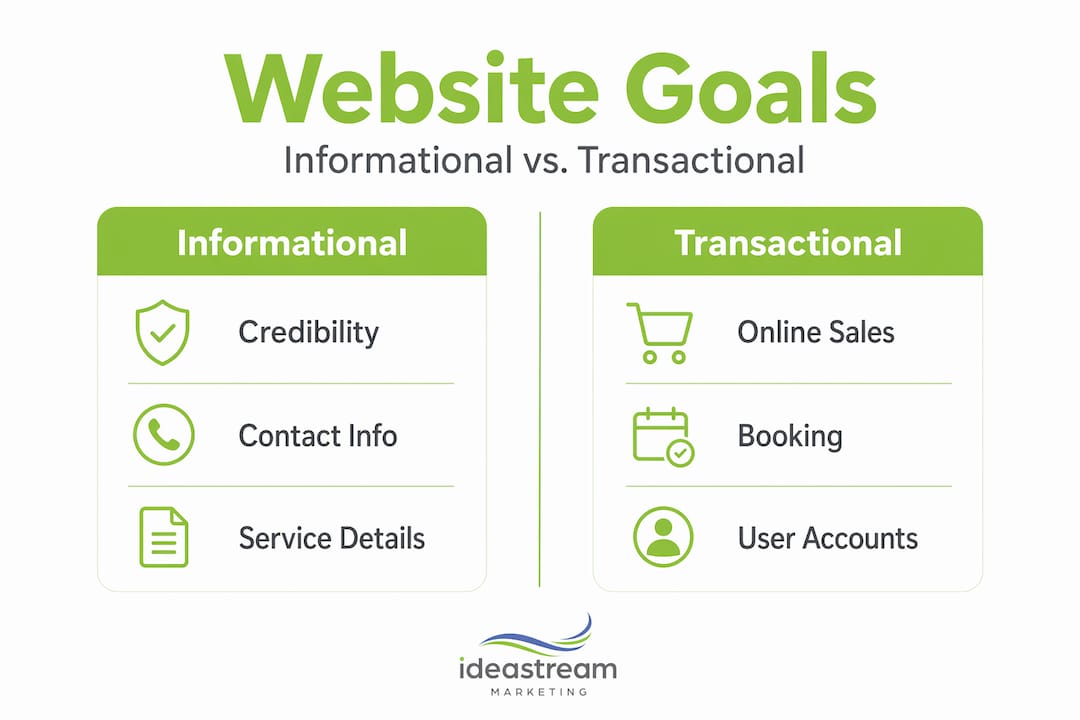
Start by defining what your website actually needs to do. Is this an informational site meant to build credibility? An ecommerce website development project with product pages, cart functionality, and payment processing? A portfolio or booking platform? Each type has different architecture requirements, content needs, and cost profiles. Getting specific here saves you from building the wrong thing.
Next, think through your audience. Who lands on your site, and what do they need to do within the first 30 seconds? That question drives your navigation, calls to action, and page hierarchy. User journey mapping before design prevents costly scope creep and ensures functional navigation flow.
Here are the key considerations to lock in before you start:
- Business goals: Lead generation, online sales, appointment booking, or brand awareness each require different site structures.
- Site type: Informational, ecommerce, portfolio, or web application development each have distinct build requirements.
- Budget and timeline: Small sites of 5 to 10 pages typically take 6 to 8 weeks from planning through post-launch.
- Technology choice: Decide between a CMS like WordPress, one of the best website builders for ease of use, or a fully custom website solution for complex needs.
- Responsive design: Treat this as a standard requirement, not an optional upgrade.
Here is a quick comparison to help you pick your technology path:
| Approach | Best for | Typical cost range | Flexibility |
|---|---|---|---|
| Website builder | Startups, simple sites | Low | Limited |
| CMS (WordPress) | Content-heavy businesses | Moderate | High |
| Custom development | Complex, scalable needs | Higher | Maximum |
Pro Tip: If you plan to grow your site significantly in the next two years, avoid locking into a template-based builder. The migration cost later almost always exceeds what you would have spent building on a flexible CMS from the start.
The website development process, step by step
Understanding how to develop a website before you hire anyone, or before you start yourself, puts you in control of the project. Here is the full website development process broken into seven steps.
- Analyze and strategize. Define your goals, audience, competitors, and success metrics. Document everything. This becomes your project brief and keeps everyone aligned.
- Plan your architecture and sitemap. Map out every page, how they connect, and what action each page drives. Think of this as your blueprint. Changes here cost nothing. Changes after development starts cost a lot.
- Design UI and UX mockups. Create wireframes first, then visual mockups aligned with your brand identity. Web design services at this stage should reflect how your customers think, not just how you want your brand to look.
- Create your content. Most business owners underestimate how long this takes. Every page needs copy, images, and metadata. Write for your audience first, then optimize for search. Pages with vague or thin content hurt both conversions and rankings.
- Develop front-end and back-end components. This is where your designs become a working site. Front-end covers what users see. Back-end handles databases, user accounts, forms, and any integrations your site needs.
- Test thoroughly. Check compatibility across browsers and devices, run performance audits, test all forms and links, and review accessibility. Performance matters more than most people realize. A 123% bounce rate increase occurs when page load slows from 1 second to 10 seconds. That is not a minor inconvenience. That is lost revenue.
- Launch and monitor. Go live, then watch closely. Set up analytics, monitor for errors, and plan your first round of post-launch updates within 30 days.
Pro Tip: Build scope creep protection into your contract or project plan from day one. Any request outside the original spec should require a change order. This keeps projects on time and on budget for everyone involved.
A common mistake is treating the launch as the finish line. It is actually the starting point. Your post-launch maintenance needs include hosting setup, security patches, software updates, and ongoing SEO to stay performant and secure. Budget for it from the beginning.
Responsive web design: why it matters more than ever
Responsive web design is the practice of building a single site that adapts its layout and content to fit any screen size. Your site looks and functions correctly on a desktop, tablet, and phone without maintaining separate versions of the same pages.
The distinction between responsive and adaptive design is worth understanding. Responsive design is the standard for most content sites and the cost-effective choice for the majority of small businesses. Adaptive design uses fixed layouts for specific breakpoints and is more expensive, but it gives you precise control over the mobile experience. If mobile conversions are your primary revenue driver, adaptive design may justify the cost. Otherwise, responsive is the right call.
Modern responsive techniques have moved well beyond basic media queries. Here is what current best practices actually look like:
- CSS Grid: Allows complex, two-dimensional layouts that reflow automatically at different screen sizes without JavaScript.
- Container queries: CSS Grid and container queries let components adapt based on their parent container size, not just the full viewport. This makes UI components genuinely reusable across different page sections.
- Fluid typography: Font sizes scale proportionally with the screen, keeping text readable without hard breakpoints.
- Mobile-first design: You design for the smallest screen first, then layer in enhancements for larger displays. This forces you to prioritize what actually matters on each page.
The SEO case for responsive design is also clear. A single responsive site avoids duplicate content issues that arise when separate mobile and desktop sites exist. Google favors the unified approach, and you benefit from consolidated link authority. You can read more about why responsive design matters for marketing-focused websites and how it connects directly to search visibility.
Pro Tip: Run your site through Google’s PageSpeed Insights and Core Web Vitals before launch. These scores directly influence your search rankings, and fixing performance issues before going live is far easier than after.
Common mistakes that derail websites post-launch
Most website problems are not technical failures. They are planning failures that surface after launch. Knowing where things go wrong helps you build a site that actually delivers the business outcomes you want.
“A website that launches well but receives no ongoing attention is like opening a store and never restocking the shelves. The initial effort only pays off with consistent follow-through.”
Here are the most common issues to watch for:
- Skipping information architecture. Jumping straight into design without mapping your site structure leads to confusing navigation, orphaned pages, and content gaps. Early IA planning prevents the mid-project scope creep that blows budgets.
- Underestimating maintenance costs. Post-launch hidden costs like hosting, security patches, plugin updates, and backups catch many owners off guard. Build a monthly estimate into your plan from the start.
- Ignoring technical SEO during build. Title tags, meta descriptions, schema markup, and site speed are not afterthoughts. They belong in the development checklist, not a future project.
- No analytics setup at launch. If you are not tracking behavior from day one, you have no baseline to measure improvements against. Install Google Analytics and Google Search Console before you go live.
- Treating launch as done. A live website is a living asset. It needs content updates, performance reviews, and security monitoring on a regular schedule to stay effective and safe.
The businesses that get the best return from their websites are the ones treating it as an ongoing investment, not a one-time expense.
My take on what actually works

I have worked with a lot of business owners who came to the table with a template in mind and a price they saw advertised somewhere. What I have found over years of hands-on work is that the price is almost never the real issue. The issue is misaligned expectations at the start of the project.
The owners who get the best results are the ones who spend time on strategy before anything visual happens. They know who they are trying to reach, what that person needs to do on the site, and what success actually looks like. Design is just the delivery vehicle for that strategy.
I have also seen the real cost of ignoring post-launch maintenance. A site that was built beautifully two years ago and never touched since is usually a security risk, slow to load, and dropping in search rankings. That neglect costs more to fix than regular upkeep would have.
One thing I genuinely believe is underused: subscription-based design models that start around $500 per month. For growing businesses that need ongoing updates but cannot justify a large one-time project, this model delivers consistent quality without locking you into a long-term contract. It keeps your site evolving alongside your business.
My honest advice: choose technology that your team can manage without a developer for basic updates. Choose partners who explain their process clearly. And plan your budget to include the first year of ownership, not just the build.
— Dean
Ready to build something that actually works for your business?
A well-built website is one of the highest-return investments a small business can make. But getting there requires the right strategy, the right design approach, and a partner who understands both the technical side and the marketing side.

At Idea Stream Marketing, we build data-driven websites that are engineered for performance from day one. Every project integrates responsive design, conversion-focused structure, and AI-powered SEO to give your site the best chance of ranking and converting. We work with businesses across Long Island, New York City, and throughout the United States. Whether you need a fresh build, a redesign, or an ongoing growth partner, our team is ready to help. Explore our web design services or reach out to schedule a consultation.
FAQ
How long does website development take for a small business?
For a site with 5 to 10 pages, the full process from planning through post-launch review typically takes 6 to 8 weeks. Larger or more complex projects, like ecommerce builds or web application development, will take longer depending on scope.
What is the difference between responsive and adaptive web design?
Responsive design uses flexible layouts that adjust to any screen size automatically, while adaptive design uses fixed layouts for specific device breakpoints. Responsive design is standard and more cost-effective for most small businesses. Adaptive design offers finer mobile control but at a higher cost.
Do I really need a custom website, or will a website builder work?
Best website builders work well for simple informational sites and early-stage startups. If you expect significant growth, need ecommerce functionality, or want custom website solutions that scale, a CMS-based or fully custom build will serve you much better in the long run.
Why does my website’s load speed matter so much?
Slow load times directly drive visitors away. A 123% bounce rate increase occurs when a page takes 10 seconds to load versus 1 second. Faster sites rank better on Google and convert more visitors into customers.
What ongoing costs should I expect after my site launches?
Plan for monthly expenses covering hosting, security monitoring, software and plugin updates, and periodic content refreshes. These post-launch maintenance costs are often overlooked in initial budgets but are non-negotiable for keeping your site secure and performing well.

