



October 10, 2026




A marketing automation workflow is a set of rules that automatically moves a contact through triggers, waits, and actions, so your team responds faster, nurtures leads consistently, and hands off sales-ready prospects without anyone touching a spreadsheet. Done right, it delivers three things immediately: faster response to new leads, consistent nurture without manual follow-up, and reliable handoffs between marketing and sales.
The five workflows worth building first, in order of impact:
- Welcome/onboarding — greets new subscribers or customers automatically
- Lead nurture drip — moves cold leads toward sales-ready status
- Lead scoring and MQL handoff — flags hot leads for sales in real time
- Event or webinar follow-up — capitalizes on attendance while interest is high
- Re-engagement/win-back — revives contacts who have gone quiet
A prioritized set of five workflow types like these covers the majority of automation impact for most teams, according to marketing automation researchers at G2 Learn. Pick one manual process you repeat weekly, like sending a follow-up email after a demo request, and map it to a trigger before you read further. That single conversion is the fastest way to see what automation actually changes.
Key Takeaways
A marketing automation workflow only earns its place in your stack when it has one trigger, at least three exit conditions, a named owner, and a 60 to 90 day audit on the calendar.
| Point | Details |
|---|---|
| Start with five workflows | Welcome, nurture, scoring/handoff, event follow-up, and re-engagement cover most of the impact. |
| Build in human override | Unenroll contacts the moment they reply, book a meeting, or enter an active deal. |
| Cap branch complexity | Limit decision points per workflow and require a rollback plan before adding new branches. |
| Audit every 60 to 90 days | Check exit conditions, offers, and owner status before performance quietly decays. |
| Get expert help when stuck | Idea Stream Marketing builds and audits full workflows, including the video assets nurture sequences need. |
Table of Contents
- What Are the Parts of a Marketing Automation Workflow?
- What Marketing Automation Workflow Templates Should You Build First?
- How Do You Build a Marketing Automation Workflow?
- How Do You Keep CRM Data Clean Across Automated Workflows?
- What Metrics Prove a Workflow Is Working?
- What Are the Most Common Marketing Automation Mistakes?
- What Do Agency Audits Usually Find First?
- What Types of Marketing Automation Platforms Exist?
- What Security and Compliance Rules Apply to Marketing Automation?
- What KPIs Actually Measure Workflow ROI?
- What the Templates Won’t Tell You
- Get Hands-On Help Building Workflows That Actually Convert
- Sources
- FAQ
What Are the Parts of a Marketing Automation Workflow?
Every marketing automation workflow is built from six components, and understanding each one prevents the tangled, unmaintainable messes that plague most marketing operations teams.
A trigger starts the workflow: a form submission, a page visit, a purchase, a date. A condition branches the path based on a fact about the contact, like “job title contains Director” or “opened last email: yes/no.” An action does the work: sends an email, updates a CRM field, alerts a rep, adds a tag. A wait pauses the sequence for a set time or until a specific event happens. A goal defines the outcome that ends the workflow successfully, such as booking a call. An exit removes the contact from the workflow entirely, whether they hit the goal, disqualified themselves, or the workflow simply expired.
Here is what each looks like at the node level:
- Trigger example: Contact submits a “Request a Quote” form.
- Condition example: Is the contact’s company size over 50 employees?
- Action example: Send a personalized email introducing the account rep.
- Wait example: Pause three days before the next nurture touch.
- Goal example: Contact books a discovery call.
- Exit example: Contact unsubscribes, converts, or hits a 90-day expiration.
Three operational rules keep this system from collapsing under its own complexity. First, give every workflow exactly one trigger. Second, build every workflow with at least three exit conditions. Every workflow needs a named owner and at least three exit triggers, covering goal completion, disqualification, and time-based expiry, to prevent contacts from getting stuck in a loop or bombarded past the point of usefulness. Third, name workflows with a consistent convention (department + trigger + version, like “Sales_DemoRequest_v2”) and assign a single owner who is accountable for its performance.
Pro Tip: Write the exit conditions before you write the emails. If you can’t name three ways out, the workflow isn’t ready to build.
What Marketing Automation Workflow Templates Should You Build First?
These five templates cover the situations that generate the most revenue impact per hour invested, based on the pattern most workflow guides converge on for prioritization.
Template 1: Welcome/onboarding
Trigger: New subscriber or new customer record created.
Sequence: Send a welcome email immediately, wait one day, send a “here’s what to expect” email with your top resource, wait two days, send a product or service highlight tied to their signup source, wait three days, send a soft call-to-action inviting a reply or booking.
Exit conditions: Contact replies, unsubscribes, or completes all four steps.
Primary metric: Email open rate on message one; reply rate across the sequence.
Template 2: Lead nurture drip
Trigger: Lead downloads a gated asset or joins a nurture list.
Segmentation: Branch immediately by lead source (organic, paid, referral) and again by declared interest if you collect it on the form.
Sequence: Four to six emails spaced five to seven days apart, each tied to a stage of buyer awareness rather than a generic newsletter cadence.
Branch rule: If a contact clicks two or more emails, move them into an accelerated sales-ready track; if they show zero engagement after three sends, drop them into a lower-frequency maintenance list instead of unsubscribing them outright.
Exit conditions: Converts to MQL, unsubscribes, or completes the sequence with no engagement.
Primary metric: Click-through rate and drip-to-MQL conversion rate.
Template 3: Lead scoring to MQL handoff
Trigger: Contact’s lead score crosses your defined MQL threshold.
Scoring changes: Points accumulate from page visits, email clicks, and form fills; points decay after 30 days of inactivity to keep the score honest.
Actions: Notify the assigned sales rep by CRM task and Slack or email alert, update the contact’s lifecycle stage field, and log the qualifying activity for context.
Pause rules: Once a rep claims the lead, all marketing nurture pauses automatically. This is where the human-override principle matters most: unenrolling contacts the moment sales engages prevents the awkward experience of a prospect getting a sales call and a generic drip email on the same day.
Exit conditions: Rep claims lead, score decays below threshold, or 14 days pass with no rep action (escalate to manager).
Primary metric: Time-to-first-touch after handoff.
Template 4: Webinar/event follow-up
Trigger: Event registration closes or the live session ends.
Branches: Attendees get one path, no-shows get another, and both differ from registrants who left early.
Actions: Attendees receive a recording link plus a next-step offer (consultation, trial, deeper resource); no-shows get the recording with a slightly more urgent subject line; early leavers get a shorter recap.
Exit conditions: Contact books the next-step offer, unsubscribes, or the sequence completes after two follow-up touches.
Primary metric: Recording view rate and next-step conversion rate.
Template 5: Re-engagement/win-back
Trigger: No email opens or site visits in 90 to 120 days.
Suppression rules: Exclude anyone currently in an active sales deal or a recent purchase cycle. This overlaps with the handoff pause rule above.
Actions: Send a low-commitment offer (a short survey, a discount, or a “still interested?” check-in) rather than a full sales pitch.
Exit conditions: Contact re-engages, unsubscribes, or gets suppressed permanently after no response to two win-back attempts.
Primary metric: Reactivation rate.
| Workflow | B2B variant | B2C variant |
|---|---|---|
| Welcome | Include a rep introduction | Include a discount or loyalty signup bonus |
| Nurture drip | Content-led (guides, case studies) | Offer-led (promotions, product picks) |
| Scoring/handoff | Sales rep notification | Cart or browse abandonment alert |
| Event follow-up | Sales next-step offer | Purchase or registration upsell |
| Re-engagement | Check-in call offer | Win-back discount code |
Before you launch any of these, confirm you have the supporting assets ready: a clear call-to-action, a landing page that matches the email’s promise, a recording or resource file if the workflow references one, and at least one case study or testimonial video for the nurture and handoff stages. Lead nurturing strategies that boost conversions consistently point back to this same gap: workflows fail not because the logic is wrong, but because the destination page doesn’t match what the email promised.
How Do You Build a Marketing Automation Workflow?
Building a workflow that survives contact with real customers takes more than dragging boxes onto a canvas. It takes a sequence that forces you to test assumptions before they become live mistakes.
Before you open your platform’s workflow builder, confirm four things: the specific goal this workflow serves, who owns it, the one metric that proves it’s working, and whether your contact data is clean enough to trust. Skipping that last check is how you end up personalizing an email with a blank first name field.
- Map the manual process first. Write down every step a human currently takes, in order, before you touch software. If your sales team currently emails every demo request within an hour, that’s your trigger and your benchmark.
- Choose one trigger. Resist the urge to fire the workflow from three different events. Pick the cleanest signal.
- Set conditions and branches. Decide what facts about the contact change their path, and keep the branch count low.
- Add wait steps and exits. Space actions so they feel considerate rather than automated, and define every way a contact can leave.
- Test with sample contacts. Run your own email through the workflow, and build a holdout group so you have a baseline for comparison.
- Launch small, then scale. Release to a 5 to 10 percent segment first, confirm deliverability and logic hold, then open it to your full list.
Your testing plan should include a small batch of test contacts representing different branch paths, a genuine holdout group that receives no automation so you can measure lift, a deliverability preflight check on your sending domain, and a staged rollout rather than a full-list launch on day one. For a broader look at sequencing this across channels, the digital marketing workflow guide walks through how to plan the full campaign calendar around these builds.
How Do You Keep CRM Data Clean Across Automated Workflows?
Workflows are only as good as the data feeding them, and a broken sync between your marketing platform and CRM is the single fastest way to make lead scoring meaningless.
Two-way sync means updates flow in both directions: when marketing changes a lifecycle stage, sales sees it instantly, and when sales logs a closed deal, marketing stops nurturing that contact automatically. Validate this monthly by picking five test contacts, changing a field in each system, and confirming the update appears on the other side within minutes, not hours. Poor two-way sync between CRM and automation platforms creates data silos that make lead scores inaccurate and handoffs unreliable, which is exactly the failure mode Template 3 above is designed to prevent.
Enrichment timing matters more than most teams realize. Enrich contact data before routing to sales, not after assignment, so the rep opens a complete record instead of chasing missing fields mid-call. Dedupe rules should run on every import and on a weekly schedule, since duplicate records split engagement history and corrupt scoring.
- Confirm SPF, DKIM, and DMARC records are configured correctly before any high-volume send goes live.
- Warm new sending domains gradually rather than blasting a full list on day one.
- Throttle sends to match your platform’s reputation limits, especially during list growth spurts.
- Schedule sends within business hours for the recipient’s time zone where your platform supports it.
Pro Tip: Deliverability failures almost always trace back to missing authentication records or a cold sending domain, not the email copy. Check the technical layer before you rewrite the subject line.
What Metrics Prove a Workflow Is Working?
Two categories of metrics matter, and most teams only track one of them.
Outcome metrics tell you whether the workflow moves revenue: pipeline influenced by the workflow, MQL-to-opportunity conversion rate, and time-to-first-touch after a lead qualifies. That last one is worth watching closely, since a delay of even a few hours between qualification and outreach measurably hurts conversion.
Operational metrics tell you whether the workflow itself is healthy: deliverability rate, unsubscribe rate, duplicate contact rate, and re-enrollment frequency (how often the same contact cycles back into a workflow it should have exited).
- Pipeline influenced by workflow (tie to CRM deal source field)
- MQL-to-opportunity conversion rate
- Time-to-first-touch after qualification
- Deliverability and unsubscribe rate by workflow
- Duplicate and re-enrollment rate
Audit every active workflow every 60 to 90 days. Guides on preventing automation mistakes consistently recommend this window because that’s roughly how long it takes for a broken sequence, an outdated offer, or a decayed list segment to quietly erode performance without anyone noticing. Your audit checklist should include: confirm exit conditions still fire correctly, check for outdated links or offers, verify the assigned owner is still active, and compare current performance against the metric baseline you set at launch.
What Are the Most Common Marketing Automation Mistakes?
The workflows that fail almost always fail for the same handful of reasons, and every one of them is preventable with a rule set at design time rather than a fix after the damage is done.
The human override principle comes first: every workflow needs an unenroll rule that fires the moment a lead replies, books a meeting, or enters an active sales deal. Human override is non-negotiable, because nothing damages trust faster than a prospect getting a personal reply from a rep and a generic drip email in the same afternoon.
Second, cap your branch budget. Practitioners often limit decision points per workflow and require a documented rollback plan before adding a new branch, because overcomplicated branching and missing exit conditions are the leading causes of automations that quietly break and stay broken for months.
- Cap decision points per workflow rather than letting branches multiply unchecked
- Require a naming and ownership convention on every workflow before it goes live
- Base personalization on demonstrated behavior and progressive profiling, not just a first name token
- Document a rollback plan before adding any new branch to a live workflow
Pro Tip: Personalization tied to actual behavior outperforms superficial personalization every time. A subject line referencing the page someone just viewed beats a mail-merge field with their job title.
What Do Agency Audits Usually Find First?
Across client engagements, the same handful of issues show up before anything else, and they’re almost never about the platform. They’re about the setup underneath it.
The first check is always naming and ownership. Workflows with vague names like “Email 3” and no assigned owner are the ones nobody notices when they break. The second check is dedupe: duplicate contact records split engagement history badly enough that lead scores stop meaning anything. The third is unenroll logic, or the lack of it, which is usually where the most damage to customer trust happens quietly.
When a workflow lacks a named owner and clear exit conditions, it doesn’t fail loudly. It just keeps running, quietly duplicating effort and occasionally embarrassing the brand with a message that should have stopped weeks earlier.
Day-one fixes typically include:
- Renaming every active workflow with a consistent department and trigger convention
- Running a full dedupe pass before touching any scoring logic
- Adding at least one human-override unenroll trigger to every sales-facing sequence
- Setting a calendar reminder for the 60 to 90 day audit before the workflow even launches
The CRM automation guide for small and midsize businesses covers the sync and handoff piece of this in more depth, and it’s worth a look before your next platform migration.
What Types of Marketing Automation Platforms Exist?
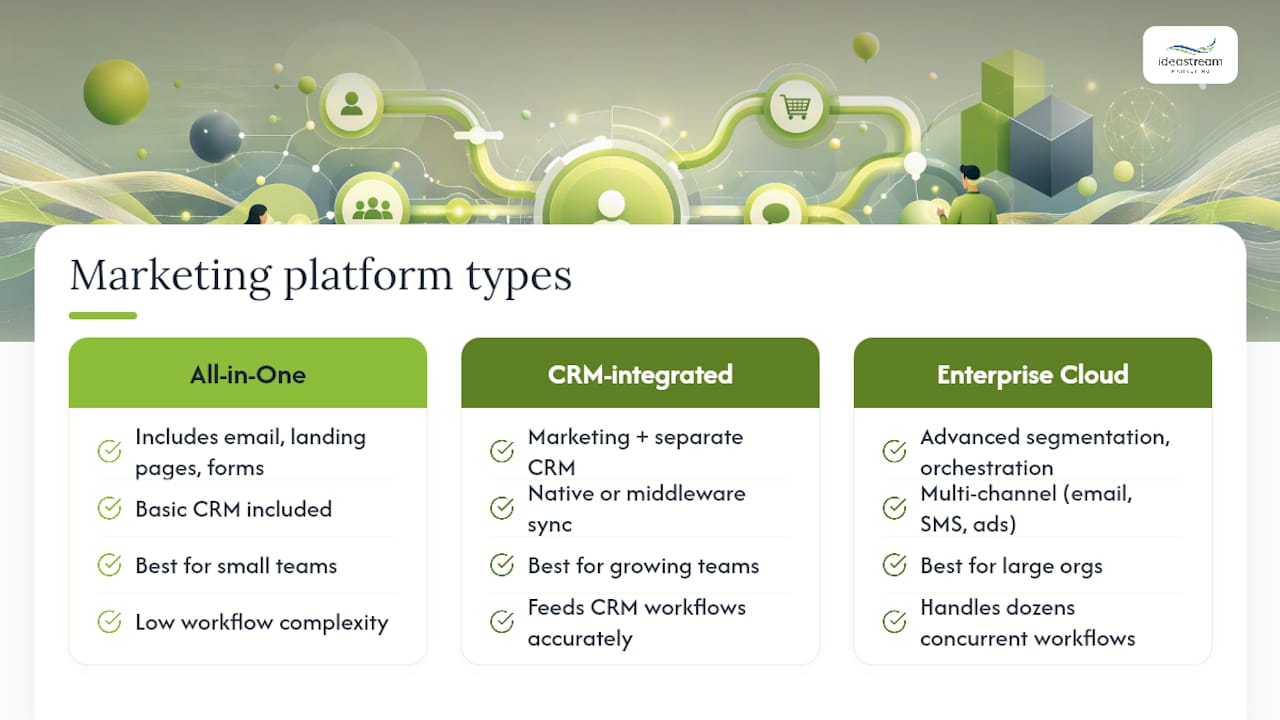
Marketing automation platforms fall into three broad categories, and picking the wrong one is usually a mismatch between your team’s complexity and the platform’s design intent.
All-in-one marketing suites bundle email, landing pages, forms, and basic CRM into a single system. These suit small teams that want one login and don’t need deep sales pipeline management.
Marketing automation platforms with CRM integration keep marketing and sales tools separate but connected through a native or middleware sync. These fit growing teams that already have a dedicated CRM and need marketing workflows to feed it accurately without replacing it.
Enterprise marketing clouds offer advanced segmentation, multi-channel orchestration across email, SMS, and ads, and heavier customization, aimed at larger teams running dozens of concurrent workflows across multiple business units.
Choosing between them comes down to three questions: How many contacts and workflows will you realistically run in year one? Does your sales team need bidirectional CRM sync, or just occasional exports? And how much of your budget goes to the platform versus the strategy and content that fill it? A platform with every feature imaginable is wasted spend if your team only builds two workflows a year. Conversely, an entry-level tool will buckle under enterprise-level branching and multi-channel demands. Many teams find the honest answer is to start with a mid-tier platform with CRM integration and grow into complexity only when a specific bottleneck demands it.
What Security and Compliance Rules Apply to Marketing Automation?
Every workflow that touches customer data carries compliance obligations, and the rules apply whether you’re sending to five contacts or five hundred thousand.
Consent and permission tracking matters first. Workflows that trigger from form submissions need to log consent timestamps and honor opt-out requests immediately, not on the next batch sync. Laws like the CAN-SPAM Act in the United States and GDPR for contacts in the European Union require clear unsubscribe mechanisms and honest sender identification in every automated email, and enforcement doesn’t distinguish between a manual send and an automated one.
Data access controls come second. Not every team member needs edit access to every workflow. Segment permissions so only workflow owners can modify live sequences, and log changes so you can trace who altered a trigger or condition and when.
Third-party integrations widen your exposure. Every tool connected to your automation platform, from enrichment services to SMS providers, is a potential point of data leakage if API keys aren’t rotated and access isn’t audited periodically.
- Log consent and timestamp every opt-in that feeds a workflow trigger
- Restrict workflow editing permissions to named owners
- Review third-party integration access and rotate API keys on a regular schedule
- Store a record of unsubscribe requests separately from your main contact database so suppression never fails silently
None of this is optional overhead. A single compliance complaint tied to a broken unsubscribe workflow can cost more in remediation than the entire automation build.
What KPIs Actually Measure Workflow ROI?
The right KPIs depend on whether you’re measuring a workflow’s business impact or its operational health, and conflating the two is how teams end up optimizing for open rates while pipeline stays flat.
For business impact, track influenced pipeline value, meaning the dollar amount of open opportunities where the contact passed through a specific workflow before the deal opened. Track MQL-to-customer conversion rate by workflow, not just by channel, since a nurture drip and a paid ad campaign feeding the same MQL pool can convert at very different rates. Track cost per qualified lead when you can attribute workflow-specific spend, including the content and design assets that feed it.
For operational health, track workflow completion rate (the percentage of contacts who reach a defined exit rather than stalling), average time in workflow compared to your intended sequence length, and re-enrollment rate, which flags contacts cycling back through a sequence they should have exited permanently.
The single most revealing KPI for most teams is time-to-first-touch after MQL qualification, since it connects directly to the handoff quality between marketing and sales and tends to correlate closely with close rate. If you can only build a dashboard around one number this quarter, that’s the one to start with. The lead generation best practices guide breaks down how these KPIs tie back to overall lead-gen performance if you want to extend this measurement framework beyond automation specifically.
What the Templates Won’t Tell You
Every guide to marketing automation workflows, including this one, hands you templates and calls it a strategy. Templates are the easy part. The judgment call that actually separates workflows that generate revenue from workflows that generate noise is deciding what NOT to automate.
The conventional advice says automate everything you can. The better advice says automate only what’s repetitive, rule-based, and high-volume enough to justify the maintenance overhead, then leave judgment calls to a human. A welcome sequence should run on autopilot. A conversation with a lead who just replied “not right now, but check back in Q3” should not.
Most teams treat the branch budget and the exit condition rules as suggestions rather than requirements, and it’s exactly backward. Those two rules are cheaper to enforce before launch than to unwind after a workflow has been quietly duplicating leads for four months.
If you build only one thing well this week, build the unenroll logic. Everything else in a workflow is optimization. The unenroll trigger is the difference between a tool that respects your prospects and one that annoys them into unsubscribing from everything you send.
Get Hands-On Help Building Workflows That Actually Convert
You could spend the next month building these five templates yourself, testing branch logic, and chasing deliverability issues on your own sending domain, or you could bring in a team that already builds this for a living. Idea Stream Marketing designs the full workflow, from trigger mapping to the video and testimonial assets your nurture sequences actually need, then handles the CRM integration and measurement dashboard so you’re not guessing whether it’s working.
Our team builds the digital marketing infrastructure around your workflows, including the branded video content that so many nurture and onboarding sequences are missing. If your welcome sequence needs a founder introduction video or your handoff template needs a customer testimonial to close the gap, our video production services cover that too. Ready to see what a properly audited workflow looks like for your business? Contact our team for a workflow assessment and we’ll show you exactly where the gaps are.
Sources
- Marketing automation best practices — The CMO
- The power of marketing automation and personalized engagement — Penn State Extension
- The 8-Step Guide to Create the Perfect Marketing Automation — G2 Learn
- Marketing automation mistakes: A prevention guide — GrowthHakka
FAQ
What Are Marketing Automation Workflows?
A marketing automation workflow is a set of rules built from triggers, conditions, actions, waits, and exits that automatically moves a contact through a marketing or sales process without manual effort at each step.
What Are Examples of Workflow Automation?
Common examples include welcome/onboarding sequences, lead nurture drips, lead scoring with MQL handoff to sales, webinar follow-up sequences, and re-engagement campaigns for inactive contacts.
What Is a Trigger in Workflow Automation?
A trigger is the specific event, like a form submission, page visit, or date, that starts a workflow and determines which contacts enter it.
What Is a Marketing Automation Strategy?
A marketing automation strategy is the plan for which processes to automate, in what order, and how success is measured, typically starting with the five highest-impact workflow types before expanding further. Idea Stream Marketing builds this strategy alongside the creative and technical assets each workflow needs to perform.
How Often Should You Audit a Marketing Automation Workflow?
Audit every active workflow every 60 to 90 days to catch broken sequences, outdated offers, and performance decay before they cost you pipeline.