








LocalBusiness schema is a JSON-LD block that hands search engines and AI assistants machine-readable facts about your business — its name, address, phone number, and hours — instead of forcing them to guess from page text. It can qualify a page for richer search displays, but it won’t create a local pack ranking on its own. The rule that governs everything else: every value in that schema must match your visible page content and your Google Business Profile exactly, or the markup does more harm than good.
TL;DR:
- Using the most specific LocalBusiness subtype, such as Plumber or Dentist, unlocks relevant properties that can improve search result eligibility.
- Service-area businesses should omit street addresses and instead list their coverage areas with areaServed or GeoCircle to avoid confusing signals.
- All schema properties, including name, address, and hours, must match Google Business Profiles and visible page content exactly for effective results.
- Regular validation with Google’s Rich Results Test and Search Console ensures schema accuracy and prevents errors that can hurt visibility.
- Implementing schema across all business content, including videos and podcasts, helps AI assistants and next-generation search tools accurately understand and surface your business.
Table of Contents
- What Is LocalBusiness Schema and When Should You Use It?
- What Properties Belong in LocalBusiness JSON-LD?
- How Do You Add LocalBusiness Schema to a Page?
- What Do Real LocalBusiness Schema Examples Look Like?
- How Do You Validate and Monitor LocalBusiness Schema?
- What Mistakes Undermine LocalBusiness Schema (and How Do You Fix Them)?
- How Do You Keep LocalBusiness Schema Accurate Over Time?
- Why Schema Matters Beyond Traditional Search
- Get Your Schema and Video Content Working Together
- Sources
- FAQ
What Is LocalBusiness Schema and When Should You Use It?
LocalBusiness sits inside a hierarchy on Schema, nested under Organization but built specifically for entities with a physical presence or a defined service area. That distinction trips up a lot of implementations. Organization schema fits a company with no storefront customers visit, like a SaaS business or a national brand with no retail footprint. LocalBusiness fits anyone customers can walk into, call locally, or hire for on-site work, from a dental practice to a landscaping crew.
The subtype you pick matters more than most site owners assume. Schema.org lists dozens of LocalBusiness subtypes, and it explicitly encourages using the most specific one available rather than defaulting to the generic parent type. A plumbing company should use Plumber, not LocalBusiness. A dental office should use Dentist. Why bother? Each subtype unlocks properties tied to that business category, and Google’s own structured data guidance points to subtype precision as part of what makes a listing eligible for enhanced search features.
Consider the practical gap between choices:
LocalBusinessgenerically: works, but signals nothing about what the business actually does.Restaurant: unlocks menu, cuisine, and reservation-related properties.Dentist,Plumber,Electrician: map to theMedicalBusinessorHomeAndConstructionBusinessbranches, which carry properties generic LocalBusiness doesn’t.ProfessionalService: a reasonable fallback for consultants, agencies, and firms that don’t fit a narrower category.
Service-area businesses need a different mental model entirely. A mobile dog groomer, an HVAC repair company, or a traveling notary doesn’t want customers showing up at what might be a home office or an empty lot. For these businesses, skip the public-facing street address and use the areaServed property instead, listing the cities, counties, or a GeoCircle radius the business actually covers. This mirrors how Google Business Profile already treats service-area businesses, and keeping schema consistent with that GBP setting avoids sending mixed signals about where the business operates.
What Properties Belong in LocalBusiness JSON-LD?
Every LocalBusiness block needs a handful of properties to function, and a longer list of recommended ones that separate a bare-minimum implementation from one that actually earns rich results eligibility.
Identity properties come first. @context and @type declare the vocabulary and entity type. @id assigns a stable, unique identifier to the entity, which matters more than most implementers realize: it lets other schema blocks on your site, breadcrumbs, articles, VideoObject markup, reference the same node instead of creating a duplicate, unlinked entity. name, url, and telephone round out the basics, and all three need to match what’s printed on the page word for word.
Location and mapping properties describe where the business sits physically. address should use the nested PostalAddress type with streetAddress, addressLocality, addressRegion, postalCode, and addressCountry as separate fields, not one string. geo takes GeoCoordinates with latitude and longitude. hasMap can point to a Google Maps URL for the location.
Operational details tell customers and search engines when and how they can transact. openingHoursSpecification is the structured version, handling multiple day-and-hour blocks with clean machine parsing; the simpler openingHours string works for basic cases but breaks down fast once a business has split shifts or day-specific hours. priceRange and paymentAccepted round out the operational picture.
Statistic Callout: Semrush’s guidance on local business schema confirms that this structured data, built in JSON-LD, gives search engines machine-readable business facts that help verify your entity in local search results, a verification step that generic page text can’t replicate.
Trust and linking properties round out a mature implementation. sameAs links to verified profiles: your Google Business Profile, Facebook page, Yelp listing, industry directories. aggregateRating and review should only appear if that exact rating and review content is visible somewhere on the same page, a rule the next section covers in more depth.
How Do You Add LocalBusiness Schema to a Page?
- Pick the right page or pages. Homepages work for single-location businesses. Multi-location companies need a distinct schema block on each location’s dedicated page rather than one master block reused everywhere.
- Pull canonical values from Google Business Profile first. Your GBP listing should function as the single source of truth for name, address, phone, and hours. Copy from there, not from an old print brochure or a founder’s memory of the hours.
- Build the JSON-LD structure with proper nesting.
PostalAddressandGeoCoordinatesnest inside the mainLocalBusinessobject;openingHoursSpecificationbecomes an array if hours vary by day. Assign a unique@idat this stage so the entity can be referenced elsewhere. - Insert the script tag. The
<script type="application/ld+json">block typically goes in the page<head>, though Google accepts it in the<body>as well. On WordPress, a schema plugin can generate and inject this automatically from custom fields; for custom-built sites, a developer usually hand-codes it into a template partial so every location page inherits the structure without manual duplication. - Validate before publishing. Run the page through Google’s Rich Results Test and a Schema Markup Validator to catch syntax errors and property misuse before it goes live.
- Monitor after launch. Check Search Console’s enhancement reports a week after deployment, then fold the page into a recurring audit cycle.
Pro Tip: Stage your schema on a preview or dev URL and run it through the Rich Results Test before it ever touches production. Catching a malformed PostalAddress object in staging takes two minutes; catching it three weeks after launch, when Search Console flags a spike in errors, takes an afternoon.
What Do Real LocalBusiness Schema Examples Look Like?
Reading the property list in the abstract only gets you so far. Here’s how it comes together in three common scenarios.
Single-location business (a restaurant). A neighborhood restaurant needs Restaurant as its type, not generic LocalBusiness, since that subtype unlocks cuisine and menu properties. The block nests PostalAddress for the physical location, GeoCoordinates for lat/long, and openingHoursSpecification as an array covering different hours for weekdays versus weekends. sameAs links out to the restaurant’s Facebook and Yelp profiles, and image points to a photo that actually appears on the page, not a stock file pulled from a media kit.
Multi-location pattern. A regional chain with five locations shouldn’t run five identical copies of the same schema block with only the address swapped out. The cleaner pattern nests a parent Organization entity representing the brand overall, then gives each location page its own LocalBusiness block with a unique @id, its own NAP details, its own hours, and a parentOrganization property pointing back to the parent entity’s @id. This keeps each location distinct in Google’s entity graph while making the corporate relationship explicit rather than implied.
Service-area business. A mobile pet grooming company or an HVAC repair service that dispatches technicians rather than hosting walk-in customers should omit the street address property entirely. In its place, areaServed lists the specific cities, counties, or a GeoCircle radius the business actually covers. This isn’t a workaround. It’s the schema equivalent of what these businesses already declare inside their Google Business Profile settings, and keeping the two aligned avoids the address/service-area mismatch that confuses both crawlers and customers.
A few structural notes apply across all three patterns:
- Every
@idshould be unique and stable across page updates, not regenerated every time content changes. - Address fields belong in separate
PostalAddresssub-properties, never crammed into one string. - Image URLs and review content in schema should point to assets and text that genuinely appear on that page.
How Do You Validate and Monitor LocalBusiness Schema?
Writing correct JSON-LD is only half the job. Confirming Google can actually parse it, and catching regressions before they cost visibility, takes an ongoing check, not a one-time test.
Google’s own Rich Results Test checks syntax and flags eligibility for enhanced search features, distinguishing between hard errors that block eligibility and warnings that flag missing recommended properties without disqualifying the page. A Schema Markup Validator adds a second layer, checking that every property name and nesting structure actually conforms to Schema.org’s vocabulary rather than a close-but-wrong variant a developer typed from memory.
Search Console’s structured data enhancement reports matter most for ongoing monitoring rather than pre-launch checks. They surface issues across the whole site at once: a template update that accidentally duplicated an @id across pages, a phone number that drifted out of sync after a CRM migration, or a subtype that Google is treating as ineligible for a feature you expected it to support.
A workable cadence looks like this:
- Weekly checks for any page with newly deployed or recently edited schema, since fresh implementations are where most errors surface.
- Quarterly audits across the full site for businesses running steady-state schema with no recent changes, catching slow drift before it compounds.
- Immediate checks any time Google Business Profile details change, since a GBP edit that isn’t mirrored in schema is the single most common source of the mismatch errors covered next.
What Mistakes Undermine LocalBusiness Schema (and How Do You Fix Them)?
- NAP mismatch across the site, GBP, and directories. Name, address, and phone number need to match character for character everywhere they appear. Audit your homepage, location pages, Google Business Profile, and major directories like Yelp side by side; a suite abbreviated as “Ste 4” on one page and “Suite 4” on another is enough to erode entity confidence, according to guidance from SEOprocheck’s LocalBusiness schema guide.
- Marking up reviews or ratings that customers can’t see on the page.
aggregateRatingandreviewproperties should only appear when that exact rating and review text is visible somewhere on the same page. Markup that references reviews pulled from elsewhere, or fabricated entirely, violates the spirit of structured data and risks a manual action. - Schema bloat: marking up content that isn’t visible to users. The same logic that governs reviews extends to every property. Semrush’s schema markup best practices warn against adding structured data that doesn’t match what’s actually on the page, since search engines treat that mismatch as a trust signal, not a technical footnote.
- Defaulting to generic
LocalBusinessinstead of a specific subtype. A landscaping company typed as plainLocalBusinessloses out on properties and eligibility thatHomeAndConstructionBusinesssubtypes unlock. Check Schema.org’s subtype list before finalizing the type declaration.
Pro Tip: Keep your Google Business Profile open in one tab and your schema JSON in another while you audit. If a value doesn’t match character for character between the two, fix it before you touch anything else.
How Do You Keep LocalBusiness Schema Accurate Over Time?
Schema isn’t a set-it-and-forget-it asset. Practitioners covering entity trust point out that phone number changes, hour adjustments, and address moves need to hit structured data at the same time they hit the live page, not weeks later, according to Search Engine Land’s reporting on schema and local visibility.
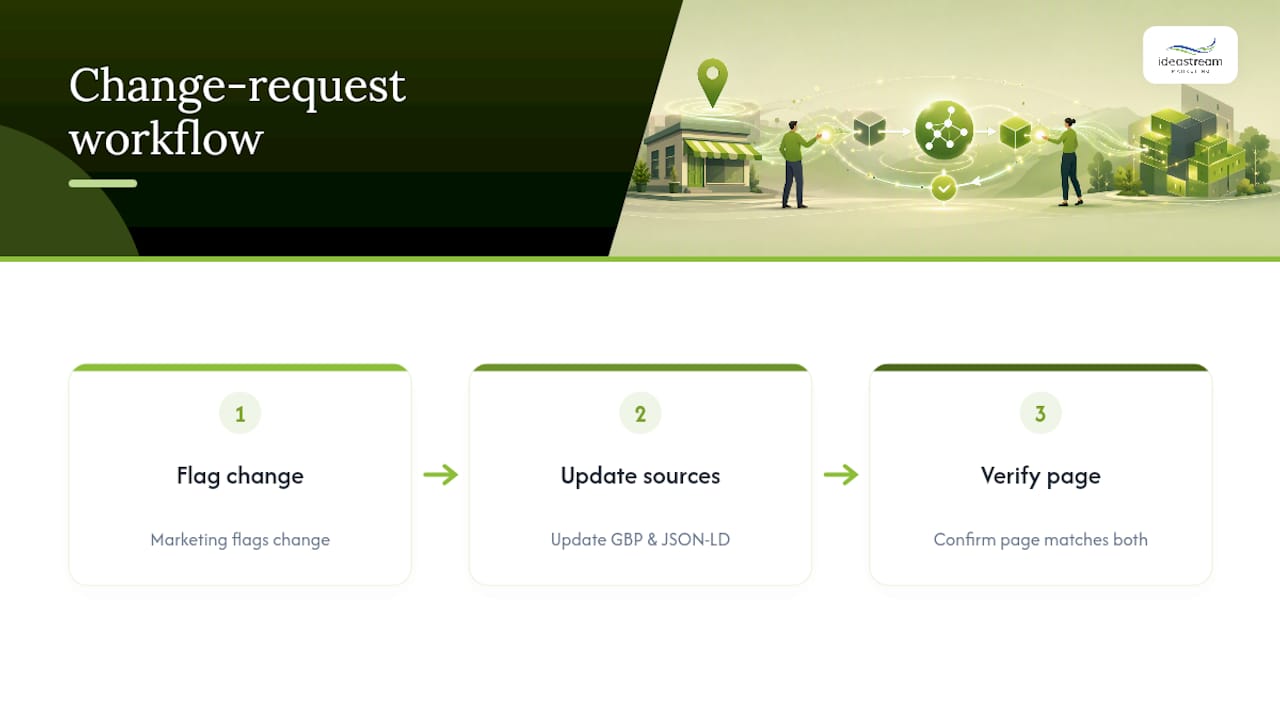
A workable governance model assigns clear ownership. Marketing typically owns the source-of-truth data, hours, holiday closures, new service lines, while a developer or agency partner owns the technical deployment. A short change-request flow works better than an informal “just update it” text message: someone flags the change, someone else confirms it’s reflected in both Google Business Profile and the schema block, and a third check confirms the live page text matches both.
Automation reduces the risk of drift. Templated JSON-LD built from CMS fields, so hours entered once in a content management system populate both the visible page and the schema block, cuts out the manual copy-paste step where mismatches usually start. Keep a manual override available for edge cases, and log schema updates in release notes so a future audit can trace when and why a value changed.
Special cases deserve their own checklist entry. Temporary closures, holiday hours, and service disruptions all need a plan for how they show up in openingHoursSpecification (which supports date-specific overrides) rather than being ignored until the schema quietly goes stale.
Why Schema Matters Beyond Traditional Search
Accurate LocalBusiness schema does more than tidy up your Google listing. It’s also how AI assistants and next-generation search tools figure out what your business actually does, especially when that business produces video and audio content that lives on its own landing pages.
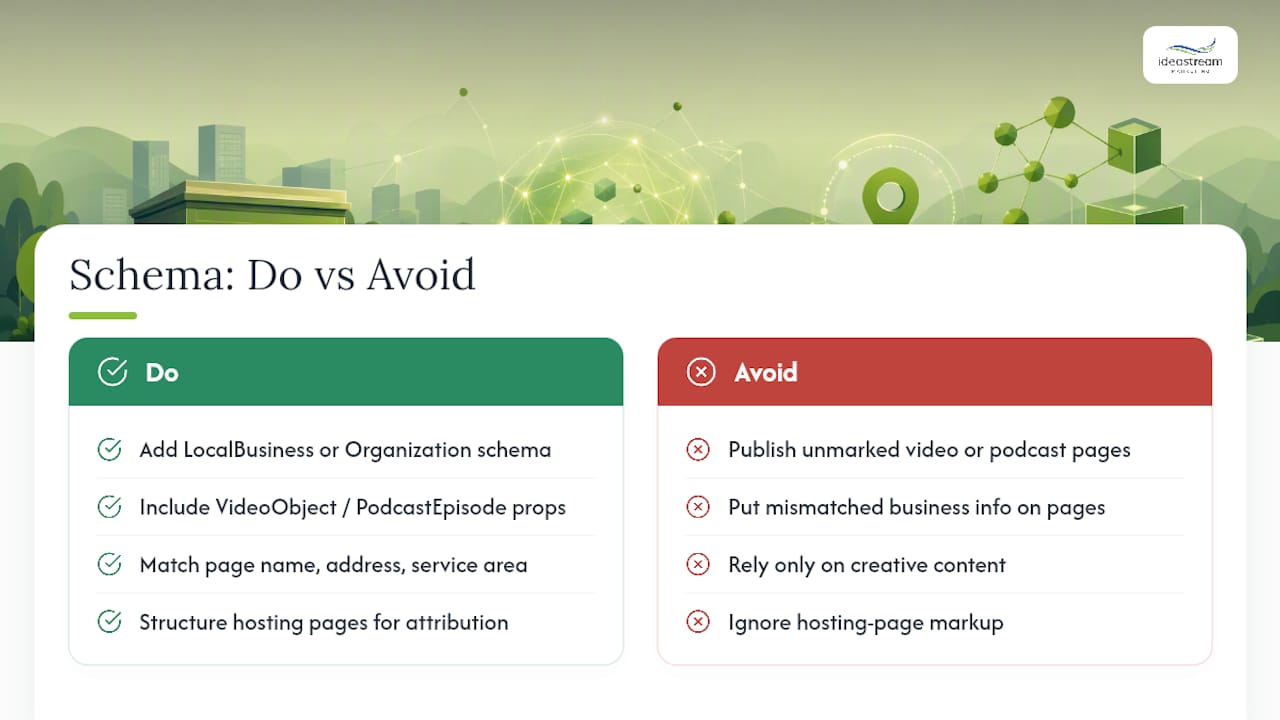
A podcast episode page or a video landing page benefits from the same discipline. Marking up those pages with LocalBusiness or Organization context, alongside VideoObject or PodcastEpisode properties where relevant, gives AI systems a cleaner signal about who produced the content and where that business operates. A law firm’s client testimonial video, a contractor’s before-and-after project reel, a healthcare practice’s explainer series: all of it becomes easier for AI assistants to surface correctly when the surrounding page carries schema that matches the business’s real name, address, and service area.
This is the overlap Idea Stream Marketing spends a lot of time in: producing the video and podcast content, then making sure the pages hosting it are structured so search engines and AI tools can actually find and attribute it correctly. Getting the creative right and the markup wrong leaves visibility on the table either way.
— Dean
Get Your Schema and Video Content Working Together
Some companies offer combined services that build your LocalBusiness structured data, optimize your Google Business Profile, and produce the video and podcast content that page is meant to showcase, all coordinated instead of handled by multiple vendors who never talk to each other.
The workflow is straightforward: an audit of your current schema and GBP setup, implementation across your site’s homepage, location pages, and media landing pages, validation through Google’s testing tools, and ongoing monitoring so drift doesn’t creep back in. If your business already records podcast episodes or produces branded video, from customer testimonials to training content, those pages deserve the same structured data attention as your homepage. Idea Stream Marketing’s digital marketing services cover schema implementation as part of a broader local SEO and content strategy built for Long Island and New York businesses.
Ready to see where your current schema stands? Consider scheduling a consultation with a digital marketing provider to get a clear analysis of what’s helping your local visibility and what may be working against it.
Sources
Two sources anchor every serious LocalBusiness implementation: the Schema.org LocalBusiness type page for the authoritative property list and subtype hierarchy, and Google’s structured data documentation for how Google specifically parses and rewards that markup.
For building the actual code, a few paths work depending on technical comfort:
- Schema
- Local business (LocalBusiness) structured data
- What Is Local Business Schema Markup? And How to Add It
- Schema and local visibility (Search Engine Land)
- LocalBusiness Schema: Complete Guide (2026)
Whichever path you choose, run the output through the Rich Results Test and a Schema Markup Validator before it ships, and add the page to your Search Console monitoring rotation once it’s live. For a deeper dive into how structured data feeds AI-driven discovery specifically, Idea Stream Marketing’s guide to schema for AI search covers the overlap.
FAQ
What Is a LocalBusiness Schema?
It’s a JSON-LD structured data block that gives search engines machine-readable facts about your business, such as name, address, phone number, and hours, so they can verify your entity and potentially display richer search results.
How Do You Create a LocalBusiness Schema?
Gather canonical NAP and hours data from your Google Business Profile, structure it as nested JSON-LD with PostalAddress, geo, and openingHoursSpecification, insert the <script type="application/ld+json"> block into the page, and validate it with Google’s Rich Results Test before publishing.
What Are the Four Types of Schema?
Schema.org’s vocabulary covers far more than four types, but the categories most relevant to local businesses are Organization, LocalBusiness (with dozens of subtypes like Restaurant and Plumber), Product, and Review or AggregateRating markup.
How Do You Do SEO for a Local Business?
Local SEO combines an optimized Google Business Profile, accurate LocalBusiness schema that mirrors that profile exactly, consistent NAP citations across directories, and content, including video and podcast episodes, built around the services and locations you actually serve.
Does LocalBusiness Schema Guarantee a Higher Google Ranking?
No. It improves entity clarity and can make a page eligible for enhanced display features, but ranking still depends on content quality, relevance, and off-page signals like reviews and citations.

