







A funnel-mapped B2B video strategy built around demo videos, customer testimonials, and repurposed short clips delivers measurable pipeline acceleration when integrated with your sales sequences and tracked to revenue KPIs. Here is the short action plan: (1) produce a demo series plus two to three testimonial videos, (2) repurpose each into 60-second clips for LinkedIn and email, (3) embed every asset into your sales sequences and YouTube channel with SEO-optimized metadata, and (4) measure pipeline contribution, not just views.
The case for starting now is straightforward. About 91% of businesses already use video as a marketing tool, which means your buyers are already conditioned to expect it. Platforms like LinkedIn and YouTube reward consistent video publishers with organic reach that compounds over time. Tools like Vidyard let you track individual viewer behavior at the account level, so your sales team knows exactly which prospects watched your demo and for how long. That data shortens follow-up cycles and improves close rates. The 90-day plan in this article gives you a plug-and-play roadmap from first shoot to pipeline attribution.
Key Takeaways
A funnel-mapped B2B video strategy built on demos, testimonials, and repurposed short clips delivers measurable pipeline acceleration when integrated with CRM tracking and sales sequences from the first 90 days.
| Point | Details | ||||
|---|---|---|---|---|---|
| Start with demos and testimonials | These two formats consistently deliver the highest pipeline ROI and should anchor your first production sprint. | ||||
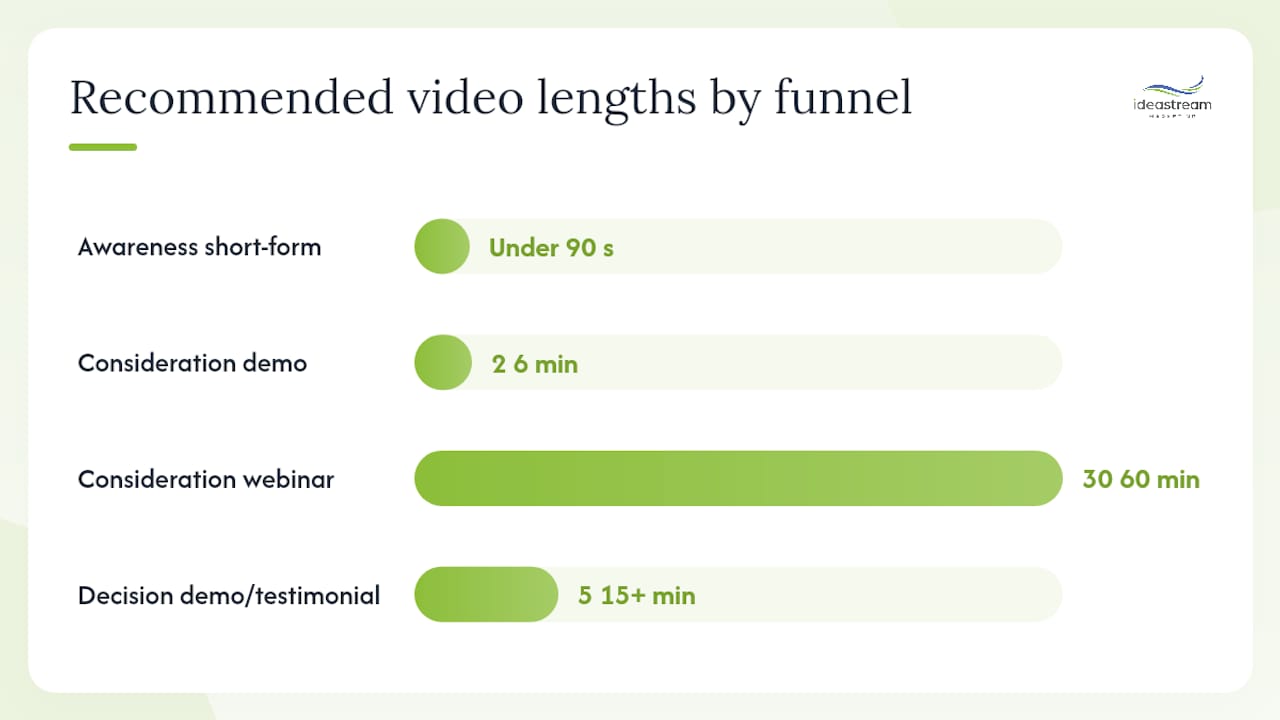
| Map every video to a funnel stage | Match length and format to buyer intent: under 90 seconds for awareness, 2–6 minutes for consideration, 5–15+ minutes for decision. | ||||
| Integrate with CRM from day one | Connect Vidyard or your hosting platform to HubSpot or Salesforce so watch-time data flows to contact records and drives sales prioritization. | ||||
| Measure pipeline, not just views | Track MQL volume, demo-request rate, deal velocity, and win rate for video-influenced opportunities, not completion rates alone. | ||||
| Ideastreammarketing delivers end-to-end | From studio production and AI-assisted repurposing to YouTube SEO and sales integration, Ideastreammarketing builds video programs tied to pipeline goals. |
Table of Contents
- Why does B2B video marketing matter for pipeline and revenue?
- Which video types fit each stage of the B2B buyer funnel?
- How do you set goals and KPIs for a B2B video program?
- How should you budget and staff a B2B video program?
- What does an end-to-end B2B video production workflow look like?
- Where should you publish and promote B2B video content?
- How do you measure video ROI and optimize over time?
- How do you repurpose long-form video into a content engine?
- Real-world workflow: from studio shoot to pipeline attribution
- Your 90-day B2B video starter plan
- How do you integrate video with your CRM and marketing automation?
- Legal and compliance considerations in B2B video marketing
- What most B2B video programs get wrong
- How Idea Stream Marketing helps you build a video program that drives pipeline
- Sources
- FAQ
Why does B2B video marketing matter for pipeline and revenue?
Video does more than build awareness. When mapped to the right funnel stage and integrated with your CRM, it accelerates every phase of the buying cycle.
- Pipeline acceleration: Prospects who watch a product demo before a discovery call arrive better qualified, ask sharper questions, and move to proposal faster.
- Higher lead quality: Demo videos and testimonials are consistently the highest-ROI assets for B2B because they address objections before a salesperson ever picks up the phone.
- Shortened sales cycles: Video lets a buyer self-educate at 11 PM on a Tuesday. By the time they book a call, they have already done the work your SDR used to do.
- Improved internal buy-in: A well-produced customer testimonial is often the most persuasive asset a champion can share with their CFO or procurement team.
- SEO and discoverability: YouTube is the second-largest search engine in the world. A library of problem-search videos compounds organic traffic over months and years.
Stat to know: Roughly 91% of businesses use video as a marketing tool, and the majority of marketers report video directly increases sales and web traffic.
Consider a mid-market SaaS company that added a 90-second customer testimonial to its outbound email sequence. The video showed a named customer describing a specific workflow problem and how the product solved it. Demo-request rates from that sequence climbed noticeably within 60 days, without changing the copy around the video. The testimonial did the persuasion work the text alone could not.
Pro Tip: Place your highest-performing testimonial video on your pricing page. Buyers who reach that page are already evaluating you, and a peer voice at that moment reduces hesitation more than any feature list.
Which video types fit each stage of the B2B buyer funnel?
Not every video belongs everywhere. Matching format and length to funnel stage is the single most important structural decision in a B2B video marketing strategy.
Principal video types and their primary use cases:
- Explainer videos: Clarify a problem or category for buyers who do not yet know your solution exists. Best at the top of the funnel.
- Demo videos: Show the product in action for buyers actively evaluating options. Mid-to-bottom funnel.
- Customer testimonials: Peer validation that reduces risk perception. Bottom funnel and sales enablement.
- Webinars: Deep-dive education and live Q&A that captures high-intent leads. Mid-to-bottom funnel.
- Short-form social clips: Punchy awareness content repurposed from longer assets. Top of funnel on LinkedIn and YouTube Shorts.
- Personalized sales videos: One-to-one Loom recordings from an SDR or AE addressing a specific prospect’s situation. Bottom funnel, post-discovery.
Short-form video under 90 seconds performs better on social channels in terms of completion rates, while longer demos and webinars perform well when buyer intent is already high.
| Funnel Stage | Format | Recommended Length | Primary Channel | Primary KPI | Repurposing Potential |
|---|---|---|---|---|---|
| Awareness | Explainer, social clip | Under 90 seconds | LinkedIn, YouTube Shorts | Views, reach, shares | High — clip from longer assets |
| Consideration | Demo, webinar, case study | 2–6 minutes (demo); 30–60 min (webinar) | YouTube, landing page, email | Watch time, MQLs, demo requests | Medium — highlight clips, replay pages |
| Decision | Full demo, testimonial, personalized video | 5–15+ minutes | Email, sales sequence, landing page | Win rate, proposal rate, CTA clicks | Low — use as-is for sales enablement |
How do you set goals and KPIs for a B2B video program?
Start with the business question, not the metric. Ask: “Do we need to accelerate pipeline velocity, improve lead quality, or increase win rates?” Each answer maps to a different set of KPIs.
- Pipeline acceleration: Track time-to-proposal before and after video is embedded in sequences. A shorter average time is your signal.
- Lead quality: Measure MQL-to-SQL conversion rate for leads that engaged with video versus those that did not.
- Win rate uplift: Compare close rates for deals where the prospect watched a demo or testimonial against deals where they did not.
- Engagement leading indicators: Watch time thresholds (50% completion is a meaningful signal), CTA click rate, and demo-scheduling rate from video CTAs.
Attribution guidance: For long B2B sales cycles (90+ days), avoid last-touch attribution. Use an assist model that credits video touch points throughout the cycle, or a pipeline-acceleration model that measures deal velocity for video-influenced opportunities versus non-influenced ones. Advanced B2B teams measure pipeline contribution, win-rate lift, and deal acceleration rather than engagement metrics alone.
Suggested attribution windows: 30 days for short-cycle SMB deals; 90–180 days for enterprise or complex sales. Tag every video touchpoint in your CRM with a UTM parameter and a lead-source field so you can filter by video-influenced pipeline in your reporting dashboard.
How should you budget and staff a B2B video program?
Budget decisions depend on where you are in the program lifecycle. A pilot phase looks very different from a scaled monthly content operation.
Staffing models:
- Freelancer/editor subscription: Low overhead, flexible, but requires strong internal creative direction. Works well for teams with a clear content calendar.
- In-house producer plus editor: Faster iteration and brand consistency, but carries fixed salary costs. Justified when you are producing four or more assets per month.
- Hybrid with a specialist agency: The most common model for growing B2B teams. In-house and outsourced hybrid teams are increasing as AI tools handle captioning, clipping, and rough-cut editing, freeing the agency relationship for strategy and high-production shoots.
Pro Tip: *Spend your first budget dollars on post-production quality, not shoot complexity. A well-lit, well-edited interview on a clean background outperforms a cinematic shoot with muddy audio and a weak cut every time.
What does an end-to-end B2B video production workflow look like?
A repeatable production process is what separates teams that publish consistently from teams that produce one great video and then go quiet for six months. Here is a workflow you can hand to a vendor or run in-house.
- Brief: Define the audience, funnel stage, single key message, desired CTA, and distribution channels before anyone touches a camera. Use a one-page brief template for every asset.
- Script: Write a full script or detailed talking-points outline. A well-structured script is the foundation of every effective marketing video. Include the opening hook (first 5 seconds), the core message, and the CTA verbatim.
- Shot list and logistics: Plan every camera angle, B-roll moment, and graphic overlay before the shoot day. Confirm location, talent, and equipment.
- Shoot: Execute against the shot list. Record more than you think you need. Capture a clean audio take for every segment.
- Edit: Rough cut first, then fine cut. Add captions (required for LinkedIn autoplay and accessibility), lower-thirds, and motion graphics. Export in multiple formats: 16:9 for YouTube, 1:1 for LinkedIn feed, 9:16 for Stories and Shorts.
- Thumbnail and metadata: Create a custom thumbnail for every YouTube upload. Write a keyword-rich title and description. Add chapters and a transcript.
- CTA and publish: Embed a clear CTA (demo request, content download, or meeting link) in the video and in the post copy. Publish to primary channel, then distribute to secondary channels.
- Log for repurposing: Before closing the project file, timestamp every strong clip, quote, or moment in a shared repurposing log. This is the step most teams skip, and it costs them hours later.
Roles: Assign a content lead (owns the brief and approval), a producer or editor (owns the shoot and cut), and a distribution owner (owns publishing and promotion). Review cycles should have no more than two rounds of feedback before final approval.
Pro Tip: Batch your shoots. Producing three videos in a single shoot day costs roughly the same as producing one. Plan your quarter’s content calendar in advance and group similar formats, such as all testimonials or all demos, into single shoot days.
Where should you publish and promote B2B video content?
Distribution is where most B2B video programs underperform. Producing a great video and posting it once is not a strategy.
- LinkedIn: The dominant paid and organic channel for B2B video distribution. Native video outperforms link posts in organic reach. Use short clips (under 90 seconds) for awareness, and longer thought-leadership pieces for consideration. Sponsored video campaigns let you target by job title, company size, and industry.
- YouTube: Treat it like a search engine, not a social feed. Build a channel that answers buyer problem searches. Titles, descriptions, and transcripts drive discovery. YouTube is strongest for long-form educational content and demo discovery. Follow video SEO best practices to maximize organic reach over time.
- Email: Embed a video thumbnail with a play-button overlay that links to a landing page. The word “video” in a subject line tends to lift open rates. Use video in nurture sequences to move mid-funnel leads toward a demo request.
- Landing pages: A demo video on a product landing page reduces bounce rate and increases time on page. A testimonial video on a pricing page addresses last-minute objections.
- Webinars: Webinars generate high-quality leads and continue driving registrations as evergreen replay content for months after the live event. Gate the replay behind a form to capture late-arriving leads.
Promotion tactics: Post natively on LinkedIn three to four times per week using a mix of short clips and text posts that reference your longer videos. Activate employee advocacy so your team shares content from their personal profiles. Run paid LinkedIn video campaigns targeting your ICP (ideal customer profile) with awareness clips, then retarget viewers with a demo or testimonial.
Pro Tip: Use Vidyard or a similar B2B video hosting platform for sales-sequence videos rather than YouTube links. Vidyard tracks individual viewer behavior at the contact level and pushes watch-time data directly into HubSpot or Salesforce, giving your sales team real-time buying signals.
How do you measure video ROI and optimize over time?
Measurement is where most B2B video programs stall. Teams track views and feel good, then struggle to justify budget at the next planning cycle. Move from vanity metrics to pipeline metrics.
Leading indicators (weekly review):
- Average watch time and completion rate by video
- CTA click rate (demo requests, content downloads, meeting bookings)
- Video-influenced MQL volume
Lagging indicators (monthly review):
- Pipeline value attributed to video-influenced opportunities
- Win rate for video-influenced deals versus non-influenced deals
- Average deal velocity (days from first video view to closed-won)
Testing cadence:
| Test Type | Frequency | What to Test |
|---|---|---|
| Thumbnail A/B | Weekly (paid) | Face vs. text overlay, color contrast, expression |
| Opening hook | Monthly | Question vs. bold claim vs. statistic in first 5 seconds |
| CTA placement | Monthly | Mid-video vs. end-card vs. post copy only |
| Video length | Quarterly | 60-second vs. 2-minute for same topic |
CRM integration: Tag every video touchpoint with a UTM parameter (utm_medium=video, utm_source=linkedin, utm_campaign=demo-series). Create a custom lead-source field in HubSpot or Salesforce for “video-influenced.” Map video view events from Vidyard or your hosting platform to contact records. This gives you a clean filter for video-influenced pipeline in your revenue reports.
How do you repurpose long-form video into a content engine?
One well-produced 30-minute webinar can yield weeks of content if you plan the repurposing before you hit record. Planning repurposing at production time, not after, creates a long runway of leads from a single asset.
Repurposing checklist:
- Log timestamps for every strong quote, insight, or demo moment during the edit
- Export highlight clips at 30, 60, and 90 seconds
- Export captions as an SRT file and a plain-text transcript
- Create format variants: 16:9 for YouTube, 1:1 for LinkedIn feed, 9:16 for Stories and Shorts
- Pull three to five text quotes for standalone LinkedIn posts
- Write a blog post or email newsletter using the transcript as a draft
Workflow for human plus AI handoff:
- Complete the rough cut of the long-form asset
- Run the transcript through an AI captioning and clipping tool (such as Descript or a similar platform) to identify highlight moments and generate caption files
- Human editor reviews AI-suggested clips, selects the strongest three to five, and fine-tunes the cuts
- Schedule clips across channels using your editorial calendar
- Log all published clips in a repurposing tracker with performance data
Scaling guardrails: Not every clip is worth publishing. Producing 20 low-quality clips from a mediocre webinar dilutes your brand faster than publishing nothing. Use automated content creation workflows to handle the mechanical steps while your team focuses on quality control.
Real-world workflow: from studio shoot to pipeline attribution
Here is a practical example of how a B2B team connected production, YouTube SEO, and AI-assisted repurposing into a single pipeline-generating workflow.
A professional services firm produced a 25-minute demo and Q&A session in a studio setting. The video was uploaded to YouTube first, with a keyword-rich title targeting a specific buyer problem search query, a full transcript in the description, and chapter markers for each section. Within 60 days, the video ranked on the first page of YouTube results for its target query.
The production team then used AI-assisted captioning to extract five highlight clips of 45–90 seconds each. Those clips ran as LinkedIn sponsored content targeting the firm’s ICP by job title and company size. Each clip ended with a CTA linking to a landing page with the full demo and a meeting-booking form.
The sales team embedded the full demo link in their outbound sequences using Vidyard, so they could see which prospects watched the video and how far they got.
The result was a measurable lift in demo-request volume from both organic YouTube traffic and LinkedIn paid campaigns, with the Vidyard data giving the sales team a clear signal for prioritizing outreach. The entire asset library from that one shoot day fueled six weeks of multi-channel distribution.
Pro Tip: Use your video transcript as a keyword research tool. Run it through a keyword analysis tool to find the exact phrases your buyers use when describing the problem your product solves. Then optimize your YouTube title and description around those phrases rather than your internal product terminology.
Your 90-day B2B video starter plan
This plan is designed for teams starting from zero or relaunching a dormant video program. Each month builds on the last.
Month 1: Foundation
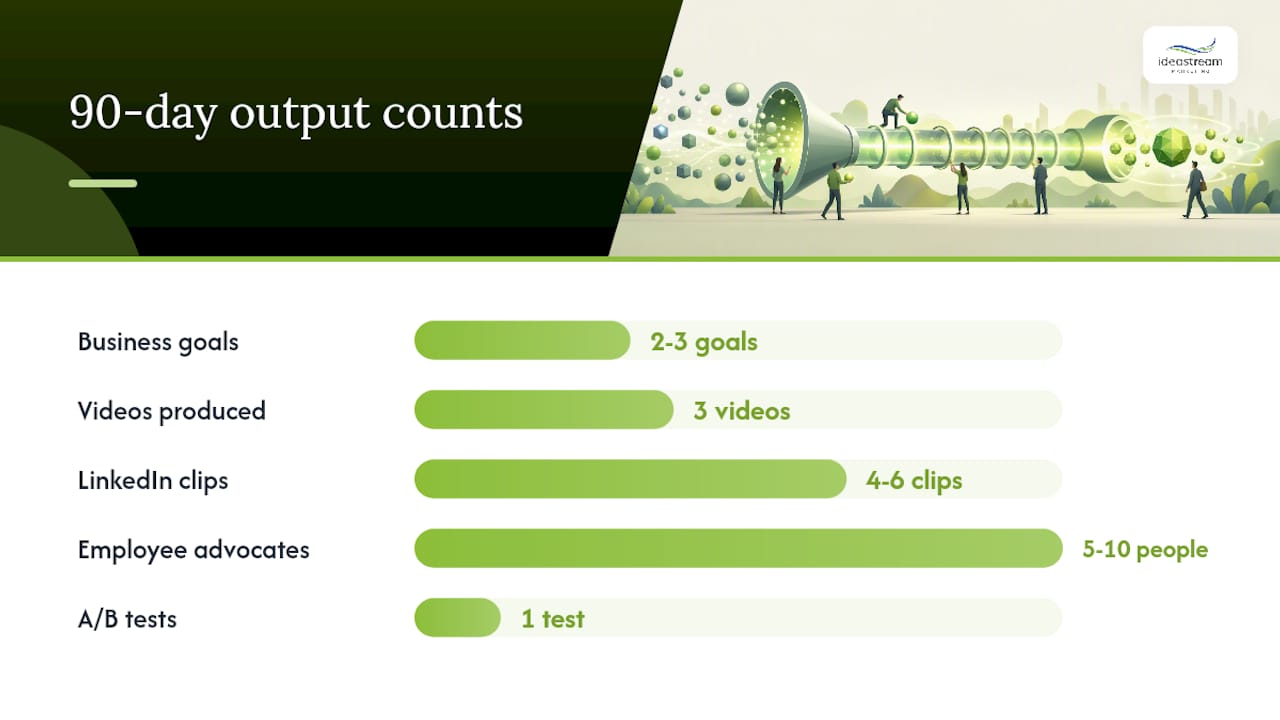
- Define two to three business goals and map each to a measurable KPI (demo requests, MQL volume, pipeline velocity).
- Set up your YouTube channel with a keyword-optimized channel description, banner, and playlist structure.
- Install Vidyard or a comparable B2B video hosting tool and connect it to your CRM.
- Produce two product demo videos and one customer testimonial video.
- Set up UTM tracking and a “video-influenced” lead-source field in your CRM.
Month 2: Distribution
- Publish both demos to YouTube with SEO-optimized titles, descriptions, and transcripts. Follow proven YouTube marketing steps to build early traction.
- Repurpose each demo into two to three LinkedIn clips and launch a sponsored campaign targeting your ICP.
- Embed the testimonial video into your primary outbound email sequence and your pricing page.
- Activate employee advocacy: ask five to ten team members to share the LinkedIn clips from their personal profiles.
- Embed demo links in sales sequences using Vidyard and brief your sales team on how to read watch-time data.
Month 3: Optimize and scale
- Pull your Month 1 and Month 2 KPI data: watch time, CTA clicks, MQL volume, and pipeline influence.
- Identify the top-performing video and run one A/B test (thumbnail or opening hook).
- Repurpose your best-performing long-form asset into additional clips and a blog post.
- Plan your next quarter’s content calendar based on what worked, and schedule a batch shoot day.
Quick-reference checklist:
- Goals and KPIs defined and documented
- YouTube channel set up with SEO metadata
- CRM integration and UTM tracking live
- Two demos and one testimonial produced
- LinkedIn clips live with paid promotion
- Sales sequences updated with video links
- Repurposing log started and maintained
- Monthly reporting dashboard built
Use the video content checklist for marketing pros to keep your team aligned across every production cycle.
How do you integrate video with your CRM and marketing automation?
Video data is only as useful as the system it feeds. Without CRM integration, you are flying blind on which prospects actually watched your content and which ones are ready to buy.
HubSpot’s B2B video marketing guidance recommends connecting your video hosting platform directly to your CRM so that view events, watch-time percentages, and CTA clicks flow into contact records automatically. Vidyard integrates natively with HubSpot and Salesforce, pushing individual viewer data to the contact level.
On the marketing automation side, use video engagement as a trigger for workflow enrollment.
UTM parameters are the connective tissue between your video distribution and your revenue attribution. Every video link shared in email, LinkedIn, or a sales sequence should carry a consistent UTM structure (source, medium, campaign, content) so your reporting can isolate video-influenced pipeline from other channels. Build a simple UTM naming convention and document it in a shared team reference so every team member uses the same format.
Legal and compliance considerations in B2B video marketing
Video content carries real legal obligations that many marketing teams overlook until they have a problem.
Privacy and consent: If your video features a real customer, employee, or third party, you need a signed release form before publishing. This applies to testimonial videos, case study interviews, and event footage. For any video that captures identifiable individuals in the background (such as trade show footage), a general release or clear signage at the event is required.
Music and licensing: Never use commercially released music without a proper sync license. Use royalty-free music libraries such as Artlist, Musicbed, or Epidemic Sound, which provide licenses that cover commercial use. Unlicensed music on YouTube will trigger a Content ID claim and can result in your video being muted or taken down.
FTC disclosures: If a customer testimonial was provided in exchange for compensation, a discount, or a free product, the FTC requires a clear disclosure. The same applies to sponsored video content or paid partnerships. The disclosure must be prominent and not buried in a description or fine print.
Accessibility: The Americans with Disabilities Act (ADA) and Section 508 of the Rehabilitation Act require that video content published by organizations receiving federal funding include accurate captions and, in some cases, audio descriptions. Even for private companies, accurate captions are a best practice for accessibility and SEO.
Data collection: If your video is gated behind a form or uses a tracking pixel to identify viewers, your privacy policy must disclose this data collection. CCPA compliance is relevant for California-based viewers, and any organization with European customers must consider GDPR implications for video tracking data.
This section provides general information, not legal advice. Consult a qualified attorney to confirm compliance requirements for your specific situation and jurisdiction.
What most B2B video programs get wrong
The single most common failure pattern is producing video in isolation from the sales team. Marketing creates a polished demo video, posts it on YouTube, and considers the job done. Meanwhile, the sales team has never seen it, never uses it, and continues sending walls of text to prospects who would have responded to a two-minute walkthrough.
The second mistake is treating every metric as equally important. Watch time on a brand awareness clip and watch time on a bottom-funnel demo are not the same signal.
The third mistake is inconsistent cadence. One great video every six months does not build a channel, a library, or a compounding SEO asset. The teams that win with video publish consistently, even when individual assets are imperfect. A 90-second Loom from your CEO answering a common sales objection, published every two weeks, outperforms a quarterly cinematic production that never gets embedded in a sales sequence.
The quickest win most teams can implement in 30 days: audit your top three outbound email sequences and add a video thumbnail linking to your best demo or testimonial. No new production required. Just surface what you already have. One team we know of saw their demo-request rate climb after making this single change, with no other variables altered.
How Idea Stream Marketing helps you build a video program that drives pipeline
Most B2B marketing teams have the ambition for video but not the production infrastructure to execute consistently. Idea Stream Marketing is a full-service video production and digital marketing agency that handles the entire workflow, from concept and scripting through studio filming, professional editing, AI-assisted repurposing, YouTube SEO optimization, and sales-sequence integration.
We produce demo series, customer testimonials, branded explainers, and social clips built specifically for B2B pipeline goals, not just brand awareness. Every asset is developed with discoverability in mind: keyword-optimized metadata, transcript-based SEO, and multi-format exports ready for LinkedIn, YouTube, and email. Our team also connects your video program to your CRM and marketing automation stack so you can track pipeline contribution from day one.
Whether you are launching your first video program or scaling an existing one, we offer project-based and retainer-based engagements sized for small to mid-market B2B teams. Explore our video advertising and production services or contact us to request a 90-day starter plan built around your specific pipeline goals.
Sources
- B2B Video Marketing: 6 Tips to Start Your Strategy — Leadfeeder
- B2B Video Marketing Statistics 2026: 50+ Stats (91% Use Video) — Pixel8 Production
- State of Video Report: Video marketing statistics — Wistia
- Building a B2B Video Marketing Strategy With Impact — HubSpot Blog
FAQ
What is the most effective B2B video type for generating pipeline?
Demo videos and customer testimonials consistently produce the highest pipeline ROI in B2B, because they address buyer objections and accelerate purchase intent before a sales call. Embed them in outbound sequences and on high-intent landing pages for maximum impact.
How long should a B2B video be?
Match length to funnel stage: awareness clips should run under 90 seconds, consideration-stage demos work best at 2–6 minutes, and decision-stage content such as full product walkthroughs or webinar replays can run 5–15+ minutes when buyer intent is already high.
Which platforms work best for distributing B2B video content?
LinkedIn is the top channel for social and paid B2B video distribution, while YouTube is strongest for long-form educational content and organic discovery. Email and landing pages drive the highest conversion rates for bottom-funnel assets.
How do you measure the ROI of a B2B video program?
Track leading indicators weekly (watch time, CTA clicks, demo requests) and lagging indicators monthly (pipeline value, win rate, and deal velocity for video-influenced opportunities). Connect your video hosting platform to your CRM using UTM parameters and event tagging to isolate video-influenced pipeline.
How much does a B2B video program typically cost?
B2B video program costs vary widely depending on scope and production approach, from low-cost DIY styles to high-end full-service productions, with many teams using a hybrid model combining in-house and agency resources.

