








Effective training videos deliver one clear learning objective, run at the right length for the content, and include at least one embedded assessment tied to a measurable outcome. Before you produce a single frame, run through this starter checklist:
- Define the specific behavior or skill the learner must demonstrate after watching.
- Pick the right format (screen-cast, animation, live-action, or microlearning clip).
- Write a 90–120 second script for microlearning modules, or a 6–12 minute script for complex software demos.
- Plan one embedded knowledge check per module.
- Choose a hosting platform that gives you viewer-level analytics, not just total play counts.
Target KPI: Aim for a completion rate and knowledge-check pass rate of 70% or higher on short modules, per TechSmith’s measurement guidance.
TalentLMS’s 2026 L&D Benchmark Report found that 73% of HR managers identify “finding the right, relevant content” as a primary obstacle to effective L&D. That single finding explains why most corporate video libraries underperform: teams produce volume instead of relevance. The fix is objective-first production, not more videos.
Employee preference data reinforces the case for well-crafted short video. Brightcove’s Engage report found that a large majority of employees agree more workplace video would improve their experience, and many employees prefer a one-minute video over reading an email. When you combine that preference with a clear learning objective and a measurable outcome, training videos become one of the highest-ROI tools in your L&D toolkit. For organizations that want professional production from concept through delivery, Ideastreammarketing works as a full-service production partner.
Key Takeaways
Effective training videos require a clear learning objective, the right format for the content, an embedded assessment, and a measurement framework tied to a business outcome — production quality alone does not determine results.
| Point | Details | ||||
|---|---|---|---|---|---|
| Objective first, always | Write one measurable learning objective before scripting; it determines format, length, and assessment. | ||||
| Match format to content | Use screencasts for software tasks, animation for abstract concepts, and branching video for decision-making skills. | ||||
| Aim for 70%+ completion | TechSmith recommends targeting a completion and quiz pass rate above 70% on short modules as your baseline KPI. | ||||
| Embed assessments mid-video | Interpolated quiz questions improve retention more than post-video testing; place at least one per module. | ||||
| Govern before you scale | Assign a content owner, set a review cadence, and apply a metadata standard before building a large library. | ||||
| Ideastreammarketing | Full-service production from scripting through LMS-ready delivery, paired with video SEO and AI-powered distribution. |
30/60/90-day action plan
- 30 days: Pilot one microlearning module using the script template and storyboard format above. Measure completion rate and quiz pass rate at day 30.
- 60 days: Build three role-based modules, integrate them into your LMS with consistent metadata, and pull drop-off data to identify content gaps.
- 90 days: Review analytics across all modules, map quiz performance to on-the-job outcomes, and set your first content review cycle based on what the data shows.
Prioritize measurement and governance over volume. Ten well-designed, measurable modules will outperform a library of fifty untracked ones every time.
Table of Contents
- When are training videos the right investment?
- Which training video format fits your content?
- How to produce a training video from start to finish
- Real examples and ready-to-adapt templates for common use cases
- Which tools should you use to create and host training videos?
- How to make training videos accessible, engaging, and measurable
- Common mistakes that undermine training video programs
- What most training video guides get wrong
- Idea Stream Marketing can handle your training video production end to end
- Sources
- FAQ
When are training videos the right investment?
Video earns its budget when the content needs to be consistent across a large audience, when the task is visual or procedural, or when the stakes of getting it wrong are high. The use cases with the strongest return are:
- New-hire onboarding: Standardizes the message every new employee receives, regardless of who is presenting that week.
- Compliance and safety: Delivers documented, trackable training for topics where BLS/OSHA workforce data confirms real injury and liability risk.
- Software and systems training: Screen-recorded walkthroughs let learners pause, rewind, and follow along at their own pace.
- Sales enablement: Product-value stories and objection-handling scenarios give reps a repeatable reference they can revisit before a call.
- Product training: Demos and feature walkthroughs reduce support tickets and accelerate time-to-competency for both employees and customers.
- Customer support refreshers: Short FAQ-style clips keep support teams current without pulling them into a full training session.
Video is a lower-ROI choice for very short policy alerts that change frequently (a two-sentence text update beats a two-minute video), and for culture conversations that genuinely need two-way dialogue. If the content requires real-time Q&A or emotional nuance, a live session or a discussion thread will outperform a recorded clip.
A practical prioritization tool is the RRF rubric: score each potential video project on Reach (how many people need this), Risk (what happens if they get it wrong), and Frequency (how often this content is needed). Projects that score high on all three deserve video investment first.
Pro Tip: Pair every short training video with a one-page job aid and a scheduled live follow-up session. The 2025 Training Industry report recommends treating video as a modular part of a blended learning ecosystem, not a standalone solution. The job aid gives learners a reference at the moment of need; the live session closes the gap between watching and doing.
Which training video format fits your content?
Choosing the wrong format wastes production budget and frustrates learners. Here is a practical mapping of the most common formats:
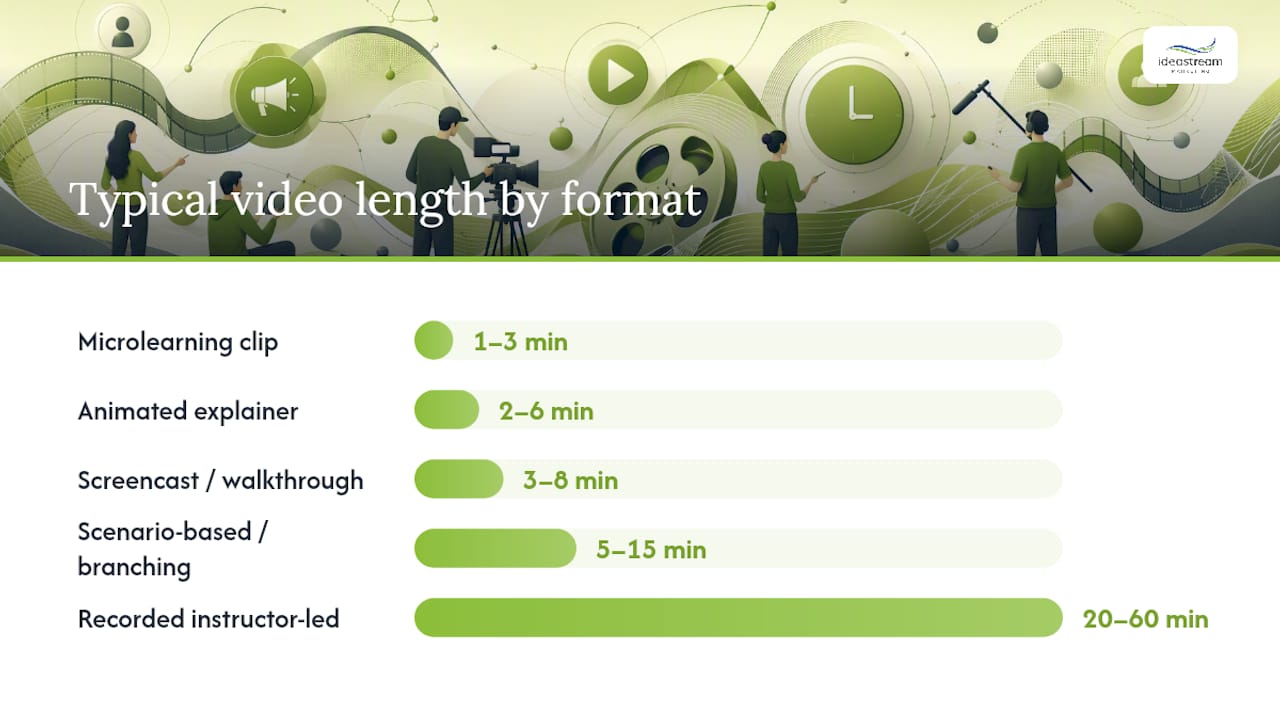
| Format | Best for | Typical length | Production complexity |
|---|---|---|---|
| Microlearning clip | Single skill or concept, mobile learners | 1–3 min | Low |
| Screencast / screen walkthrough | Software training, step-by-step processes | 3–8 min | Low–Medium |
| Animated explainer | Abstract concepts, compliance, onboarding | 2–6 min | Medium–High |
| Scenario-based / branching | Decision-making, soft skills, compliance | 5–15 min | High |
| Live-action role play | Behavioral modeling, sales, customer service | 3–10 min | Medium–High |
| Recorded instructor-led session | Complex topics, certification prep | 20–60 min | Low (capture) |
| Product demo / feature walkthrough | Product training, customer onboarding | 2–8 min | Low–Medium |
A few format-specific notes worth keeping in mind:
Microlearning works best when you have already chunked a larger topic into discrete skills. If your content genuinely requires 20 minutes to cover, do not force it into a three-minute clip. Break it into a playlist of four or five focused modules instead.
Scenario-based and branching video generates the richest analytics data because every path choice is a data point. Cinema8’s research on video analytics shows that branching-path data lets L&D teams identify widespread misunderstandings and tailor follow-up content accordingly. The production investment is higher, but the diagnostic value is proportionally greater.
Recorded instructor-led sessions are the lowest-effort capture format, but they carry the highest risk of passive viewing. Always add chapter markers, a summary quiz, and a transcript to make them searchable and measurable.
For accessibility, every format needs closed captions at minimum. Animated and screen-cast formats should also include audio descriptions for any visual information that is not spoken aloud.
How to produce a training video from start to finish
A clean production workflow prevents the two most common failures: starting to record before the objective is clear, and publishing without any measurement plan. Work through these steps in order.
The production checklist
- Define the learning objective and target performance metric. Write one sentence: “After watching this video, the learner will be able to [do X] as measured by [Y].”
- Write a learner-centered script. Open with the problem the learner faces, not a title card. Use the scripting techniques that keep viewers engaged from the first line.
- Build a brief storyboard or slide map. Four to six panels is enough for most short modules.
- Choose your format and recording approach. Camera, screen capture, or animation, based on the format table above.
- Record. Batch multiple short modules in a single session to cut setup time.
- Edit. Trim dead air, add captions, insert callout graphics, and place the knowledge check at the right moment (not just at the end).
- **QA and accessibility check. Verify captions are accurate, contrast ratios meet accessibility standards. AA, and all interactive elements are keyboard-accessible.
- Publish and tag in your LMS or host. Apply consistent metadata: audience, role, skill level, content owner, and review date.
- Measure and iterate. Pull completion rate, quiz pass rate, and drop-off data after the first 30 days and act on what you find.
Script template for a 90-second microlearning module
Opening (0:00–0:15): State the problem. “When a customer asks for a refund outside our 30-day window, most reps hesitate. Here is exactly what to say.”
Learning steps (0:15–1:10):
- Step 1: Acknowledge the customer’s frustration.
- Step 2: Explain the policy clearly and without apology.
- Step 3: Offer the available alternative (store credit, escalation path).
Call to action and knowledge check (1:10–1:30): “Now let’s see how you’d handle it. Answer the question below before moving to the next module.”
Four-panel storyboard for a 2–3 minute screen-cast
| Panel | On-screen | Narration | Callout / interaction |
|---|---|---|---|
| 1 | Title card + learning objective | “By the end of this video, you’ll know how to…” | None |
| 2 | Screen recording: Step 1 | Walk through the action aloud | Highlight cursor, zoom callout |
| 3 | Screen recording: Step 2–3 | Narrate each click | Arrow callout on key UI element |
| 4 | Summary slide + quiz prompt | “Let’s check your understanding.” | Embedded multiple-choice question |
Pro Tip: Use an AI transcription tool like Otter.ai or Descript to rough-cut your transcript immediately after recording. Clean the transcript, then use it to generate captions, a written job aid, and a searchable text version of the module in one pass. This automated content workflow cuts post-production time significantly.
Measurement KPIs to attach to each stage: completion rate (publish step), embedded quiz pass rate (edit step), drop-off heatmap (measure step), and time-to-competency tracked against pre-training baseline (30-day review).
Real examples and ready-to-adapt templates for common use cases
The fastest way to start producing is to adapt a proven structure rather than build from scratch. Here are compact example cards for the five most common corporate video types.
New-hire onboarding (2–4 module series)
- Objective: “The new hire will identify the three core values and explain how each applies to their role.”
- Lesson outline: Company mission → team structure → day-one expectations.
- Format: Animated explainer or talking-head with motion graphics.
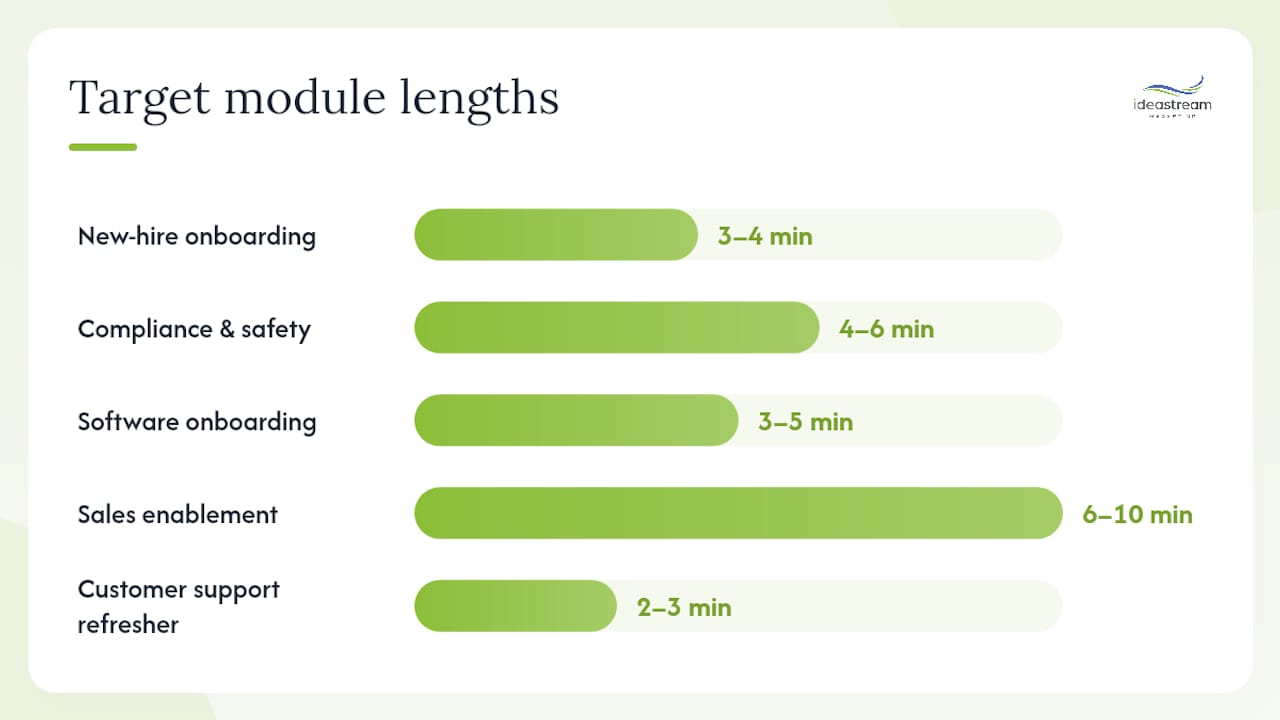
- Target length: 3–4 minutes per module.
- Assessment: “Which of the following best describes our approach to customer escalations?”
Compliance and safety
- Objective: “The employee will correctly identify the three steps required before entering a confined space.”
- Lesson outline: Regulatory requirement → hazard identification → required procedure.
- Format: Live-action with on-screen text callouts; modular and trackable.
- Target length: 4–6 minutes; one topic per module.
- Assessment: True/false or scenario-based question tied to the specific regulation.
Software onboarding (screen-cast + quiz)
- Objective: “The user will complete a purchase order in the ERP system without assistance.”
- Lesson outline: Navigate to the module → enter required fields → submit and confirm.
- Format: Screencast with zoom callouts.
- Target length: 3–5 minutes.
- Assessment: “What happens if you submit without entering the cost center code?”
Sales enablement
- Objective: “The rep will articulate the top three differentiators and handle the ‘too expensive’ objection.”
- Lesson outline: Product value story → competitive context → objection-handling scenario.
- Format: Scenario-based branching video.
- Target length: 6–10 minutes.
- Assessment: Branching scenario where the rep chooses a response and sees the outcome.
Customer support refresher
- Objective: “The agent will follow the correct escalation path for billing disputes.”
- Lesson outline: Trigger conditions → escalation steps → documentation requirements.
- Format: Screencast or animated flowchart.
- Target length: 2–3 minutes.
- Assessment: “A customer disputes a charge from 45 days ago. What is your first step?”
Distribution and reuse
The best distribution channels for internal employee training materials are your LMS (for tracking), your intranet (for discoverability), and a direct email link with UTM parameters (for measuring click-through from communications). Tag every video with audience, role, skill level, and content owner so learners can find it through search.
One recording can serve multiple purposes. Pull a 30-second clip for a Slack or Teams announcement, convert the transcript into a written article, and use the captions file as the basis for a job aid. Panopto’s Workforce Training Report found that over half of organizations now use video as their primary training modality, and the organizations reporting the highest ROI are those that treat each recording as a content asset to be reused, not a one-time event.
Which tools should you use to create and host training videos?
The right tool depends on what you are building and how much production time you can invest. Here is a practical breakdown by category.
Quick screen capture: Loom
Loom is the fastest path from idea to shareable video. Record your screen, your camera, or both, and the link is ready to share in seconds. It works well for software walkthroughs, quick manager updates, and informal knowledge transfers. Loom’s viewer analytics show watch time and engagement, though it is not a full LMS. For teams that need SCORM packaging or formal assessment tracking, Loom is a starting point, not an endpoint.
Animation and explainer video: Vyond
Vyond is built for teams that need polished animated content without a motion graphics studio. Its character-based animation library and scene templates make compliance modules, onboarding explainers, and scenario-based content achievable at medium production complexity. Vyond supports SCORM export, which means you can publish directly to most LMS platforms and track completion and quiz results. Budget and time investment sit in the medium range: expect a few hours per finished minute for a first-time user.
Cloud-based editing: Microsoft Clipchamp
For organizations already in the Microsoft 365 ecosystem, Clipchamp offers browser-based editing with no software installation. Clipchamp for Work accounts add organizational licensing and collaboration features. It handles basic trimming, captions, and simple graphics well. Production complexity is low, and it is a practical choice for internal updates and quick refreshers that do not require animation or branching.
For organizations that want higher-production animated content tied to brand identity, CGI and 3D rendering can support branded explainer videos where visual consistency across a product line matters.
Enterprise LMS and hosting: Docebo
Docebo is an enterprise learning platform that combines video hosting with learning analytics, assessment integrations, and SCORM/LTI support. It gives L&D teams viewer-level data: who watched, how far they got, and how they scored on embedded assessments. For organizations running formal training programs at scale, Docebo’s reporting connects viewing behavior to learning outcomes in a way that simple video hosts cannot. Budget tier is enterprise; expect a per-seat licensing model.
Selection criteria at a glance
- Interactivity and assessment support: Vyond and Docebo both support embedded quizzes and SCORM; Loom does not.
- Hosting vs. simple sharing: Docebo is a full LMS; Loom and Clipchamp are sharing-first tools.
- Production complexity: Loom and Clipchamp are low; Vyond is medium; full live-action or custom animation is high.
- Budget tier: Loom and Clipchamp are low-cost entry points; Vyond is mid-range; Docebo is enterprise.
Research puts Average instructional video production costs are estimated to be several thousand dollars per finished minute for professionally produced content. Microlearning formats and screen-capture tools reduce that cost significantly, which is one of the strongest arguments for keeping most modules short.
How to make training videos accessible, engaging, and measurable
Accessibility checklist
Closed captions are the baseline, not the ceiling. A genuinely accessible training video also includes:
- A full transcript available for download or as a companion page.
- Audio descriptions for any visual information not covered by the narration (charts, on-screen text, demonstrations).
- High-contrast visuals and on-screen text that meets WCAG 2.1 AA contrast ratios.
- Keyboard-accessible interactive elements for learners using assistive technology.
- Language translation planning for multilingual workforces, even if you start with English-only and add subtitles in a second phase.
ATD Research’s “Video for Learning” report identifies accessibility and interactivity as two of the clearest differentiators between high-performing and average video-based learning programs.
Engagement tactics that research supports
Chunking content into modules under six minutes is one of the most consistent findings in L&D research. Beyond length, the tactics with the strongest evidence base are:
- Embedded low-stakes quiz questions placed mid-video, not just at the end. Industry data summarized by Research.com shows that interpolated testing during video improves retention compared to post-video testing alone.
- Scenario branching that puts the learner in a decision-making role rather than a passive viewing role.
- Concrete examples and on-screen callouts that connect abstract concepts to real job tasks.
Stat to know: Brightcove’s Engage report found many employees prefer a one-minute video over reading an email. Short, specific, and visual is not just a preference — it is a measurable engagement advantage.
Measurement framework
Cinema8’s viewer analytics guidance outlines the four signals that matter most: watch depth, skip and rewind hotspots, embedded assessment results, and branching-path choices. Read them together, not in isolation.
- Watch depth below 60% on a module usually signals a pacing or relevance problem in the middle section.
- High rewind frequency on a specific segment means learners are confused there. Recut or add a callout.
- Low quiz pass rate on a specific question points to a gap in how that concept was explained.
- Branching path data shows which misconceptions are most common across your learner population.
Pro Tip: Map your video analytics to a business outcome, not just a learning metric. If a software training module shows 85% completion and 80% quiz pass rate but error rates in the system have not dropped, the video is not the problem. The gap is in transfer — add a live practice session or a job aid at the moment of application.
Common mistakes that undermine training video programs
The red flags to watch for
- Producing videos without a written learning objective attached to each one.
- Skipping the accessibility and QA checklist before publishing.
- Building a large video library with no metadata standard, so learners cannot find what they need.
- Measuring only total views instead of completion rate, quiz performance, and business outcomes.
- Treating a recorded Zoom call as a finished training module without editing, captioning, or adding a knowledge check.
Governance checklist
A video library without governance degrades fast. Assign these responsibilities before you publish your first module:
- Content owner: One named person responsible for each video’s accuracy and update schedule.
- Review cadence: Annual review at minimum; quarterly for compliance and safety content.
- Retention policy: Archive or delete videos that are out of date rather than leaving them discoverable.
- Metadata standard: Every video tagged with audience, role, skill level, content owner, and review date.
- Analytics review schedule: Pull completion and quiz data at 30 days post-launch and at each review cycle.
Practical best practices for scaling production
Template-driven scripting cuts production time by giving writers a consistent structure to fill in rather than starting from a blank page. Reuse strategy means treating every recording as a source asset: the full module, a short clip, a transcript-based article, and a captions file are all outputs of one production session.
Pro Tip: Set a versioning trigger before you publish. Define in writing what change to the underlying process, policy, or product will require a video update. Without that trigger, videos quietly become inaccurate and no one notices until a learner follows outdated instructions.
For teams that want to scale production without proportionally scaling budget, AI-driven production workflows can handle transcription, caption generation, and metadata tagging automatically, freeing your team to focus on scripting and quality review.
What most training video guides get wrong
Most guides on this topic spend the majority of their space on production tools and almost none on the governance and measurement infrastructure that determines whether a video program actually works. The result is organizations with polished video libraries that nobody can find, nobody finishes watching, and nobody can prove changed behavior on the job.
The more useful framing is this: a well-scripted screen-cast with clear audio and one embedded quiz question will outperform a high-budget animated module that has no learning objective and no measurement plan. Production quality matters, but it is downstream of objective clarity and measurement design.
The second thing most guides understate is the cost of irrelevant content. When 73% of HR managers say content relevance is their primary L&D obstacle (TalentLMS 2026 LD Benchmark), the answer is not better production tools. It is a tighter intake process: every video request should require a written learning objective and a named business outcome before it enters the production queue. That single governance step eliminates the majority of low-value video projects before they consume budget.
The third gap is accessibility. Teams routinely add captions as an afterthought and skip audio descriptions entirely. Accessibility is not a compliance checkbox. It is a quality signal: a video with a clean transcript, accurate captions, and keyboard-accessible interactions is a better-designed video for every learner, not just those with disabilities.
Start with the measurement framework, then build the governance structure, then produce. That sequence is the opposite of what most teams do, and it is why most teams end up with a library of videos they cannot defend to leadership.
Idea Stream Marketing can handle your training video production end to end
If your team has the learning objectives but not the production infrastructure, Idea Stream Marketing delivers the full production chain: concept development, scripting and storyboarding, studio and field recording, professional editing, motion graphics, closed captions, and analytics-ready delivery formatted for your LMS or hosting platform.
We produce microlearning packs, software walkthrough packages, compliance modules, and sales enablement series, and we pair every project with AI-powered distribution and video SEO so your content is discoverable both internally and externally. Our full-service video production team serves clients across Long Island, New York City, and nationwide. To discuss your training video program and get a production plan, contact us here.
Sources
- The-TalentLMS-2026-LD-Benchmark-Report.pdf
- 2025 Training Industry report
- Panopto workforce training report
- Research
- BrightCove Engage report (Ascend2)
- How to Measure Engagement With Your Video Training
- Measuring employee training engagement with video analytics | Cinema8
- Bls
FAQ
What are training videos?
Training videos are short, structured recordings designed to teach a specific skill or procedure, typically used in corporate L&D, onboarding, compliance, and software education programs.
What are the main types of training videos?
The most common formats are microlearning clips, screencasts, animated explainers, scenario-based branching videos, live-action role plays, recorded instructor-led sessions, and product demos. Each format fits different content types and production budgets.
What is the best platform for hosting online training courses?
For enterprise programs with formal tracking needs, Docebo offers viewer-level analytics, SCORM/LTI support, and assessment integrations. For quick internal sharing, Loom is a practical low-cost starting point.
How long should a training video be?
Microlearning modules work best at 1–3 minutes; software walkthroughs and demos typically run 3–8 minutes; complex scenario-based content can run up to 15 minutes. Keep most modules under six minutes where the content allows.
Do employees get paid to watch training videos?
In the United States, time spent watching required training videos during work hours is generally compensable under the Fair Labor Standards Act. Employees should be paid for any mandatory training time, whether in-person or video-based. Consult your HR or legal team to confirm how your organization’s specific policies apply.

