








An explainer video is a short, narrated visual that teaches one key idea to one specific viewer, typically in about one minute. Use one when you need to convert a curious visitor, activate a new user, or reduce repetitive support questions. The rule is simple: write the script first, then choose your production route.
For marketing and product pages, roughly one minute is the proven sweet spot. Social teasers work at short durations. Onboarding and training pieces can be somewhat longer without losing viewers, as long as every scene earns its place.
Table of Contents
- What format should your explainer video use?
- Where do explainer videos actually pay off?
- How do you make an explainer video step by step?
- Which tool or production route is right for you?
- What does an explainer video actually cost?
- What makes an explainer video actually work?
- Your production checklist and 4-week schedule
- Key Takeaways
- When hiring a professional team changes the outcome
- Ready to produce a video that actually converts?
- Useful sources
- FAQ
What format should your explainer video use?
Choosing a format before you understand your goal is one of the most common production mistakes. Each style carries different communication strengths, not just aesthetic ones.
- 2D animation: The most versatile format. Works for abstract concepts, SaaS products, and anything that is hard to film. Moderate cost, strong brand control, and a multi-week production window with a professional team. Best for landing pages and product launches.
- Whiteboard animation: Draws itself on screen, which naturally paces the viewer’s attention. Effective for step-by-step processes and educational content. Lower production cost than full 2D, but the visual style can feel generic if not customized.
- Live-action: Builds the most human trust, especially for service businesses, healthcare, and recruiting. Requires filming, which adds cost and scheduling complexity. Best when a real face or real environment is the message.
- Screencast: Records software in action, often with a voiceover. The fastest format to produce and the clearest for software onboarding and tutorials. Minimal visual design required.
- AI avatar / AI-generated: Uses synthetic presenters and generative visuals. Fastest turnaround and lowest per-unit cost, making it practical for high-volume needs like localized variants or internal training libraries. Every AI-generated draft requires human review for brand nuance and emotional pacing before publishing.
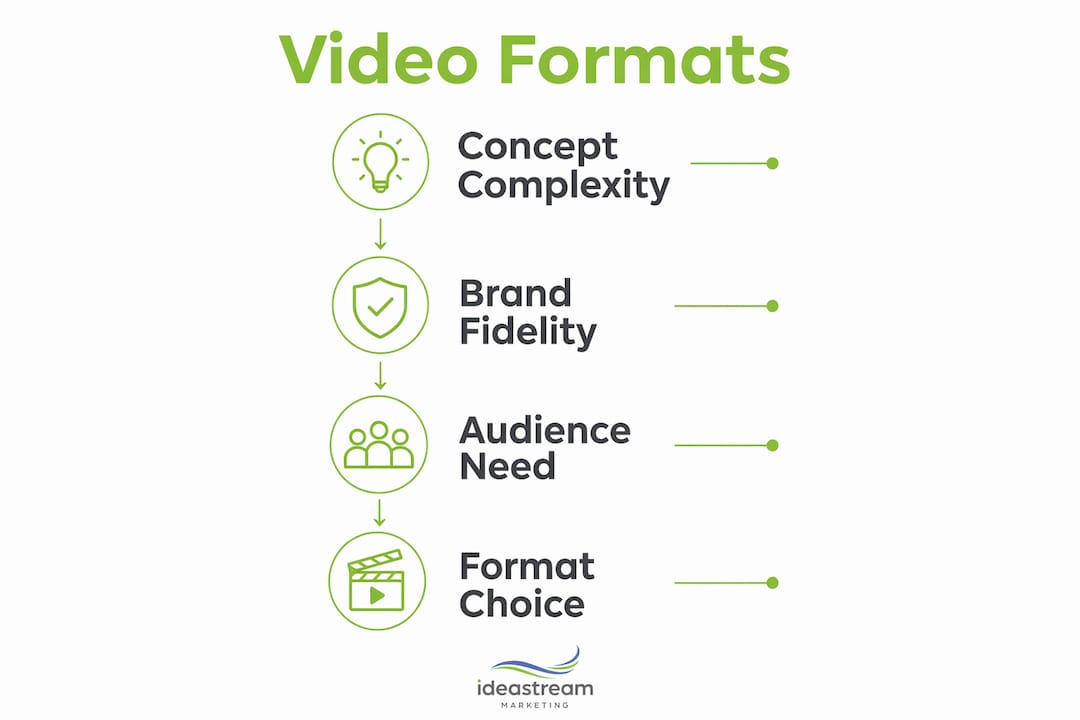
The format decision comes down to three variables: how abstract is the concept, how much brand fidelity matters, and what your timeline allows.
Where do explainer videos actually pay off?
The benefits of explainer videos map directly to business functions, which makes it easier to justify the investment with a specific metric rather than a vague “awareness” goal.
- Conversion: A well-placed video on a landing page gives visitors the clarity they need to act. Complex products especially benefit because a 90-second visual explanation does what three paragraphs of copy often cannot.
- Onboarding: New users who watch a product walkthrough activate faster and ask fewer setup questions. This shortens your support queue from day one.
- Ticket deflection: A short how-to video embedded in a help center article handles the same question repeatedly without adding headcount.
- Training retention: Employees retain procedural information better from video than from written manuals, particularly for multi-step workflows.
- Recruiting and brand: A 60-second culture video on a careers page communicates what a job description never can.
A short video does not replace your sales team or your documentation. It answers the one question that is blocking the next step, whether that is a purchase, a signup, or a policy acknowledgment. Match the video to the specific friction point, and the ROI becomes measurable.
When should you skip the video format? If your audience needs to scan and reference content quickly, a well-structured article or interactive FAQ will outperform a video. Video works when the viewer needs to understand something, not just look something up.
For a deeper look at how video fits into a broader strategy, video marketing ROI is worth reviewing before you commit to a production budget.

How do you make an explainer video step by step?
A reliable production workflow has five stages. Skipping any one of them is where projects stall or ship with messaging that does not land.
- Brief (early days): Answer three questions in writing before touching any tool: Who is the viewer? What single problem do they have? What one thing should they understand after watching? A narrow, specific brief is the single biggest predictor of a focused final video.
- Script (shortly after initial brief): Write conversationally, in short sentences, and read it aloud before approving it. At roughly 150 words per minute, a roughly one-minute video needs about 150 words. Structure: hook (0–10s), problem frame (10–30s), mechanism (30–60s), proof (60–90s), CTA (final 10s). Link to scripting marketing videos for a deeper walkthrough.
- Storyboard (mid-production phase): Sketch or wireframe each scene. One scene = one question answered. If a scene does not answer a specific question the viewer has at that moment, cut it.
- Production (subsequent phase): Animation, filming, or screen recording depending on format. Voiceover is recorded against the approved script, not improvised.
- Post-production and publish (final phase): Color, sound mix, captions, and export. After publishing, track watch completion and CTA click-throughs. If either underperforms, edit the opening 10 seconds or the CTA before remaking the whole video.
Deliverables checklist for handoffs:
- Approved script (PDF or shared doc)
- Voiceover file (WAV or MP3, isolated)
- Closed captions file (SRT)
- Master video file (1080p or 4K MP4)
- Social cut exports (16:9, 1:1, 9:16)
- Transcript for SEO page copy
Pro Tip: Pair every published video with a few hundred words of supporting text and a full transcript. Video alone gives search engines nothing to index — the surrounding text is what drives organic discovery.
Which tool or production route is right for you?
There are four distinct routes, and the right one depends on how much control you need versus how fast you need to move.
- DIY template editors (browser-based drag-and-drop tools with pre-built scenes): fastest to start, lowest cost, limited brand customization. Best for social content and internal communications where polish is secondary.
- Timeline-based animation apps (frame-by-frame or motion-path tools): higher learning curve, full creative control, moderate cost. Best for branded marketing videos where the visual identity must be exact.
- Screen-recording / screencast tools: near-zero production overhead, ideal for software demos and tutorials. Output quality depends almost entirely on the quality of the script and narration.
- AI generative agents: minutes per short output, low per-unit cost, strong for high-volume localization and variant production. Requires a clear brief and mandatory human QA before publishing.
- Full-service agencies: highest cost and longest timeline, but they own the entire process from brief to final file. Best when brand fidelity, distribution strategy, and production quality all need to be right the first time.
For a broader look at video production tools across these categories, that resource covers current options in detail.
| Route | Speed | Brand Control | Relative Cost | Best For |
|---|---|---|---|---|
| DIY template editor | Hours | Low | $ | Social clips, internal use |
| Timeline animation app | Days–weeks | High | $$ | Branded marketing videos |
| Screencast tool | Hours | Medium | $ | Software tutorials |
| AI generative agent | Minutes | Medium | $ | High-volume, localized variants |
| Full-service agency | Weeks | Very high | $$$–$$$$ | Launch campaigns, brand-critical work |

What does an explainer video actually cost?
Production route determines both cost and timeline more than any other variable. Here is what realistic ranges look like.
| Route | Typical Cost | Typical Timeline |
|---|---|---|
| DIY / template editor | $0/month (subscription) | Hours to 1 day |
| In-house (tooling + staff) | Fixed tooling + staff time | Days to weeks |
| AI generative agent | Low per-unit cost | Minutes per video |
| Professional agency | $3,000–$15,000+ per video | 3–6 weeks |
Agency cost and timeline figures come from corporate production benchmarks. The $3,000 floor typically covers a simple animated piece with a licensed voiceover. The $15,000+ range reflects custom 2D animation, original music, and multiple revision rounds.
The hidden cost in every route is approvals. A two-week agency project can stretch to six weeks if internal stakeholders take ten days to review a script. Assign one decision-maker before production starts.
How to choose by budget:
- Under $500: DIY template editor or screencast tool, strong script required.
- $500–$3,000: In-house production with a timeline-based animation app and a freelance voiceover artist.
- $3,000+: Professional agency when the video will anchor a paid campaign, a product launch, or a high-traffic landing page.
For a comparison of commercial video production services across these tiers, that breakdown covers agency, in-house, and AI-powered options side by side.
What makes an explainer video actually work?
The most effective explainers share three principles: one message per video, visuals that reduce cognitive load rather than add to it, and a story structure the viewer can follow without effort.
Story structure and timing:
- Hook (0–10s): State the problem or outcome immediately. Viewers decide whether to keep watching in the first ten seconds.
- Problem frame (10–30s): Make the viewer feel the friction. Specificity here builds credibility.
- Mechanism (30–60s): Show how your solution resolves the friction. Avoid feature lists; show the transformation.
- Proof (60–90s): One result, one testimonial reference, or one before/after comparison.
- CTA (final 10s): One action. Not three options.
Visual principles:
- Every scene should answer one question the viewer has at that exact moment. If it does not, cut the scene.
- Animation that explains beats animation that decorates. Motion for its own sake increases confusion, not comprehension.
- Captions are not optional. A significant share of social video is watched without sound.
- Pacing: a new idea every several seconds is the upper limit for retention.
Pro Tip: Before approving any inspiration video as a reference, run it through this quick checklist: Does it state the problem in the first 10 seconds? Does every scene advance the story? Is the CTA singular and clear? If any answer is no, find a better reference.
For storytelling frameworks that translate directly into video narrative structure, that resource covers the principles in depth.
Your production checklist and 4-week schedule
A timeline of several weeks typically works for agency-produced or in-house animated explainers. Adjust for your route, but keep the stage order fixed.
| Week | Stage | Owner | Key Deliverable |
|---|---|---|---|
| Week 1 | Brief + script | Marketing lead | Approved script doc |
| Week 2 | Storyboard + voiceover record | Creative / agency | Approved storyboard, VO file |
| Week 3 | Animation / production | Designer / agency | Draft video for review |
| Week 4 | Post, QA, captions, publish | Editor / marketing | Final MP4, SRT, page copy |
Pre-publish checklist:
- Script signed off by one named decision-maker
- Voiceover reviewed against final script
- Captions file (SRT) attached and tested
- Analytics event or UTM parameter added to CTA link
- Supporting page copy (400–600 words) and transcript published
- Social exports cut and sized (16:9, 1:1, 9:16)
- Video SEO metadata complete (title, description, tags, thumbnail)
Roles for small teams:
- Project owner: Holds the brief, approves script and final cut. One person only.
- Writer / strategist: Scripts and storyboard direction.
- Producer / animator: Handles production and post.
- Distributor: Uploads, writes page copy, sets up tracking.
Pro Tip: Use a pre-publish video checklist to catch missing captions, broken CTA links, and unoptimized metadata before the video goes live. These are the errors that cost conversions silently.
Key Takeaways
Explainer videos work when they carry one message, follow a proven story structure, and are paired with supporting text for SEO discoverability.
| Point | Details | ||||||||||||
|---|---|---|---|---|---|---|---|---|---|---|---|---|---|
| Ideal length | 60–90 seconds for marketing; up to 2 minutes for onboarding or training. | ||||||||||||
| Script first | Write and approve the script before touching any production tool. | ||||||||||||
| Measure two metrics | Track watch completion rate and CTA click-throughs; edit the hook or CTA before remaking the video. | ||||||||||||
When hiring a professional team changes the outcome
Most clients who come to us have already tried a template tool or an AI generator. The output was technically fine. What it lacked was a clear message, a story that moved the viewer, and a distribution plan that put the video in front of the right people at the right moment.
That gap is not a tool problem. It is a strategy and craft problem. A template can execute a script, but it cannot write one that converts. An AI agent can produce a video in minutes, but it cannot tell you which friction point in your funnel that video should address, or how to structure the page around it for SEO.
The scenarios where agency involvement consistently changes outcomes: a product launch where the video will anchor paid media spend, a brand-critical piece that will live on the homepage for two or three years, and any project where localization, accessibility, or multi-platform distribution adds complexity. For those situations, the cost of getting it wrong exceeds the cost of the agency.
When in-house or AI-first workflows are the right call: high-volume internal training libraries, rapid social content, and A/B testing variants where speed matters more than polish. These are legitimate use cases, and we say so directly to clients who ask.
The practical signpost is this: if the video will be seen by thousands of people and directly influence a purchase or a hiring decision, invest in craft. If it is an internal update or a social experiment, use the fastest tool available and iterate.
Ready to produce a video that actually converts?
Idea Stream Marketing is the full-service alternative to piecing together a video from templates when the stakes are high. We handle concept development, scripting, motion graphics, professional production, and post-production, then build the distribution and SEO strategy around the finished asset so it gets found and watched.
Our team works with businesses across Long Island, New York City, and nationwide, from healthcare providers and law firms to SaaS companies and regional brands. Every video we produce is built with discoverability in mind: YouTube optimization, schema markup, supporting page copy, and social cuts are part of the deliverable, not add-ons.
If you are ready to move from concept to a finished, optimized video, visit our video production services page or explore how we approach video in advertising to see what a full-service production looks like. Reach out with your brief, your key metric, and your timeline, and we will tell you exactly what we can build.
Useful sources
- TapVid: How to Create an Explainer Video: End-to-end production guide covering scripting, storyboarding, and post-launch measurement. Strong on the script-first method and SEO pairing.
- Simpleshow: What Makes an Explainer Video Effective: Covers visual principles, cognitive load, and the one-message rule. Useful for evaluating inspiration examples.
- Pexo: Corporate Explainer Video Production: Benchmarks for agency cost and timeline, plus a comparison of production routes. Reference this when building a procurement case.
- Top video creation platforms: Comparative resources on current video creation platforms and generative tools, useful when evaluating DIY and AI-assisted options.
- Ideastreammarketing: Effective Video Marketing Strategies: Covers distribution, optimization, and how to measure video performance across platforms.
- Search YouTube for 60–90 second explainer examples in your category and read the auto-generated transcripts. Studying how a strong script paces its ideas, sentence by sentence, is the fastest way to improve your own brief.
FAQ
What is an explainer video?
An explainer video is a short narrated visual, typically 60–90 seconds, designed to teach one specific idea to one specific viewer. It combines script, visuals, and audio to answer the single question blocking a viewer’s next action.
How long should an explainer video be?
Marketing and product explainers work best at 60–90 seconds. Social teasers run 15–30 seconds, and onboarding or training videos can extend up to 2 minutes without losing retention.
How much does a professional explainer video cost?
Agency-produced videos typically involve a substantial budget and several weeks timeline. DIY template tools cost as little as a monthly subscription, while AI-generated videos carry a low per-unit cost but require human review before publishing.
What should I measure after publishing an explainer video?
Track watch completion rate and CTA click-throughs. If either metric underperforms, edit the opening 10 seconds or the CTA rather than remaking the entire video.
Can Ideastreammarketing produce explainer videos for my business?
Yes. Ideastreammarketing handles the full process from brief and script through production, motion graphics, captions, and SEO-ready distribution for businesses across Long Island and nationwide.

