



October 21, 2026




FAQ schema (FAQPage) is a Schema.org markup format that labels visible question-and-answer pairs so search engines and AI crawlers can parse them as structured data. It won’t necessarily earn you a rich result snippet in Google anymore, but it still helps machines extract and cite your content correctly.
Here’s your three-step action plan:
- Confirm visibility first. Every question and answer in your markup must appear as readable text on the live page. Google requires marked-up content to be visible to users, not hidden in a collapsed accordion that never renders.
- Write the JSON-LD. Build a single FAQPage object with a
mainEntityarray of Question and acceptedAnswer pairs. - Validate before you ship. Run the markup through the Schema Markup Validator to catch structural errors before deployment.
Pro Tip: Use JSON-LD over microdata for FAQ markup. It lives in a single script tag separate from your visible HTML, which makes it far easier to update, template, and debug without touching your page layout.
Key Takeaways
Effective FAQ schema markup requires visible Q&A content, valid JSON-LD with required Question and Answer properties, and validation through schema.org’s own tools rather than Google’s rich result testing.
| Point | Details |
|---|---|
| Content comes before code | Write visible, readable Q&A copy first, then wrap it in JSON-LD markup. |
| JSON-LD is the recommended format | It’s easier to template, update, and audit than microdata or RDFa. |
| Rich results are largely gone | Google retired the FAQ SERP display for most sites, but the schema still parses. |
| Validate with the right tool | Use the Schema Markup Validator, not the Rich Results Test, for FAQPage structure checks. |
| Agency support closes the gap | Idea Stream Marketing handles schema audits, JSON-LD implementation, and drift monitoring for teams without in-house developers. |
Table of Contents
- What Is FAQ Schema Markup, and When Should You Use It?
- What Properties Does FAQ Schema Require?
- How Do You Implement FAQ Schema Step by Step?
- How Do You Test and Validate FAQ Schema?
- Does Google Still Support FAQ Rich Results?
- Does FAQ Schema Still Help SEO?
- What Are the Most Common FAQ Schema Errors?
- What Copy-Paste FAQ Schema Templates Can You Use?
- What One Change Should Teams Prioritize?
- Get FAQ Schema Implemented Without the Guesswork
- Official Docs and Tools to Bookmark
- Sources
- FAQ
What Is FAQ Schema Markup, and When Should You Use It?
FAQPage is a Schema that describes a page presenting one or more frequently asked questions, each with an accepted answer. It tells a crawler, in plain structural terms, “this is a question, and this is its answer” instead of leaving that relationship to be inferred from headings and paragraph breaks.
That distinction sounds trivial until you consider how much of the web buries genuine Q&A content inside vague div soup. FAQPage markup solves that ambiguity directly.
You’ll find FAQPage doing real work in a handful of common spots:
- Product support pages answering shipping, returns, and warranty questions
- Knowledge base articles structured as discrete question entries
- Product pages where a manufacturer answers recurring buyer objections
- Service pages clarifying pricing, scope, or process questions
FAQPage isn’t your only option, though. Schema.org also defines QAPage, a separate type built for user-generated Q&A, the kind of format you’d see on a forum or a community support board where multiple people submit suggestedAnswer entries and the community votes on the best one.
| Attribute | FAQPage | QAPage |
|---|---|---|
| Who writes the answers | The site or brand | Site users/community |
| Answer structure | One acceptedAnswer per question |
Multiple suggestedAnswer entries, often with a marked best answer |
| Typical use case | Product FAQs, support docs, buyer objections | Forums, community Q&A, voted answer threads |
| Vote/rating data | Not applicable | Often includes upvote counts |
If your content team writes and owns every answer, use FAQPage. If your users generate the answers and vote on quality, QAPage is the correct type, and mislabeling one as the other is a common source of validation confusion.
Pro Tip: Never mark up a question and answer that isn’t actually visible on the page. If the answer text only exists in your JSON-LD and not in the rendered HTML, that’s a mismatch between structured data and visible content, and it violates Google’s own structured data policies.
What Properties Does FAQ Schema Require?
A valid FAQPage object needs surprisingly few properties, but each one matters. Skip one and the Schema Markup Validator will flag it immediately.
| Property | Belongs to | Required? | Purpose |
|---|---|---|---|
@type: FAQPage |
Root object | Required | Declares the page type |
mainEntity |
FAQPage | Required | Array holding each Question object |
@type: Question |
Question item | Required | Declares the item as a question |
name |
Question | Required | The question text itself |
acceptedAnswer |
Question | Required | Holds the Answer object |
text |
Answer | Required | The answer content |
url |
Question | Recommended | Deep-links to the answer’s anchor on the page |
author |
Answer | Optional | Attribution, useful for expert-authored content |
datePublished |
Answer | Optional | Helps signal content freshness |
Beyond those, Schema.org’s Question type documentation shows the underlying property structure that FAQPage inherits from. Here’s a minimal, valid skeleton:
{
  "@context": "https://schema.org",
  "@type": "FAQPage",
  "mainEntity": [{
    "@type": "Question",
    "name": "What is FAQ schema markup?",
    "acceptedAnswer": {
      "@type": "Answer",
      "text": "FAQ schema markup labels visible question-and-answer pairs so search engines and AI crawlers can parse them as structured data."
    }
  }]
}
That’s the entire required shape. Everything else is optional polish.
Pro Tip: Keep acceptedAnswer.text matched word-for-word to your visible copy. A paraphrased or trimmed version in the JSON-LD, even a shortened summary, counts as a content mismatch under Google’s guidelines.
How Do You Implement FAQ Schema Step by Step?
Start with the content, not the code. Write your questions and answers as real, visible copy on the page: an accordion, a static list, or plain paragraphs under subheadings all work. Once that copy exists and reads naturally, wrap it in JSON-LD.
Author the JSON-LD block
Build one FAQPage object per URL, with a mainEntity array holding every Question on that page. Here’s a fuller, multi-question example:
{
  "@context": "https://schema.org",
  "@type": "FAQPage",
  "mainEntity": [
    {
      "@type": "Question",
      "name": "Do I need JSON-LD or can I use microdata?",
      "acceptedAnswer": {
        "@type": "Answer",
        "text": "JSON-LD is the format Google recommends because it separates markup from your HTML, making it easier to maintain and template."
      }
    },
    {
      "@type": "Question",
      "name": "Can I use FAQ schema on every page?",
      "acceptedAnswer": {
        "@type": "Answer",
        "text": "Only on pages where the visible content actually contains question-and-answer pairs written by the site, not a generic landing page."
      }
    },
    {
      "@type": "Question",
      "name": "How long can an answer be?",
      "acceptedAnswer": {
        "@type": "Answer",
        "text": "Keep answers concise and self-contained, ideally under a few sentences, so extraction tools can parse them cleanly."
      }
    }
  ]
}
Place this script tag in the page <head> or right before the closing </body> tag. Either works; consistency across your site matters more than the exact location.
Consider the microdata alternative
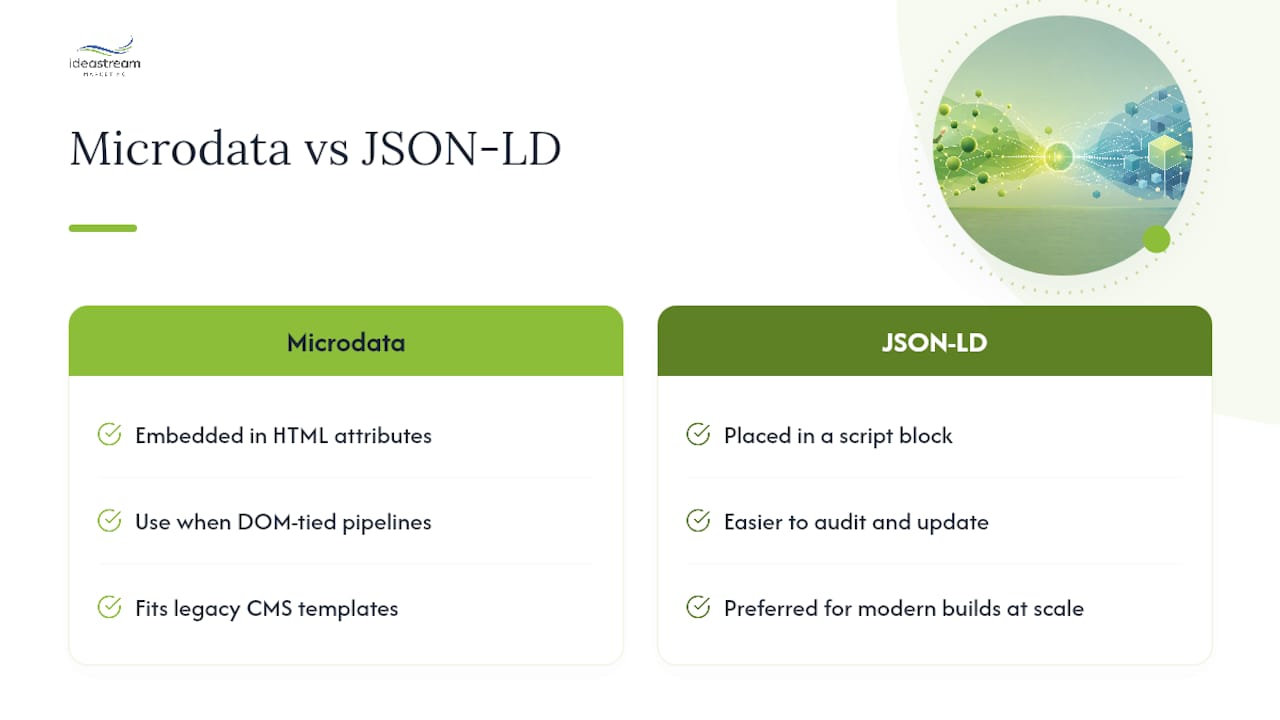
Microdata embeds attributes directly in your HTML elements instead of using a separate script block:
<div itemscope itemtype="https://schema.org/FAQPage">
  <div itemscope itemprop="mainEntity" itemtype="https://schema.org/Question">
    <h3 itemprop="name">What is FAQ schema markup?</h3>
    <div itemscope itemprop="acceptedAnswer" itemtype="https://schema.org/Answer">
      <p itemprop="text">FAQ schema markup labels visible question-and-answer pairs for search engines.</p>
    </div>
  </div>
</div>
Microdata makes sense when your rendering pipeline already ties data directly to DOM elements, or when a legacy CMS template doesn’t support easy script injection. For most modern builds, Google’s supported structured data formats include JSON-LD, microdata, and RDFa, but JSON-LD remains simpler to audit and update at scale.
Build a deployment checklist
Before you push FAQ schema live, run through this:
- Confirm exactly one FAQPage object exists per URL. Two competing FAQPage blobs on the same page (a common bug when a theme and a plugin both inject markup) will confuse validators and crawlers alike.
- Check whether your CMS plugin auto-generates a second, hidden FAQPage output alongside your custom one.
- Decide between server-side rendering and client-side JavaScript injection. Server-rendered markup is visible to every crawler immediately; client-injected markup depends on the crawler executing JavaScript, which adds risk for less sophisticated bots.
- View page source (not just the rendered DOM) to confirm the JSON-LD block actually ships in the initial HTML response.
Pro Tip: Sync your CMS content fields directly to the JSON-LD generator instead of hardcoding answer text twice. When editors update an FAQ answer in the CMS but the schema template still pulls from an old, hardcoded string, you get silent drift between what users see and what crawlers read, and that’s exactly the mismatch Google’s policies flag.
How Do You Test and Validate FAQ Schema?
Validation has two very different jobs, and conflating them causes most of the confusion developers run into. One job is checking that your JSON-LD is structurally correct. The other is checking whether Google will show a rich result for it, and as of 2026, that second question mostly has one answer: no, for most sites.
Run the Schema Markup Validator first. It checks your JSON-LD against the actual Schema.org vocabulary and flags missing properties, malformed nesting, or type errors, independent of what Google’s search results do with the markup.
| Error | Likely cause | Fix |
|---|---|---|
Missing acceptedAnswer |
Question object lacks a nested Answer | Add the acceptedAnswer object with @type: Answer and text |
| Duplicate FAQPage objects | Theme and plugin both inject schema | Remove one source, keep a single canonical block |
| Text mismatch | JSON-LD answer differs from visible copy | Sync CMS field to schema generator directly |
Empty mainEntity array |
Script runs before content loads | Move JSON-LD generation after content renders, or server-render it |
Also check your live source code by hand periodically. Automated tools miss context that a two-minute view-source scan catches instantly, like an entire second <script type="application/ld+json"> block a plugin silently added.
Build this into your release process: run the validator on every FAQ page before deploy, and repeat it quarterly as a monitoring habit, since CMS updates and plugin changes are a common source of silent breakage.
Pro Tip: Don’t rely on Google’s Rich Results Test for FAQ markup anymore. Support for FAQPage results was removed from that tool, so an empty or non-reporting result there doesn’t mean your markup is broken. Trust the schema.org validator and a direct source check instead.
Does Google Still Support FAQ Rich Results?
Google’s general rule for any structured data is straightforward: it must describe content that’s actually visible on the page and follow the platform’s structured data policies, including using a supported format and including every required property.
Where FAQ schema gets complicated is the visual payoff. Google restricted the FAQ rich result to a narrow set of authoritative government and health sites in 2023, then went further: FAQ rich result display support has since been retired in stages, according to Google’s own update log. The FAQPage type itself hasn’t disappeared from Schema.org, and Google’s crawlers still parse it.
That’s the key distinction developers keep missing: display and parsing are two separate systems. Google removed the visual snippet from most search results pages, but the underlying schema is still valid, still crawled, and still usable by other consumers of your structured data, including many AI answer engines.
In practice, that means implementing FAQPage markup in 2026 won’t get you the expandable blue accordion in Google’s SERP that it might have in 2021. It will still make your Q&A content easier for machines to parse correctly.
Pro Tip: Bookmark Google’s Search Central updates feed and check it periodically. Structured data policy changes fast, and this is the one place Google documents changes as they roll out.
Does FAQ Schema Still Help SEO?
FAQ schema doesn’t move rankings by itself, and it hasn’t guaranteed a rich result for most sites since Google narrowed and then retired that display. If you’re implementing FAQPage purely to chase the old SERP snippet, temper that expectation now.
What it does still do is real, just less visible. Clearly structured Q&A pairs give AI retrieval systems and third-party crawlers a cleaner unit to extract and cite. Industry audits report that pages with well-implemented FAQPage markup see improved citation rates in AI answer engines compared to pages where the same content sits in unstructured prose, though the effect size varies by site and depends heavily on other ranking and authority signals.
The realistic list of benefits looks like this:
- Cleaner extraction for AI search tools and large language model retrieval systems
- Better internal site search functionality when your platform indexes structured Q&A
- A more parseable data layer for any downstream tool consuming your page’s structured data
- Marginal clarity gains for Google’s own understanding of page topic and intent
And the honest limits:
- It is not a ranking factor on its own
- It won’t restore the old FAQ rich result snippet for the vast majority of sites
- Content quality, site authority, and technical SEO fundamentals still dominate outcomes
Treat FAQ schema as infrastructure, not a growth lever. It’s the kind of unglamorous, load-bearing work that supports everything else your SEO strategy is trying to do.
What Are the Most Common FAQ Schema Errors?
Most FAQ schema problems trace back to one of four mistakes, and each has a fast fix.
Markup not in the rendered HTML. Your JSON-LD only exists in a JavaScript file that never actually renders into the page’s source. Fix: confirm the script tag appears in view-source, not just in dev tools’ rendered DOM.
Duplicate FAQPage blobs. A theme and a plugin both generate schema for the same page.
// Wrong: two separate FAQPage objects on one page
{"@type": "FAQPage", "mainEntity": [...]}
{"@type": "FAQPage", "mainEntity": [...]}
// Corrected: one FAQPage object, all questions in a single mainEntity array
{"@type": "FAQPage", "mainEntity": [{...}, {...}]}
Using FAQPage for user-generated content. If users submit questions and other users vote on answers, that’s a job for QAPage, not FAQPage.
Answers too long for extraction. A 400-word acceptedAnswer.text value defeats the purpose of structured extraction. Trim it to a concise, self-contained answer.
When a FAQPage looks broken in a consumer tool, run this triage in order: view-source to confirm the block exists, the Schema Markup Validator to confirm structure, then a manual check for a second, competing FAQPage output elsewhere on the page.
Pro Tip: If your validator passes but your markup still seems ignored downstream, check for a second FAQPage blob before you assume the tool is wrong. Duplicate schema is the single most common “invisible” bug developers miss.
What Copy-Paste FAQ Schema Templates Can You Use?
Start small. This single-question template covers the bare minimum:
{
  "@context": "https://schema.org",
  "@type": "FAQPage",
  "mainEntity": [{
    "@type": "Question",
    "name": "Your question text here",
    "acceptedAnswer": {
      "@type": "Answer",
      "text": "Your concise answer text here."
    }
  }]
}
For a real page with multiple questions, extend the mainEntity array with additional Question objects, following the same pattern shown in the implementation section above.
If you’re generating this dynamically from a CMS, the safest pattern loops through your published FAQ entries at render time and injects the JSON-LD server-side, so the script tag ships with the initial HTML response rather than being appended later by client-side JavaScript. That avoids the empty mainEntity array problem crawlers sometimes hit with delayed script execution.
For teams handling FAQ content and site search together, a dedicated FAQ assistant tool can help surface the same Q&A pairs directly to visitors, which reinforces the visibility your schema depends on rather than working against it.
Before you ship any template, run this checklist:
- Visible copy on the page matches the JSON-LD text exactly
- Each URL has exactly one FAQPage object, no duplicates
- Answers are short enough for clean extraction, not paragraphs-long
- You’ve validated the block after deployment, not just before
What One Change Should Teams Prioritize?
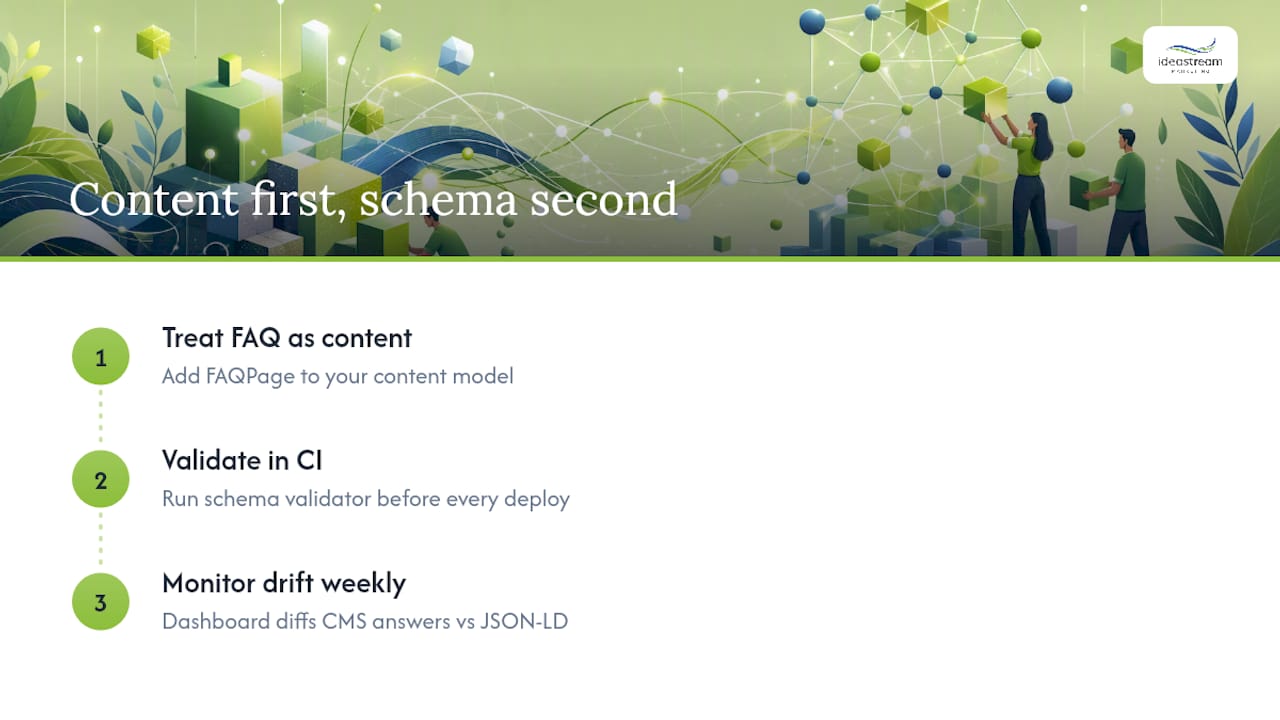
Content first, schema second. That’s the single change I’d push every team implementing FAQ markup to make, because the most common failure mode isn’t a malformed JSON-LD tag. It’s schema describing content that no longer matches what’s actually on the page.
Treat FAQPage as part of your content model, not a one-off dev task bolted on after launch. Wire it into your CI pipeline so a validator check runs automatically before any FAQ page ships, the same way you’d run a linter.
Pro Tip: Build a small internal dashboard that diffs your CMS answer text against your rendered JSON-LD weekly. Drift between the two is silent, cumulative, and exactly the kind of thing nobody notices until a policy flag or a broken extraction shows up months later.
Get FAQ Schema Implemented Without the Guesswork
If your team doesn’t have a developer who lives and breathes JSON-LD, or your CMS makes schema management feel like an afterthought, Idea Stream Marketing runs the entire process for you: content audit, schema implementation, validation, and ongoing monitoring so your markup never drifts from your visible copy.

A typical engagement follows a simple sequence: we audit your existing FAQ content and any current markup, implement clean JSON-LD tied directly to your CMS fields, validate every page against the schema.org vocabulary, and set up periodic monitoring so plugin updates or theme changes never silently break your structured data again. This is part of the broader technical SEO and schema markup work we handle for clients who want their site’s structured data treated as infrastructure, not a checkbox.
If your FAQ pages need an audit or a rebuild, start with our digital marketing services page to see how a full technical SEO engagement fits your site, or reach out directly to get a schema audit scheduled.
Official Docs and Tools to Bookmark
Keep these four references close whenever you touch FAQ markup:
- Schema: the canonical spec for required properties and structure
- Schema Markup Validator: the tool to check structural conformance to schema.org vocabulary
- Google’s structured data guidelines: the policy source for eligibility and visibility rules
- Google Search Central updates: the feed to track for future rich result and policy changes
Sources
- Intro to structured data | Google Search Central
- General Structured Data Guidelines | Google Search Central
- Schema
- Schema Markup Validator
- Latest Google Search Documentation Updates | Google Search Central
FAQ
Is FAQ schema still relevant in 2026?
Yes, for extraction and AI citation purposes, even though Google retired the FAQ rich result display for most sites. The FAQPage type remains valid, and crawlers and AI systems still parse it.
How do I add FAQ schema markup to a page?
Write your visible Q&A content first, then add a JSON-LD script with a FAQPage type and a mainEntity array of Question and acceptedAnswer pairs, and validate it with the Schema Markup Validator.
Can you show an example of FAQ schema?
A minimal example includes @type: FAQPage, a mainEntity array, and at least one Question object with a name and a nested acceptedAnswer containing text; see the full code templates above for a multi-question version.
Is FAQ schema good for SEO?
It’s not a ranking factor on its own and won’t restore Google’s old rich result snippet for most sites, but it improves how clearly AI answer engines and other crawlers extract your Q&A content.
Should I use FAQPage or QAPage for my content?
Use FAQPage when your site writes and owns every answer, and QAPage when users submit answers that get voted on, since the two types serve different content ownership models.

