








A local landing page is a dedicated page built for one specific city, neighborhood, or service area, and the single most effective move you can make is to create one for every location you serve instead of relying on a single homepage. Done right, these pages rank for local searches and turn nearby visitors into customers. Google also requires that each verified Business Profile link to a page built for that exact location, not a shared homepage.
TL;DR:
- Separate storefronts from service area markets before building pages, because each requires different proof and Business Profile settings; show an address only when customers visit.
- Choose initial markets using sales, search demand, and customer lifetime value, then expand from a working template rather than equating busyness with profitability.
- Track phone clicks, directions, bookings, and forms by location in GA4, then test page changes on your five highest traffic locations before wider rollout.
- For ten or more locations, launch with a shared template, then customize pages where search demand, revenue, or local competition justify extra investment.
Table of Contents
- Why local landing pages matter for multi-location businesses
- Core elements every local landing page needs
- How to determine where your customers are
- Local SEO and metadata that actually convert
- Google Business Profile link rules for multi-location listings
- Measuring and testing local landing page performance
- A one-page template you can hand to any developer
- Using local video and media to strengthen location pages
- Balancing scale with local specificity across many markets
- How we help you build and film local landing pages that convert
- FAQ
- Sources
Why local landing pages matter for multi-location businesses
When each location gets its own page, you give Google specific, relevant content to match against local searches instead of forcing one homepage to represent every market you serve. That specificity shows up in map rankings and local-pack placement, where searchers are looking for “near me” results tied to a real address or service area.
Local pages also convert better because they remove friction. A visitor searching for your service in their town wants hours, directions, and a phone number immediately, not a generic page that makes them hunt for proof you serve their area. The closer your page matches their intent, the faster they act.
These pages strengthen paid campaigns too. When a Google Ads click lands on a page that mirrors the search query (same city, same service), quality scores improve and conversion rates follow. And because each location has its own URL, you get real location-level data: which markets convert, which need more local proof, and where to invest next.
- Local relevance improves visibility in map results and the local pack.
- Dedicated pages remove friction with upfront hours, directions, and click-to-call options.
- Matching ad landing pages to local search intent strengthens paid campaign performance.
- Separate URLs give you location-level measurement instead of blended, citywide guesswork.
Core elements every local landing page needs
A local landing page earns its ranking and its conversions through a consistent set of building blocks. Skip one of these and you are either harder to find or harder to trust once someone lands on the page.
Start with the URL. A human-readable, city-based slug (for example, /locations/babylon-ny) tells both users and search engines exactly what the page covers before they read a word of copy. Pair that with a title tag and meta description that name the service and the location together, a clear H1 that matches searcher intent, and subheadings that work through services, hours, and local proof points in a logical order.
Above the fold, give visitors a reason to act immediately: click-to-call, an online booking link, directions, and a map embed. Mobile visitors in particular will bounce if they have to scroll to find your phone number.
Original photography does real work here. A map embed paired with real exterior and interior shots, plus a few team photos, builds more trust than stock imagery ever will. Follow that with a short, scannable list of the services available at that specific location, since not every location may offer the same full menu.
Structured data ties it together. Adding LocalBusiness schema gives search engines explicit, machine-readable details like address, phone number, hours, and geographic coordinates, which supports rich results and clearer local relevance. Review schema can layer on top of that to surface your ratings directly in search results.
Finally, internal linking matters more than most location pages give it credit for. Breadcrumbs, links to nearby locations, and links to related service pages help both users and search engines understand how your locations connect, which supports a stronger overall multi-location SEO structure.
- Use a localized, human-readable URL slug naming the city or neighborhood.
- Write a title tag, meta description, and H1 that pair the service with the location.
- Place click-to-call, booking, and directions above the fold.
- Embed a map and include original exterior, interior, and team photography.
- List the specific services offered at that location in a short, scannable format.
- Add LocalBusiness JSON-LD and review schema for richer search visibility.
- Link to nearby locations and related services through breadcrumbs and contextual links.
Pro Tip: Validate your structured data with Validator before you publish, since a single syntax error can keep your markup from being read at all.
How to determine where your customers are
Before you build a single page, decide whether you are serving storefront customers who visit you or a service area where you travel to them. That distinction changes both your page content and your Google Business Profile setup.
- Separate storefront locations (where customers walk in) from service-area markets (where you perform the work on-site), since each needs different proof points and a different Business Profile configuration.
- Pull sales, search demand, and CRM data to see where your existing customers and highest-value leads actually come from, rather than assuming your busiest city is your most profitable one.
- Configure Business Profile service areas to list the cities, postal codes, or regions you cover, and only display a storefront address if customers genuinely visit that location.
- Prioritize your first batch of pages around the highest search volume and the highest lifetime value, then expand once you have a working template.
Local SEO and metadata that actually convert
Local search intent follows a predictable pattern: service, plus place, plus modifier. Think “emergency plumber Babylon NY” or “corporate video production Nassau County,” and lean into the modifiers that signal urgency or commercial intent, like “near me,” “hours,” or “booking.”
Pull your keyword list from Google’s autosuggest, the related searches at the bottom of results pages, your own internal site search data, and any local PPC campaigns you are already running. Those PPC keyword lists in particular tend to surface the exact phrasing paying customers use.
When you write your title tag and meta description, name the service and the city without repeating either one twice in the same line. A clean pattern looks like “Corporate Video Production in Babylon, NY | [Business Name]” rather than stacking keywords for the sake of it. Use your H2 and H3 headings to mirror the actual questions a local searcher would ask, and work in service variants naturally as you answer them.
- Build keyword phrases around service, place, and intent modifiers like “near me” or “hours.”
- Pull real phrasing from autosuggest, related searches, internal search data, and local PPC reports.
- Write titles and meta descriptions that pair service and city once, without stuffing.
- Shape headings around the questions local searchers actually type.
Google Business Profile link rules for multi-location listings
Google’s business links policy requires the URL on each Business Profile to lead directly to a page representing that specific location, under your direct control, not a redirect to a central homepage or a social media profile. Profiles that link to the wrong page risk losing trust signals that support local ranking, since Google can’t confirm the linked page actually represents that location.
Unacceptable links include a social media profile standing in for a website, or a URL that redirects every location back to one shared homepage. Both practices break the one-to-one match Google expects between a profile and its page.
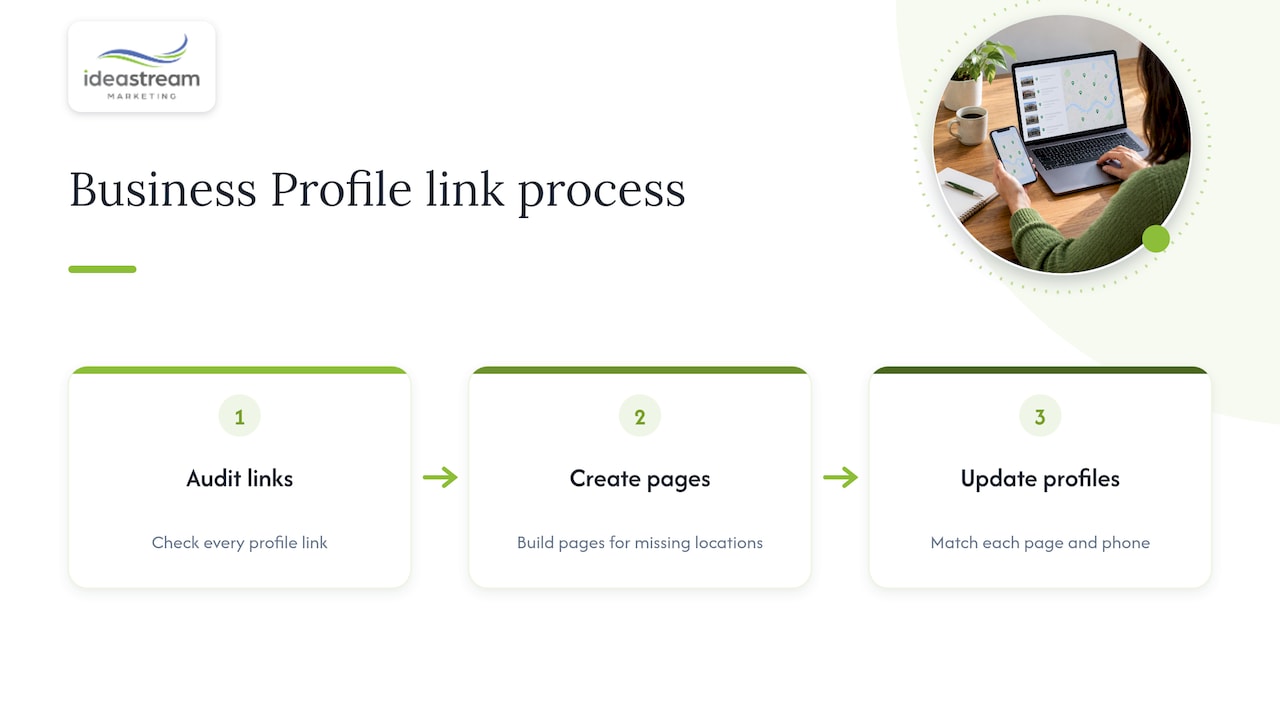
To fix this, audit every existing Business Profile link across your locations, build a dedicated page for any location missing one, and update each profile entry to point to its correct page. Google’s broader business information guidelines reinforce the same principle for phone numbers: each one should connect to the specific location, not a shared call center number that confuses attribution.
Measuring and testing local landing page performance
Treat every location page as a living asset, not a one-time build. Track organic sessions by location, phone clicks, direction requests, booking completions, and form submissions, along with any assisted conversions that start on a location page but close elsewhere.
- Configure GA4 events for phone clicks, direction requests, and form submissions, tagged by location so you can compare performance market to market.
- Test title tag and meta description variants, hero CTA wording, the presence or absence of a hero image, and map placement to see what moves conversion rates.
- Run structured data changes as controlled tests rather than blanket rollouts, since SEO split testing lets you isolate which on-page changes actually affect organic traffic before you commit.
- Once a change proves itself on a handful of pages, roll it out across the rest of your location pages using a shared template.
Pro Tip: Run your first test on your five highest-traffic locations so you get a usable result faster, then apply the winning version everywhere else.
A one-page template you can hand to any developer
A location page works best when its blocks follow a predictable order: a hero with the service, the city, and a primary CTA; a quick-facts block with address, hours, phone, and parking or accessibility notes; a services list specific to that location; a review or testimonial snippet; a short gallery with a local video; and a technical layer that keeps the page fast and crawlable.
- Hero block: service plus location name, paired with a click-to-call or booking CTA.
- Quick facts block: address, hours, phone number, parking, and accessibility details.
- Services block: a scannable list of what is offered at that specific location.
- Social proof block: a review snippet or recent testimonial tied to that location.
- Media block: real photography and one short local video, such as an exterior shot or team introduction.
- Technical block: a canonical tag, LocalBusiness JSON-LD, and a mobile-first responsive layout.
| Page block | What it includes | Why it matters |
|---|---|---|
| Hero | Service, location, primary CTA | Captures intent immediately |
| Quick facts | Address, hours, phone, parking | Removes visitor friction |
| Services | Location-specific service list | Matches local search intent |
| Social proof | Review or testimonial snippet | Builds trust fast |
| Media | Photography and short video | Increases time on page |
| Technical | Canonical, JSON-LD, mobile layout | Supports crawlability and speed |
Using local video and media to strengthen location pages
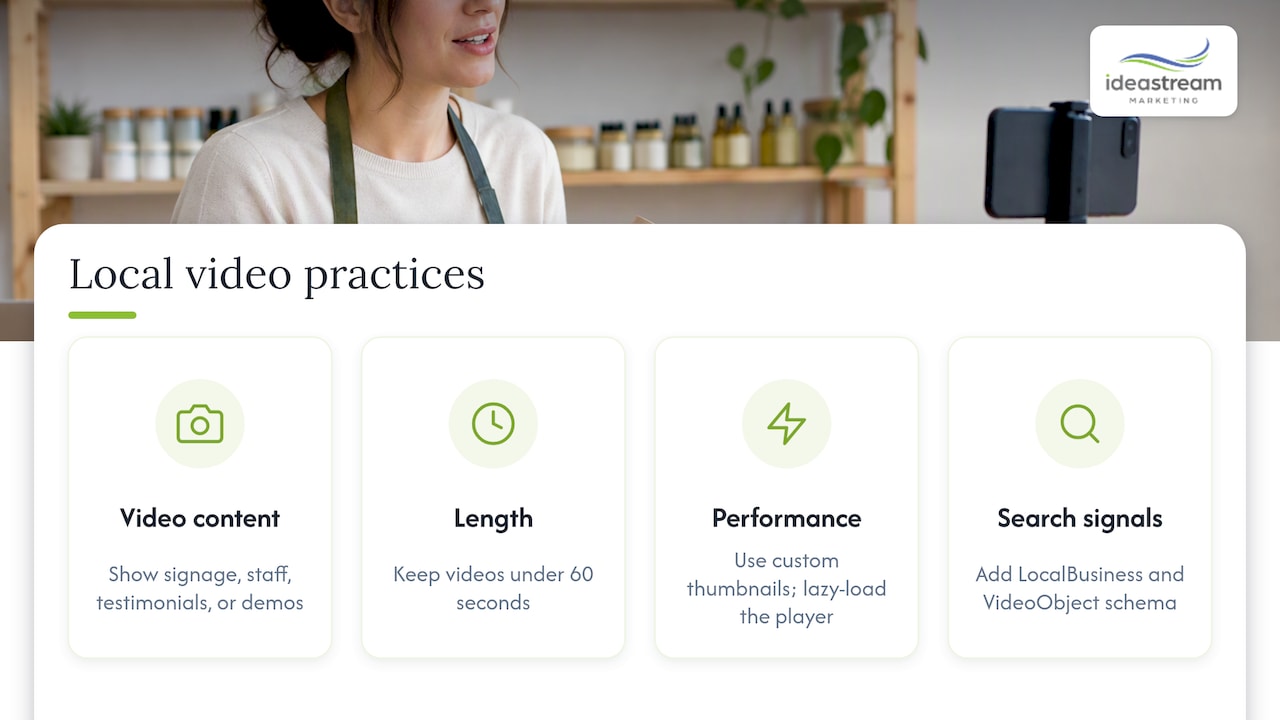
A short video does more for a location page than another paragraph of copy ever could. Exterior shots that show recognizable signage, quick staff introductions, a customer testimonial, or a 30-second service demo all give visitors a reason to trust the page and stay on it longer.
Keep these short, generally under 60 seconds, formatted for fast mobile playback, and paired with a custom thumbnail rather than an auto-generated frame. Lazy-loading the video player and using an optimized thumbnail keeps page speed intact, which still matters for both ranking and bounce rate.
Pairing that video with LocalBusiness schema and a VideoObject markup gives search engines two complementary signals about the same location, which can support discoverability across both Google search and video platforms. A short transcript under the embed adds another layer of indexable, location-relevant text.
Pro Tip: Repurpose a longer studio interview into three short clips sized for Instagram Reels, Facebook Reels, and YouTube Shorts, then embed the best one directly on the matching location page.
Balancing scale with local specificity across many markets
A single template is the right starting point when you are launching pages for ten or more locations at once: it keeps hours, phone numbers, and photos consistent while you get pages live quickly. Bespoke content becomes worth the investment once a location shows high search demand, strong revenue, or heavy local competition that a generic page can’t compete against.
Prioritize customization using the same signals you’d use to prioritize ad spend: search volume, revenue per location, and how crowded the local results already are. One early experiment worth running: an A/B test on title tags and meta descriptions across your ten highest-traffic locations before you commit to a template-wide rollout.
How we help you build and film local landing pages that convert
We build local landing pages as part of a broader local SEO and web design engagement, coordinating the page itself, the Google Business Profile setup, and on-location video production in a unified project. That combination is what keeps a location page from reading like a template with a city name swapped in.
A typical pilot starts with a short consultation where we review your current locations, your Business Profile setup, and where your search visibility is weakest, then scope a page build, a schema implementation, and an on-site video shoot around the markets that matter most to your revenue.
- Local SEO and Google Business Profile optimization built around your actual service areas.
- Custom location page design and development with LocalBusiness schema included.
- On-location video production for hero clips, staff introductions, and testimonials.
- Ongoing testing and reporting so you know which changes actually move conversions.
If you are ready to explore a coordinated local landing page and video project for your locations, schedule a consultation to discuss a plan built around your markets.
FAQ
How much should a landing page cost?
Costs vary widely depending on whether you need a single page or a template built to scale across dozens of locations, along with how much original photography or video you include. Pricing for a custom-built, schema-equipped location page is generally available on request from a web design or marketing provider rather than a flat published rate.
Where can I get a free landing page?
Many website builders and content management systems offer free or low-cost landing page templates, though these typically lack the custom schema markup, local keyword structure, and original photography that drive local rankings. A free template can work as a starting point, but it usually needs real optimization work before it performs for local search.
Are landing pages still a thing?
Yes, and for multi-location and service-area businesses they remain one of the more reliable ways to rank in local search results. Google’s own Business Profile link policy requires a dedicated page per location, which keeps local landing pages central to any local SEO strategy.
What is the best website for a landing page?
There is no single best platform, since the right choice depends on your existing website, your content management system, and whether you need to scale across many locations at once. What matters more than the platform is whether the page supports a clean local URL structure, fast mobile load times, and LocalBusiness schema.
How do I know if my service area setup is correct in Google Business Profile?
Check whether your Business Profile service area settings list the specific cities or postal codes you serve, and confirm you are not displaying a storefront address unless customers genuinely visit it. Service-area businesses can define up to 20 areas, which should align directly with the location pages you build.

